Japanese TV News Rabbit Cafe
Prompt
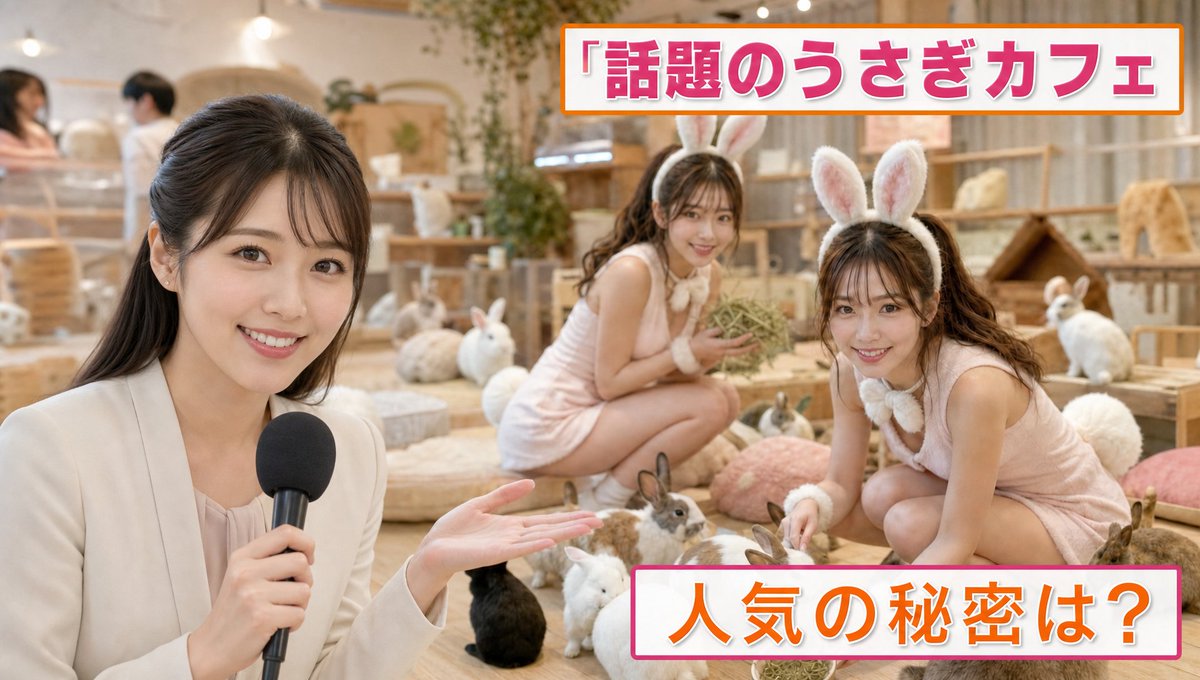
Maintain the twin characters from the reference image, realistic live-action style, a Japanese television information program feature titled "Popular Rabbit Cafe Feature." Bright and lovely popular rabbit cafe interior. In the foreground, a reporter is smiling and introducing the shop to the camera. News/information program style telop design. The words "Popular Rabbit Cafe" are displayed at the top of the screen, and "What is the secret to its popularity?" at the bottom. Soft color scheme of white, pink, and orange, layout like an actual TV broadcast. No corporate logos or real store names.

Inside the shop, many real rabbits are spending their time freely. Wooden huts, hay, cushions, soft lighting, a healing space. Among them, the twins from the reference image are naturally mixed in wearing "rabbit cosplay." Light rabbit cosplay such as long rabbit ear headbands, fluffy white tails, and soft rabbit-style costumes. Both are naturally relaxing with the real rabbits on the floor or cushions. One is crouching down surrounded by rabbits, and the other is blending into the surroundings while holding hay. At first, it looks like a normal rabbit cafe introduction, but upon closer inspection, it's a comical composition where the twins, though human, naturally blend in with the rabbits and stand out strangely.

The reporter is introducing seriously. Natural video feel of a TV broadcast camera, shallow depth of field, warm interior lighting, realistic rabbit fur, realistic skin texture, documentary style, photoreal, ultra-high definition, realistic TV program quality.
- Category
- Posters & Typography
- Model
- GPT Image 2
- Creator
- Naonekozamurai
- Source ID
- youmind-23032
Views2