Editorial poster: GPT Image 2 prompt
Prompt
{
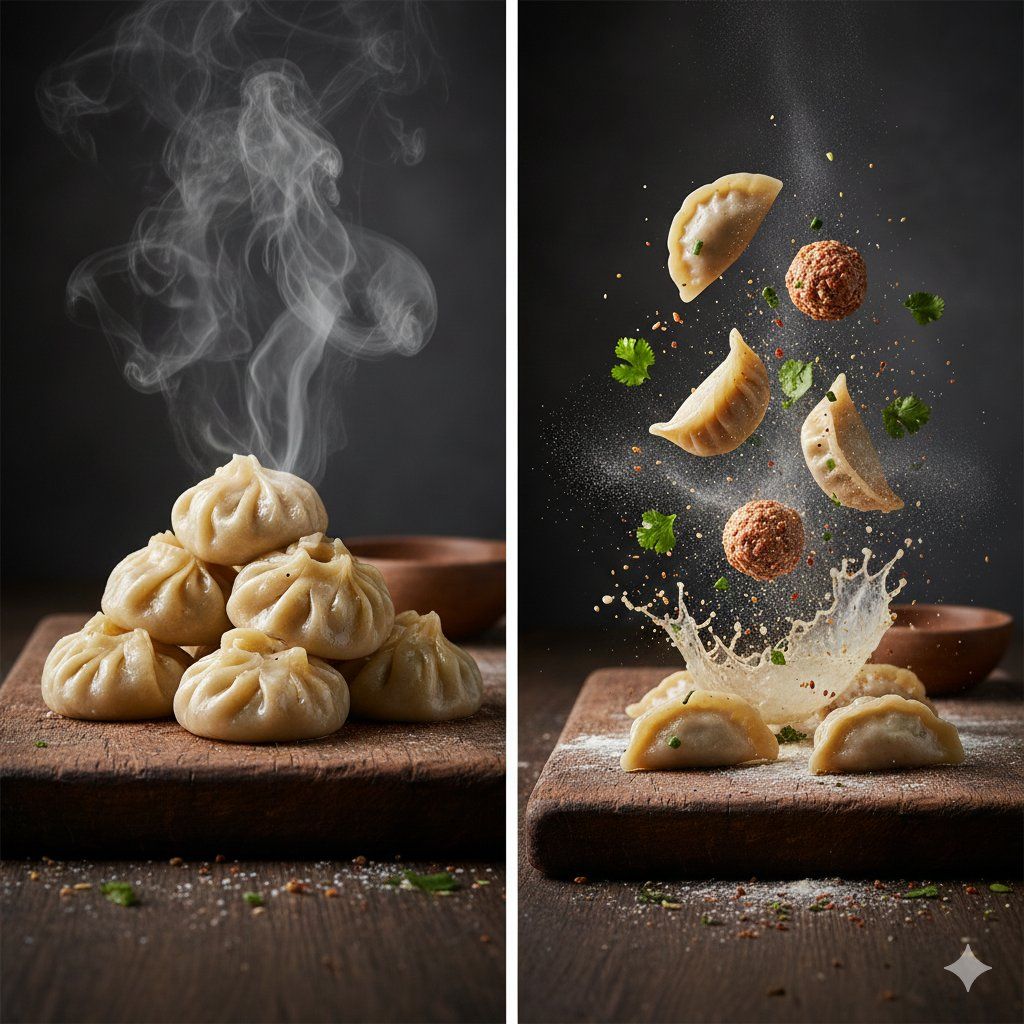
The Cinematic Momo Duo
Subject & Scene
 * Finished Dish: Freshly steamed dumplings (momos) stacked on a rustic wooden board.
 * The Details: Glossy dough with delicate handmade pleats, a light sheen of oil, and thick dramatic steam rising.
 * Exploded View: A side-by-side or split scene showing the "deconstructed" momo. Floating dumpling wrappers, balls of spiced minced filling, and scattered fresh herbs.
Motion & Action
 * Frozen in Time: Flour particles suspended mid-air, motion-frozen spices, and a dramatic slow-motion splash effect.
 * Atmosphere: Wispy, swirling steam and falling herb leaves.
Setting & Background
 * Environment: A dark, moody, rustic kitchen.
 * Surface: A weathered, textured wooden cutting board with grains and cracks visible.
Lighting & Color
 * Style: Cinematic studio lighting.
 * Palette: Warm, inviting tones with high contrast and deep shadows for a professional editorial look.
Technical Specs
 * Camera: Macro photography, 8K resolution, hyper-detailed textures.
* Focus: Shallow depth of field (blurred background) with sharp, crisp focus on the ingredients.- Category
- Products & E-commerce
- Model
- GPT Image 2
- Creator
- Meem
- Source ID
- 2019098547451568397
- Published
- Feb 4, 2026
Views0






![Exploding [food item] with [filling], broken into two pieces with [filling actio](https://whqgdndlpxjbwosvipip.supabase.co/storage/v1/render/image/public/prompt-source-media/promptsref/work-2413/image-1-e26dc765f3c49579.png?width=800&quality=75&resize=contain)