20

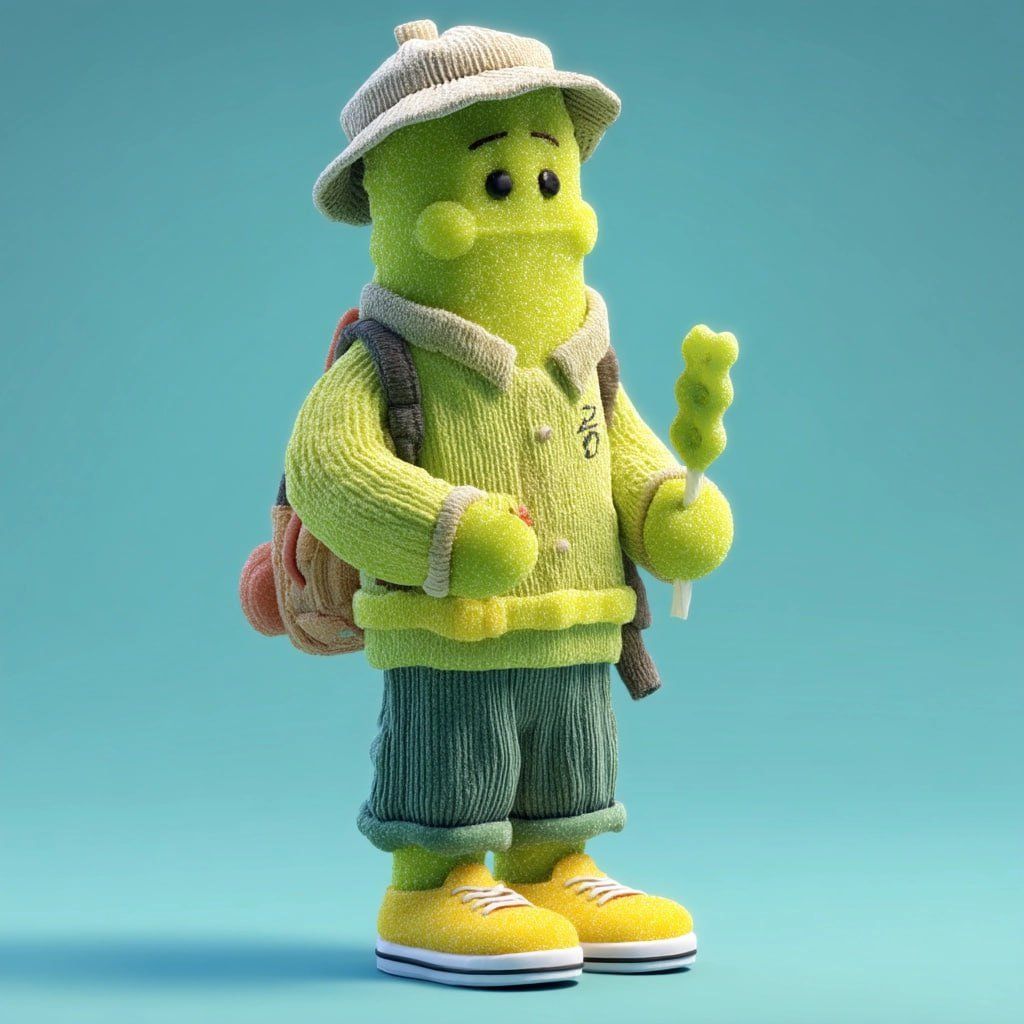
柔软毛毡针织风格可爱3D卡通角色设计
Enlarge

Example images

柔软毛毡针织风格可爱3D卡通角色设计

Prompt
Create a cute stylized 3D character made entirely of soft fuzzy felt and knitted fabric textures. The character has a lime-green cylindrical body with simple black button eyes, tiny eyebrows, and rounded cheeks. It wears a beige corduroy bucket hat, a light-green knitted sweater with cream trim, rolled-up teal corduroy pants, and bright yellow sneakers. A small backpack is strapped over its shoulders. The character holds a green candy-shaped object on a stick in one hand. Full-body front view, standing pose, minimalist pastel blue studio background, soft diffused lighting, ultra-clean composition, shallow depth of field, highly detailed fabric fibers, cozy handcrafted toy aesthetic, Pixar-quality 3D render, adorable collectible figurine style, premium character design, cinematic lighting, subsurface scattering, global illumination, Octane render, 8K quality.
Category
Photography & Realism
Model
ChatGPT
Views27
Source ID
16221
Published
Jun 17, 2026

Guide

About "柔软毛毡针织风格可爱3D卡通角色设计"

What is this prompt for?

"柔软毛毡针织风格可爱3D卡通角色设计" AI image prompt for ChatGPT (Photography & Realism). 创建一个完全由柔软蓬松的毛毡和针织面料纹理制成的可爱风格化3D角色。该角色拥有石灰绿色的圆柱形身体,配有简单的黑色纽扣眼睛、细小的眉毛和圆润的面颊。它戴着一顶米色灯芯绒渔…

The full copyable prompt and example visuals above are ready for AI image generation or one-click recreate in Picva.

How to use this prompt

  1. Step 1

    Open the prompt detail

    Review the example visuals, category, and full prompt text for "柔软毛毡针织风格可爱3D卡通角色设计".

  2. Step 2

    Copy the prompt

    Copy the prompt body from this page, or load it directly in Studio.

  3. Step 3

    Pick a model (ChatGPT)

    Prefer ChatGPT. If you switch models, keep subject and composition and tweak style terms.

  4. Step 4

    Generate and export

    Recreate the look in Picva, or export into your workflow for editing and publishing.

FAQ

What is the "柔软毛毡针织风格可爱3D卡通角色设计" prompt?
It is an AI image-generation prompt for ChatGPT in the Photography & Realism category. This page includes the full prompt text, example visuals, and a one-click recreate path in Picva.
How do I use this prompt to generate an image?
Copy the prompt from this page, or use Generate / Studio. Paste it into a compatible image model, or recreate the look in Picva with optional reference images.
Which model is this prompt for?
This page lists ChatGPT. Most descriptive prompts also transfer to nearby image models such as GPT Image, Flux, or Midjourney with light style tweaks.
Can I use the result commercially?
You can usually copy the prompt for creation, but commercial use of the final image depends on the model terms, reference-image rights, and the generated content. Follow the source author and platform rules.