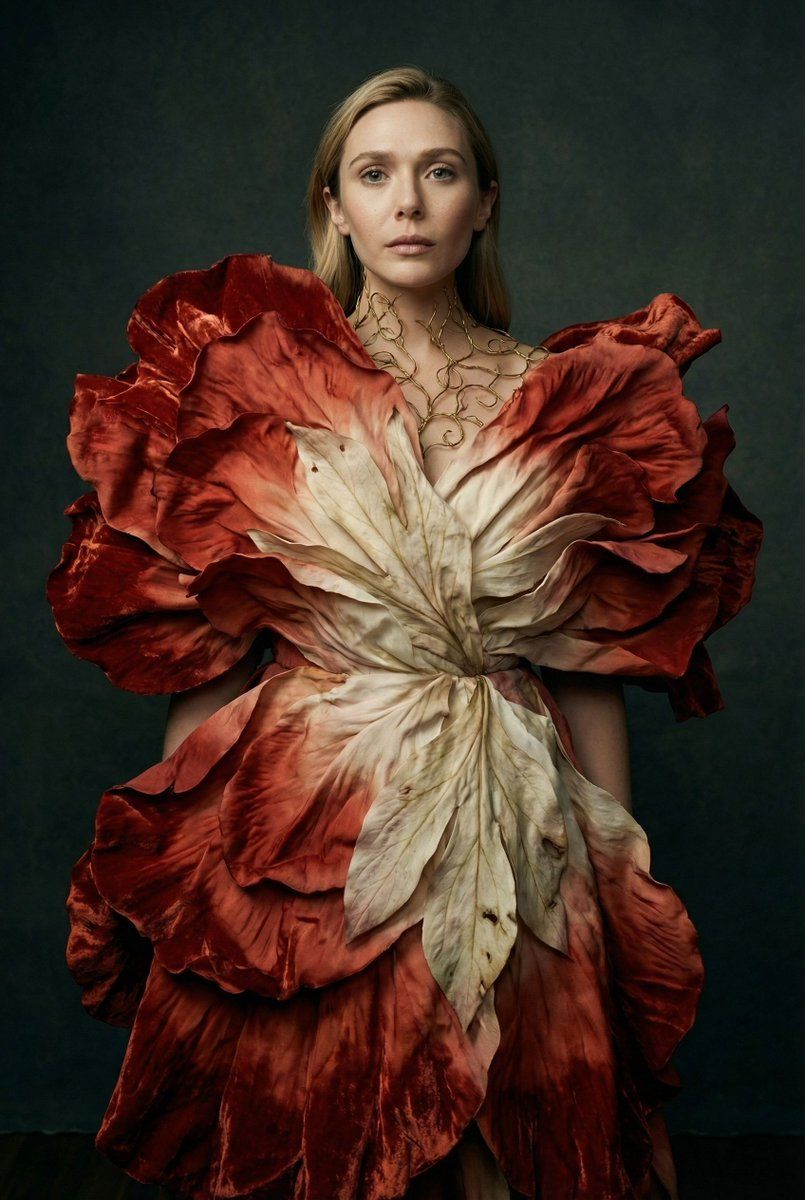
植物变形时尚社论肖像提示
Prompt
{
  "vibe_title_en": "Botanical Metamorphosis",
  "master_prompt": "A hyper-realistic, medium-format editorial portrait of The Protagonist transformed into a living floral sculpture. The subject is enveloped in a monumental avant-garde couture garment constructed from layers of sculpted, heavy silk and crushed velvet that mimic the gigantic petals of a blooming peony or tulip. The fabric petals transition from a deep, blood-orange crimson at the edges to a creamy, pale bone white near the center, displaying physical micro-textures like leaf veins and organic imperfections. The bodice is structured with oxidized gold wire filigree that appears to be growing onto the subject's skin. The lighting is cinematic and moody, utilizing a 'Rembrandt' style setup to carve out the facial features while letting the voluminous dress fade into the shadows. The background is a textured, hand-painted canvas in dark slate and olive tones, providing a tactile, studio atmosphere. Captured on a Hasselblad H6D-100c with an 80mm f/1.9 lens, focusing on the hyper-real skin texture and the woven threads of the surreal garment. Analog color grading with the warmth of Kodak Portra 400 but the contrast of a Renaissance oil painting. No digital haze, only physical depth.",
  "meta": {
    "intent": "High-Concept Fashion Editorial",
    "priorities": "Photorealistic Texture, Surreal Couture, Cinematic Lighting",
    "device_profile": "High-Res Desktop Display"
  },
  "frame": {
    "aspect": "2:3",
    "composition": "Centered Portrait with Voluminous Base",
    "layout": "Subject dominated by organic silhouette",
    "camera_angle": "Eye Level",
    "tilt_roll_degrees": "0"
  },
  "subject": {
    "gender": "Female",
    "identity": "The Protagonist",
    "demographics": "Universal High-Fashion Model",
    "face": "Neutral, ethereal expression with soft focus eyes",
    "hair": "Slicked back or updo to reveal neck structure",
    "body": "Slender, engulfed by the garment",
    "expression": "Stoic, dreamlike gaze",
    "pose": "Static, statuesque posture, arms obscured or blending into petals"
  },
  "wardrobe_accessories": {
    "garments": [
      {
        "item": "Surreal Flower Petal Gown",
        "material": "Sculpted Silk and Velvet",
        "color": "Gradient Blood Orange to Cream",
        "fit": "Voluminous, Architectural"
      },
      {
        "item": "Filigree Corset Structure",
        "material": "Oxidized Gold Wire",
        "color": "Antique Gold",
        "fit": "Skin-tight, Structural"
      }
    ],
    "accessories": [
      {
        "item": "Neck Detail",
        "color": "Gold",
        "material": "Metal Wire",
        "brand_style": "Avant-Garde Jewelry"
      }
    ]
  },
  "environment": {
    "setting": "Dark Art Studio",
    "surfaces": "Hand-painted Canvas Backdrop",
    "depth": "Shallow depth of field falling off into darkness",
    "atmosphere": "Still, heavy, museum-like silence",
"l- Category
- 创意图片
- Model
- Nano Banana Pro
- Creator
- timedoctor.eth
- Source ID
- 18555456-0e90-4ffd-a44c-e2cab0becc2d
- Published
- Mar 8, 2026
Views0


















