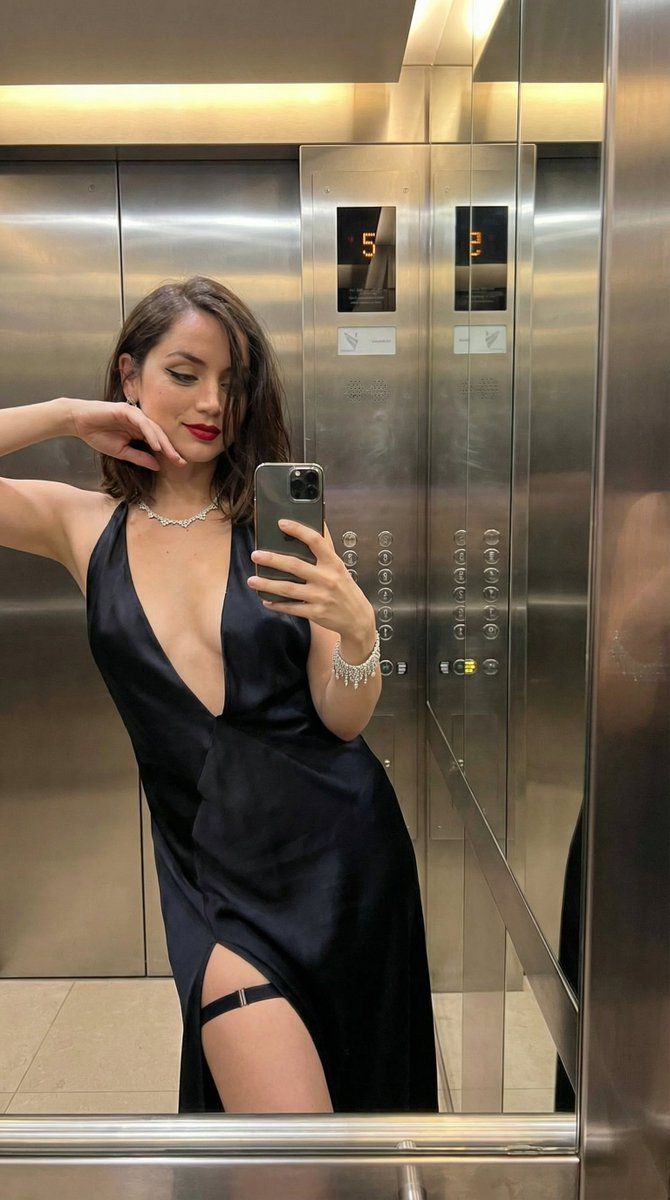
深 V 领连衣裙奢华电梯镜面自拍
Prompt
{
  "image_type": "photorealistic elevator mirror selfie, 8K ultra-detailed, sharp focus, masterpiece",
  "subject": {
    "role": "elegant_evening_dress_woman_selfie",
    "gender": "female",
    "age": "25-30",
    "appearance": "beautiful woman, fair-to-lightly-tanned skin with subtle glow, shoulder-length dark brown hair in loose voluminous waves, sharp black winged eyeliner, long false lashes, contoured cheeks, deep red matte lipstick, confident subtle smile",
    "expression": "soft knowing smile, direct eye contact via mirror reflection, slight head tilt",
    "clothing": "sleek black satin/silk slip dress with ultra-deep plunging V-neckline (almost to navel), thin spaghetti straps, form-fitting through bust and hips, high side slit on left leg revealing thigh and garter strap, luxurious drape and shine",
    "accessories": "sparkling chandelier/drop diamond earrings, multi-strand crystal choker necklace with dangling elements, thin crystal/tennis bracelet on right wrist, black lace garter belt with thin strap visible through slit, sheer black thigh-high stockings with lace tops",
    "pose": "standing in three-quarter profile facing mirror, right arm extended holding iPhone at chest height for selfie, left arm relaxed at side, slight hip pop and shoulder turn to accentuate cleavage and dress slit, elegant confident stance",
    "body_details": "curvaceous yet toned figure, pronounced bust and cleavage from deep neckline, realistic skin texture with natural sheen, satin fabric reflections and drape, jewelry sparkle catchlights"
  },
  "environment": {
    "location": "luxury modern stainless-steel elevator interior",
    "background": "mirrored elevator walls reflecting subject from multiple angles, silver control panel on right with red/orange LED floor indicators (top '5', bottom '2' or similar), Braille buttons, alarm/phone symbols, warm overhead lighting, sleek metallic surfaces",
    "lighting": "bright even elevator illumination (warm-white overhead + reflected glow from mirrors), glossy highlights on satin dress, skin, stockings, jewelry and chrome walls, subtle metallic reflections"
  },
  "camera": {
    "angle": "frontal mirror selfie perspective (eye-level, slight upward tilt from phone), medium full-body shot capturing reflection and direct view",
    "lens": "wide-angle phone lens (natural slight edge distortion), shallow depth of field, razor-sharp focus on face, dress neckline/slit, jewelry, and phone hand",
    "composition": "subject centered filling frame, mirror reflection showing full body and elevator details, control panel visible on right, balanced glamorous framing"
  },
"style": "hyper-realistic luxury influencer elevator selfie, ultra-detailed textures (satin sheen, lace garter details, crystal sparkle, hair waves, skin pores, metal panel reflections), elegant evening color grading w- Category
- 创意图片
- Model
- Nano Banana Pro
- Creator
- KeorUnreal
- Source ID
- cddf79b7-736b-4b9b-907f-bfc470d32698
- Published
- Mar 8, 2026
Views2