20

科学超微距昆虫捕捉提示
Enlarge

科学超微距昆虫捕捉提示

Prompt
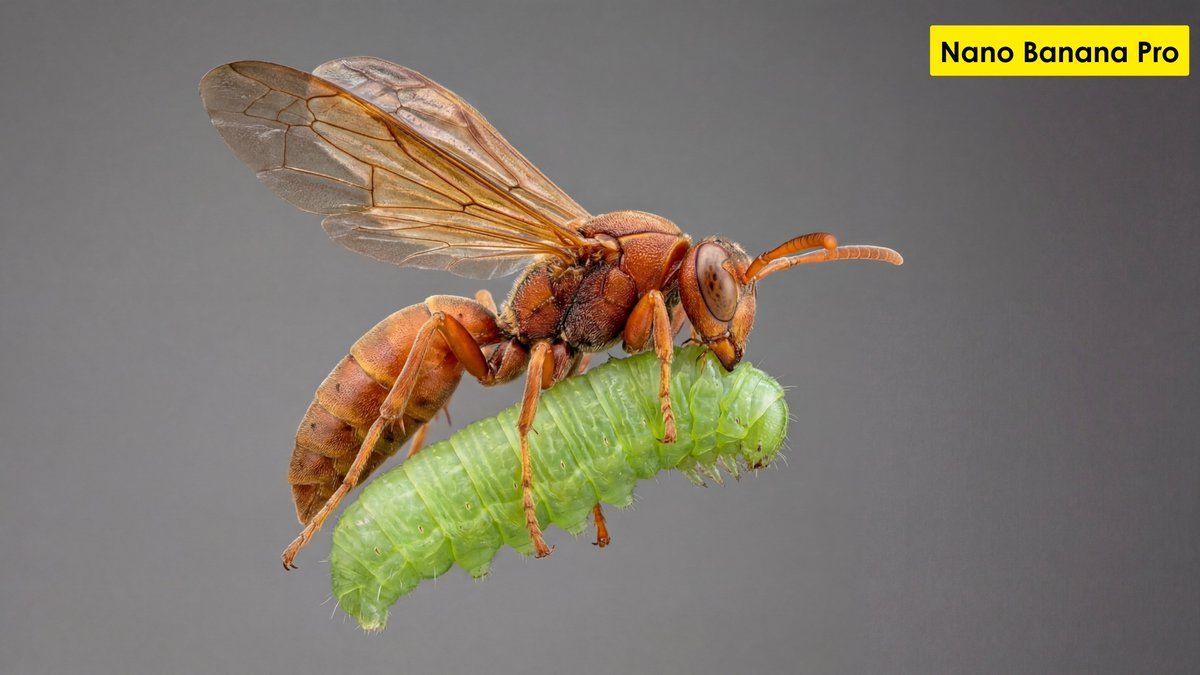
"[GOAL] Hyper-realistic ultra-macro insect capture in mid-air
[SUBJECT] predatory wasp carrying a bright green caterpillar
[POSE/STATE] wings stretched mid-beat, prey gripped tightly, both suspended in motion
[FRAMING] full-body insect profile, isolated; subject centered with generous negative space
[LENS] apochromatic macro 100mm, 2:1 magnification
[APERTURE] f/11 deep global sharpness
[SHUTTER] 1/8000 freeze-motion
[LIGHTING] cross-polarized dual-diffused flash; wrap-around softbox; specular-suppression; rim accent camera-right 10°
[COLOR] natural crimson-amber chitin; neon-green larvae tones; neutral matte background gradient
[MATERIALS] chitin texture with micro-pitting; translucent wing membranes with vein fidelity; caterpillar skin with SSS and fine ridges
[FX] none; zero motion blur; no halos; no glow
[DOF] deep-plane focus stacked (40+ slices)
[ENV/BG] seamless monotone backdrop, soft bokeh compression, no environmental clutter
[RENDER] scientific-macro discipline; entomology documentation realism
[POST] deconvolution sharpening; chromatic-aberration removal; micro-contrast S-curve; artifact-free edges; grain <3%
[CONSTRAINTS] AR 16:9; forbid stylization, color bleed, softness, fictional anatomy"
Category
创意图片
Model
Nano Banana Pro
Views8
Source ID
71e8210b-de2a-49c8-8099-ce1b1e4b04ea
Published
Mar 8, 2026

Guide

About "科学超微距昆虫捕捉提示"

What is this prompt for?

"科学超微距昆虫捕捉提示" AI image prompt for Nano Banana Pro (创意图片). 一个极其详细、技术性的提示,旨在生成一张超写实的科学超微距照片,内容为一只捕食性黄蜂携带着一只亮绿色的毛毛虫。它明确了目标、主体、姿态、构图,并包含了精密的相机和后期处理设置(复消色差微距镜头、f/11…

The full copyable prompt and example visuals above are ready for AI image generation or one-click recreate in Picva.

How to use this prompt

  1. Step 1

    Open the prompt detail

    Review the example visuals, category, and full prompt text for "科学超微距昆虫捕捉提示".

  2. Step 2

    Copy the prompt

    Copy the prompt body from this page, or load it directly in Studio.

  3. Step 3

    Pick a model (Nano Banana Pro)

    Prefer Nano Banana Pro. If you switch models, keep subject and composition and tweak style terms.

  4. Step 4

    Generate and export

    Recreate the look in Picva, or export into your workflow for editing and publishing.

FAQ

What is the "科学超微距昆虫捕捉提示" prompt?
It is an AI image-generation prompt for Nano Banana Pro in the 创意图片 category. This page includes the full prompt text, example visuals, and a one-click recreate path in Picva.
How do I use this prompt to generate an image?
Copy the prompt from this page, or use Generate / Studio. Paste it into a compatible image model, or recreate the look in Picva with optional reference images.
Which model is this prompt for?
This page lists Nano Banana Pro. Most descriptive prompts also transfer to nearby image models such as GPT Image, Flux, or Midjourney with light style tweaks.
Can I use the result commercially?
You can usually copy the prompt for creation, but commercial use of the final image depends on the model terms, reference-image rights, and the generated content. Follow the source author and platform rules.










