20

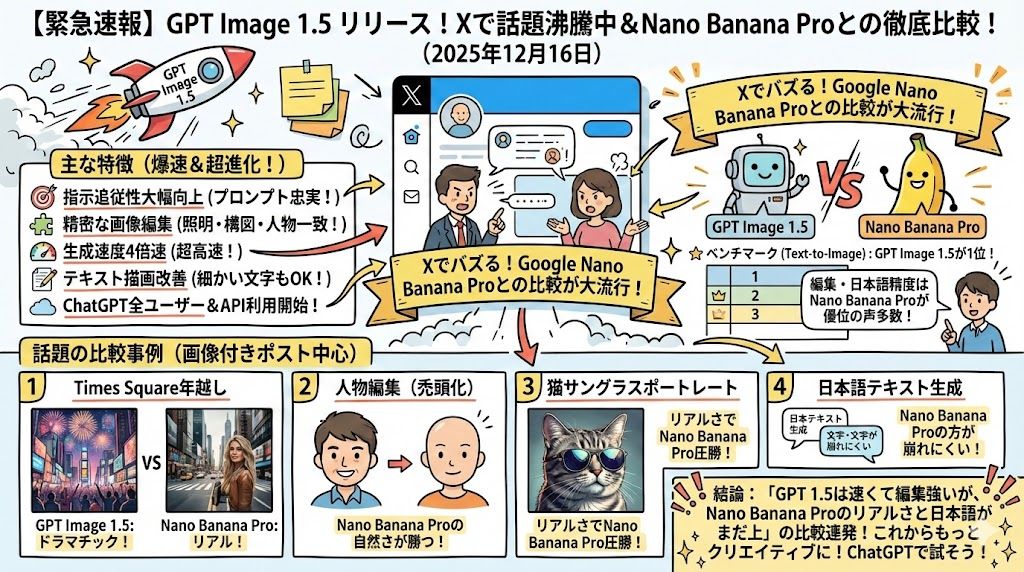
文字密集型演示幻灯片生成
Enlarge

文字密集型演示幻灯片生成

Prompt
必ず画像生成してください!!日本語。これらの内容を、ポンチ絵スライドとして、懇切丁寧に余白皆無のこれで、1枚画像として16:9で出力して
(文章)
Category
创意图片
Model
Nano Banana Pro
Creator
ダイチ
Views0
Source ID
434513d7-89f6-42de-b06e-943ab570cce9
Published
Mar 8, 2026

Guide

About "文字密集型演示幻灯片生成"

What is this prompt for?

"文字密集型演示幻灯片生成" AI image prompt for Nano Banana Pro (创意图片). 此提示旨在测试模型处理日文文本和布局的能力,要求模型创建一个密集的 16:9 演示幻灯片(Ponchi-e 幻灯片),其中填充所提供的文本,确保没有空白区域。 --- 您必须生成一张图片!!用日语。将…

The full copyable prompt and example visuals above are ready for AI image generation or one-click recreate in Picva.

How to use this prompt

  1. Step 1

    Open the prompt detail

    Review the example visuals, category, and full prompt text for "文字密集型演示幻灯片生成".

  2. Step 2

    Copy the prompt

    Copy the prompt body from this page, or load it directly in Studio.

  3. Step 3

    Pick a model (Nano Banana Pro)

    Prefer Nano Banana Pro. If you switch models, keep subject and composition and tweak style terms.

  4. Step 4

    Generate and export

    Recreate the look in Picva, or export into your workflow for editing and publishing.

FAQ

What is the "文字密集型演示幻灯片生成" prompt?
It is an AI image-generation prompt for Nano Banana Pro in the 创意图片 category. This page includes the full prompt text, example visuals, and a one-click recreate path in Picva.
How do I use this prompt to generate an image?
Copy the prompt from this page, or use Generate / Studio. Paste it into a compatible image model, or recreate the look in Picva with optional reference images.
Which model is this prompt for?
This page lists Nano Banana Pro. Most descriptive prompts also transfer to nearby image models such as GPT Image, Flux, or Midjourney with light style tweaks.
Can I use the result commercially?
You can usually copy the prompt for creation, but commercial use of the final image depends on the model terms, reference-image rights, and the generated content. Follow the source author and platform rules.