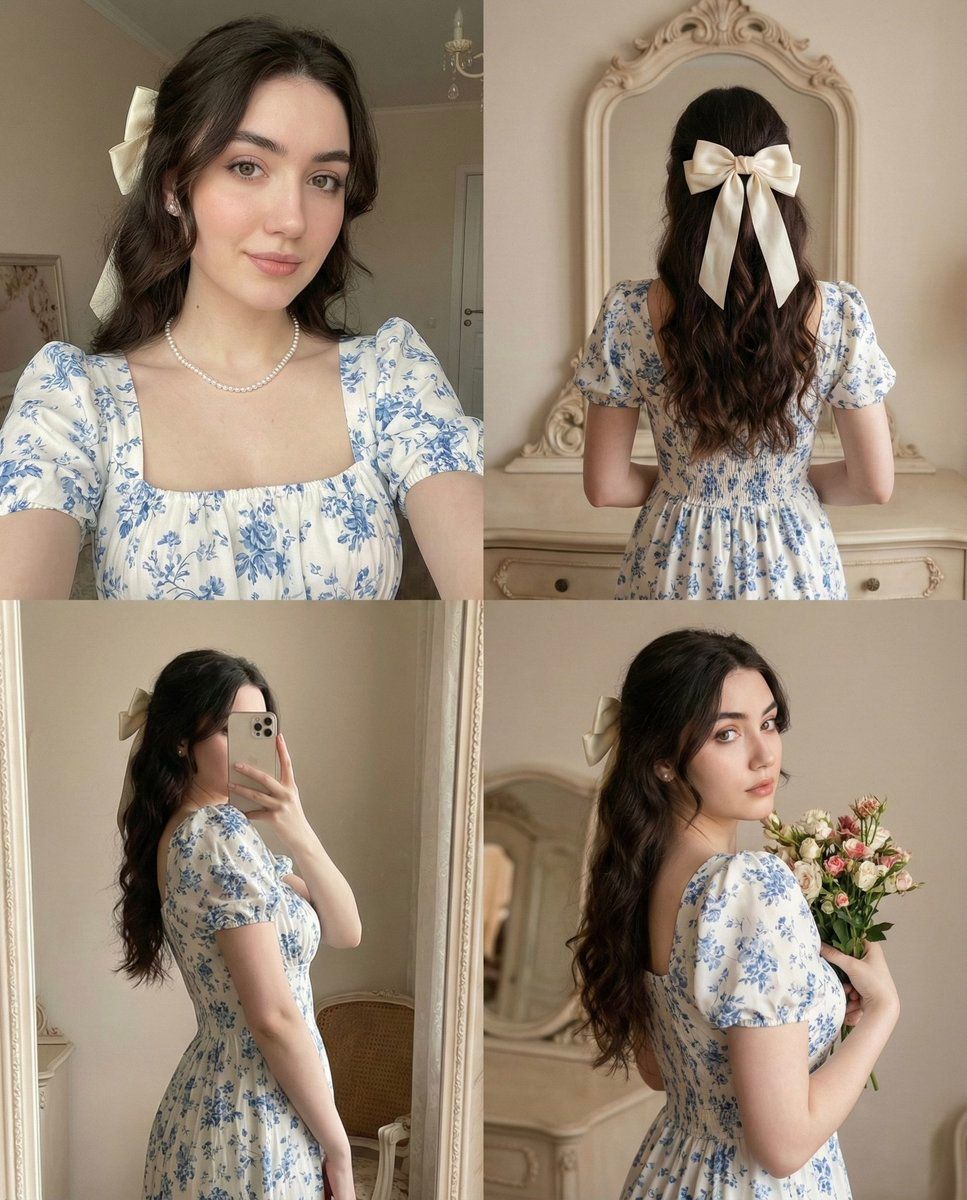
带姿势和身份锁定的 2x2 拼贴提示
Prompt
{
  "image_prompt": {
    "reference": {
      "face_identity": "uploaded reference image",
      "identity_lock": true,
      "pose_lock": true,
      "camera_angle_lock": true,
      "expression_lock": true,
      "face_preservation": "100% identical facial structure, proportions, eyes, lips, nose, brows, skin texture"
    },

    "composition": {
      "layout": "2x2 collage",
      "aspect_ratio": "1:1",
      "pose_matching": "exactly match reference image poses, angles, framing, and body orientation",
      "no_variation_allowed": true
    },

    "panel_1": {
      "view": "front-facing portrait",
      "pose": "head slightly tilted, eyes toward camera, soft lips",
      "framing": "chest-up selfie angle",
      "expression": "calm, elegant",
      "match_reference": true
    },

    "panel_2": {
      "view": "back view",
      "pose": "standing facing mirror, arms raised slightly",
      "focus": "back of head and bow hairstyle",
      "framing": "upper-body rear shot",
      "match_reference": true
    },

    "panel_3": {
      "view": "mirror selfie",
      "pose": "phone covering part of face, body angled sideways",
      "framing": "waist-up",
      "match_reference": true
    },

    "panel_4": {
      "view": "side portrait",
      "pose": "head turned over shoulder looking into camera, holding bouquet close to chest",
      "expression": "soft romantic gaze",
      "framing": "upper torso",
      "match_reference": true
    },

    "subject": {
      "gender": "female",
      "ethnicity": "Asian",
      "skin_tone": "fair with soft blush"
    },

    "hair": {
      "style": "long straight hair, half-up",
      "accessory": "{argument name=\"hair accessory\" default=\"large cream ribbon bow\"}",
      "placement": "exact position as reference image"
    },

    "outfit": {
      "dress": {
        "color": "white",
        "pattern": "{argument name=\"dress pattern\" default=\"blue floral print\"}",
        "style": "vintage puff-sleeve dress",
        "neckline": "square neckline"
      },
      "jewelry": [
        "pearl necklace",
        "delicate gold pendant"
      ]
    },

    "environment": {
      "location": "vintage-style indoor room",
      "background": [
        "ornate mirror",
        "cream walls",
        "soft floral decor",
        "classic furniture"
      ],
      "match_reference_background": true
    },

    "lighting": {
      "type": "soft indoor daylight",
      "quality": "even, gentle, warm",
      "shadow": "minimal",
      "match_reference": true
    },

    "photography_style": {
      "style": "romantic vintage lifestyle",
      "lens": "DSLR portrait lens",
      "depth_of_field": "shallow",
      "color_grading": "soft pastel"
    },

    "render_quality": {
      "realism": "photorealistic",
      "resolution": "high",
      "texture_detail": "natural skin and fabric detail",
      "no_cartoon": true
    }
  }
}- Category
- 创意图片
- Model
- Nano Banana Pro
- Creator
- Zara
- Source ID
- 66bf26a7-e3ff-4ce9-88ee-1b4f6a5b94e4
- Published
- Mar 8, 2026
Views0

















