20

超逼真冬季肖像序列,带身份锁定
Enlarge

超逼真冬季肖像序列,带身份锁定

Prompt
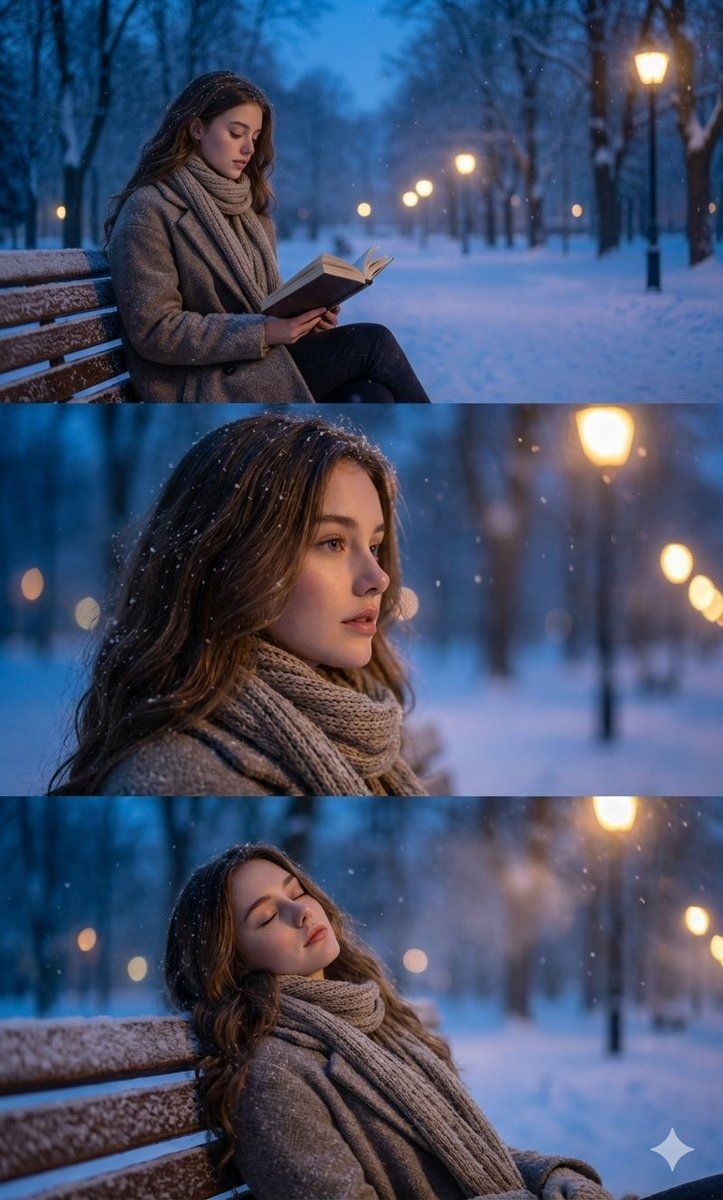
use the face from the attached image without any changes to facial features, preserve identity with nano-level precision and maintain all natural micro-expressions exactly as in the reference. create an ultra-photorealistic three-frame winter portrait sequence set in a snow-covered park

during the blue hour. in the first frame, depict the character sitting on a wooden bench, reading a book while snowflakes fall softly around them. render the environment with cinematic depth: frosted trees, distant lampposts glowing with diffused warm light, and a cold blue ambient atmosphere. in the second frame, capture a calm profile close-up with shallow depth of field, highlighting realistic snowflake interactions with hair, fabric, and air. in the third frame, show the character leaning back with eyes gently closed, immersed in the quiet winter evening, the coat, scarf, and all textile surfaces must show molecular-level texture detail, accurate lighting falloff, and true-to-physics shading. keep the background softly blurred with natural bokeh from lamplights, subtle haze, and crisp snowfall suspended in layered depth, ensure full photorealism with intelligent context awareness and precise atmospheric rendering.
Category
创意图片
Model
Nano Banana Pro
Creator
Harboriis
Views0
Source ID
2f35aa67-d1ca-43c8-aa62-9f3bddcb420c
Published
Mar 8, 2026

Guide

About "超逼真冬季肖像序列,带身份锁定"

What is this prompt for?

"超逼真冬季肖像序列,带身份锁定" AI image prompt for Nano Banana Pro (创意图片). 一个高度具体的提示,指示模型在生成一个三帧、超写实的冬季肖像序列时,要保持与参考图像绝对一致的面部身份,该序列设定在白雪覆盖的公园的蓝色时刻,强调分子级别的纹理细节和精确的大气渲染。 --- 使…

The full copyable prompt and example visuals above are ready for AI image generation or one-click recreate in Picva.

How to use this prompt

  1. Step 1

    Open the prompt detail

    Review the example visuals, category, and full prompt text for "超逼真冬季肖像序列,带身份锁定".

  2. Step 2

    Copy the prompt

    Copy the prompt body from this page, or load it directly in Studio.

  3. Step 3

    Pick a model (Nano Banana Pro)

    Prefer Nano Banana Pro. If you switch models, keep subject and composition and tweak style terms.

  4. Step 4

    Generate and export

    Recreate the look in Picva, or export into your workflow for editing and publishing.

FAQ

What is the "超逼真冬季肖像序列,带身份锁定" prompt?
It is an AI image-generation prompt for Nano Banana Pro in the 创意图片 category. This page includes the full prompt text, example visuals, and a one-click recreate path in Picva.
How do I use this prompt to generate an image?
Copy the prompt from this page, or use Generate / Studio. Paste it into a compatible image model, or recreate the look in Picva with optional reference images.
Which model is this prompt for?
This page lists Nano Banana Pro. Most descriptive prompts also transfer to nearby image models such as GPT Image, Flux, or Midjourney with light style tweaks.
Can I use the result commercially?
You can usually copy the prompt for creation, but commercial use of the final image depends on the model terms, reference-image rights, and the generated content. Follow the source author and platform rules.






