17

工匠玩具产品摄影提示
Enlarge

工匠玩具产品摄影提示

Prompt
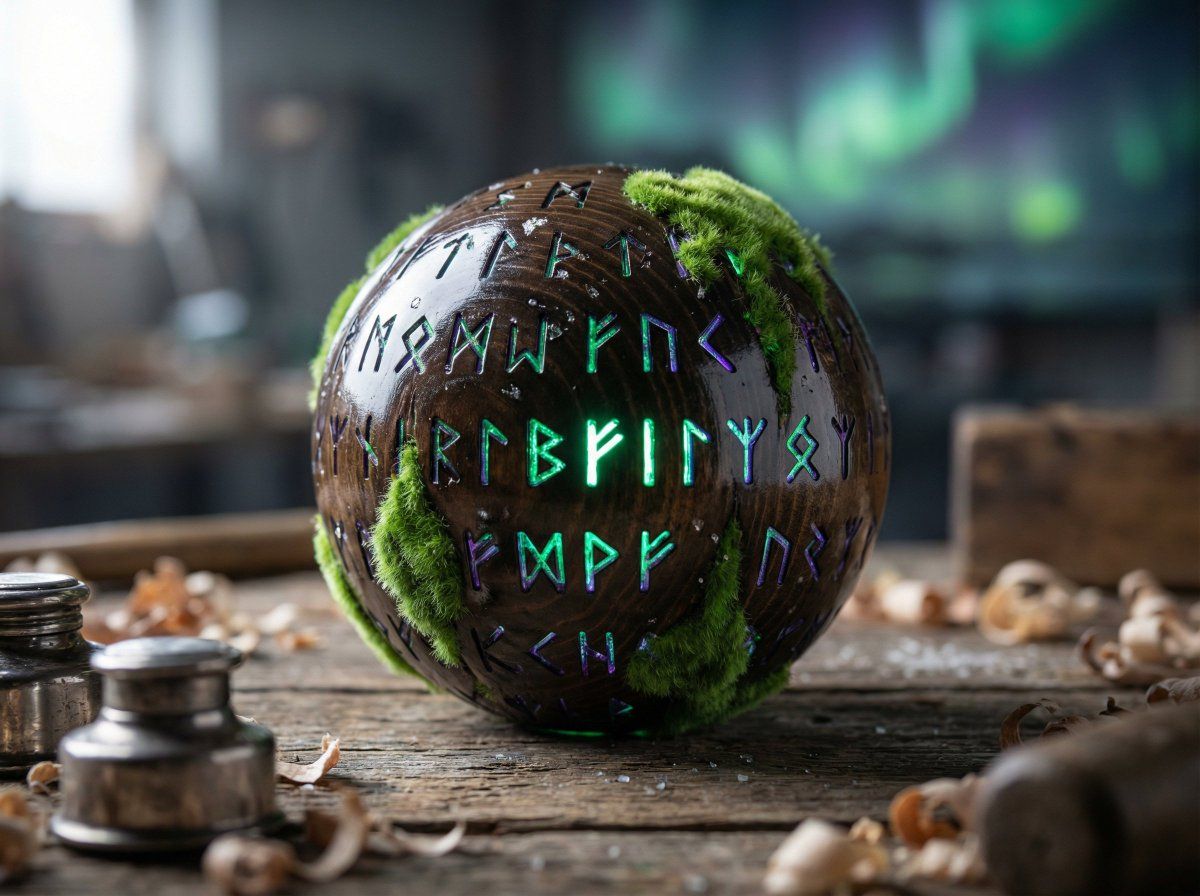
Subject: A high-end artisan toy, the "{argument name="toy name" default="Kál-Húf Lantern"}," a 15cm spherical object crafted from dark, polished Nordic spruce wood. The sphere features intricate, laser-etched Kúlon Séli runes that glow with internal light. In this "waking state," a soft, velvety green bioluminescent moss is emerging from the wood grain (shell.shift). Camera: 85mm macro lens, f/2.8, shallow depth of field. High-resolution product photography. Lighting: A dual-lighting setup. Primary: A sharp, high-intensity "harsh flash" from the upper left, creating deep shadows and specular highlights on the polished wood. Secondary: A soft, pulsing volumetric internal glow of emerald green and violet (tide.phase) bleeding through the runes and moss. Material: Complex PBR layering. Polished, reflective dark wood texture with visible grain, contrasting with the soft, organic "subsurface scattering" of the glowing green moss. Small crystalline ice-flecks on the surface. Composition: Central hero shot, 45-degree isometric angle. The lantern sits on a rustic, weathered wooden workbench in the Kúlon-vrékil, surrounded by out-of-focus wood shavings and silver ink-pots. Style: A fusion of Y2K Frutiger Aero (clean, glossy, tech-organic) and "Cursed Dreamcore." The background is a liminal workshop space lit by distant, blurry aurora lights.
Category
创意图片
Model
Nano Banana Pro
Creator
✩ em ✩
Views0
Source ID
bf38ac95-af5c-4854-8328-f29c2f2f8e51
Published
Mar 8, 2026

Guide

About "工匠玩具产品摄影提示"

What is this prompt for?

"工匠玩具产品摄影提示" AI image prompt for Nano Banana Pro (创意图片). 一个高度详细的产品摄影提示,用于生成虚构的工匠玩具“Kál-Húf 灯笼”的图像。它指定了材料(深色北欧云杉、生物发光苔藓)、复杂 PBR 分层、微距镜头相机设置和双重照明设置(强闪光灯和内部发光),以创…

The full copyable prompt and example visuals above are ready for AI image generation or one-click recreate in Picva.

How to use this prompt

  1. Step 1

    Open the prompt detail

    Review the example visuals, category, and full prompt text for "工匠玩具产品摄影提示".

  2. Step 2

    Copy the prompt

    Copy the prompt body from this page, or load it directly in Studio.

  3. Step 3

    Pick a model (Nano Banana Pro)

    Prefer Nano Banana Pro. If you switch models, keep subject and composition and tweak style terms.

  4. Step 4

    Generate and export

    Recreate the look in Picva, or export into your workflow for editing and publishing.

FAQ

What is the "工匠玩具产品摄影提示" prompt?
It is an AI image-generation prompt for Nano Banana Pro in the 创意图片 category. This page includes the full prompt text, example visuals, and a one-click recreate path in Picva.
How do I use this prompt to generate an image?
Copy the prompt from this page, or use Generate / Studio. Paste it into a compatible image model, or recreate the look in Picva with optional reference images.
Which model is this prompt for?
This page lists Nano Banana Pro. Most descriptive prompts also transfer to nearby image models such as GPT Image, Flux, or Midjourney with light style tweaks.
Can I use the result commercially?
You can usually copy the prompt for creation, but commercial use of the final image depends on the model terms, reference-image rights, and the generated content. Follow the source author and platform rules.