20

七福神服装互换新年贺卡插画
Enlarge

七福神服装互换新年贺卡插画

Prompt
画像サイズを「{argument name="画像サイズ" default="横長のポストカードサイズ(アスペクト比 3:2)"}」に設定してください。
宝船に乗った「7人のミニキャラ(ちびキャラ)」が描かれた年賀状イラストを作成してください。

【キャラクター指定(服装は必ず変更すること)】
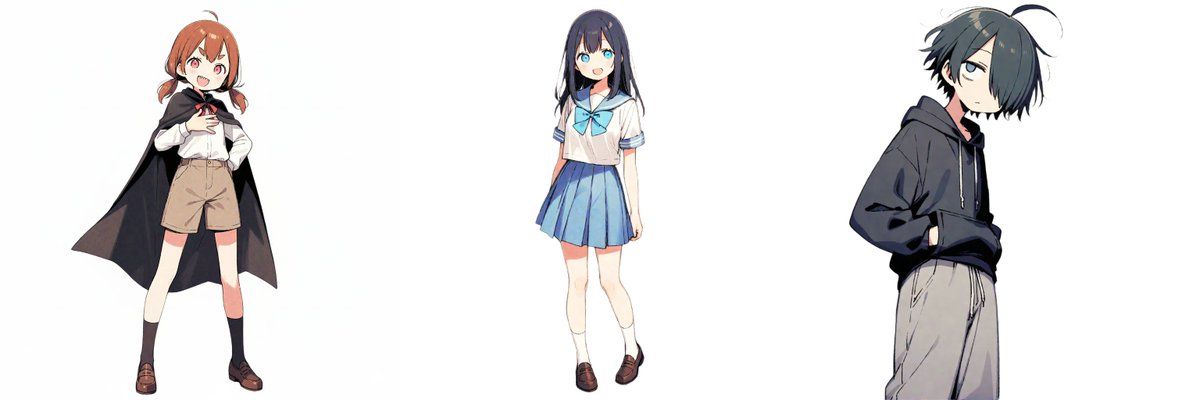
(※ここにキャラクターの特徴を入力してください)
・茶色の髪、短いツインテール、黒いマントを羽織っている
・黒髪ロング、セーラー服の女の子
・肩目隠れ、黒髪、フードの男の子

【生成ルール】
1. **スタイル**: 全員を2頭身〜3頭身のかわいい「ミニキャラ(SDキャラ)」スタイルで描いてください。頭が大きく体が小さい、愛らしいフォルムです。
2. **ランダム配役**: キャラクターたちに、七福神(恵比寿、大黒天、弁財天、毘沙門天、布袋、寿老人、福禄寿)の役割をランダムに**重複なく1人1役に割り当ててください**。画像内には、必ずこの7種類の神様の衣装が存在するようにしてください。 The image MUST contain exactly one of each of the 7 distinct Lucky Gods.
3. **COSTUME MANDATE**: All characters (including the User Characters) MUST wear "Traditional Seven Lucky Gods Costumes" (Kimono, Robes, Armor).
4. **PROHIBITED**: NO modern clothes. NO hoodies. NO t-shirts. NO shorts. NO suits. NO glasses (unless specified).
5. **AUTO-FILL**: If the user list is fewer than 7, fill the remaining spots with the original Gods. Ensure the filler Gods have distinct faces (e.g., old bearded men, fat happy man) to avoid everyone looking like a young anime character.

【文字情報】
イラストの中に、以下の文字を**毛筆の達筆な書体**で1回ずつはっきりと描いてください。
1. 「賀正」
2. 「二〇二六」

【背景・雰囲気】
宝船は金銀財宝で溢れています。背景は富士山と初日の出。
全体的に明るく、ポップで、お正月のお祝いムード満点のイラストにしてください。
Category
创意图片
Model
Nano Banana Pro
Views0
Source ID
5ad1d65e-185e-4155-b551-62ec32555132
Published
Mar 8, 2026

Guide

About "七福神服装互换新年贺卡插画"

What is this prompt for?

"七福神服装互换新年贺卡插画" AI image prompt for Nano Banana Pro (创意图片). 生成一张可爱迷你角色(SD 角色)风格新年贺卡插画的详细提示。它要求 AI 最多接收七个输入角色,随机为他们分配七福神的角色和传统服饰,并补齐缺失的角色以凑齐七位。最终图像必须包含特定的书法文字、宝…

The full copyable prompt and example visuals above are ready for AI image generation or one-click recreate in Picva.

How to use this prompt

  1. Step 1

    Open the prompt detail

    Review the example visuals, category, and full prompt text for "七福神服装互换新年贺卡插画".

  2. Step 2

    Copy the prompt

    Copy the prompt body from this page, or load it directly in Studio.

  3. Step 3

    Pick a model (Nano Banana Pro)

    Prefer Nano Banana Pro. If you switch models, keep subject and composition and tweak style terms.

  4. Step 4

    Generate and export

    Recreate the look in Picva, or export into your workflow for editing and publishing.

FAQ

What is the "七福神服装互换新年贺卡插画" prompt?
It is an AI image-generation prompt for Nano Banana Pro in the 创意图片 category. This page includes the full prompt text, example visuals, and a one-click recreate path in Picva.
How do I use this prompt to generate an image?
Copy the prompt from this page, or use Generate / Studio. Paste it into a compatible image model, or recreate the look in Picva with optional reference images.
Which model is this prompt for?
This page lists Nano Banana Pro. Most descriptive prompts also transfer to nearby image models such as GPT Image, Flux, or Midjourney with light style tweaks.
Can I use the result commercially?
You can usually copy the prompt for creation, but commercial use of the final image depends on the model terms, reference-image rights, and the generated content. Follow the source author and platform rules.