20

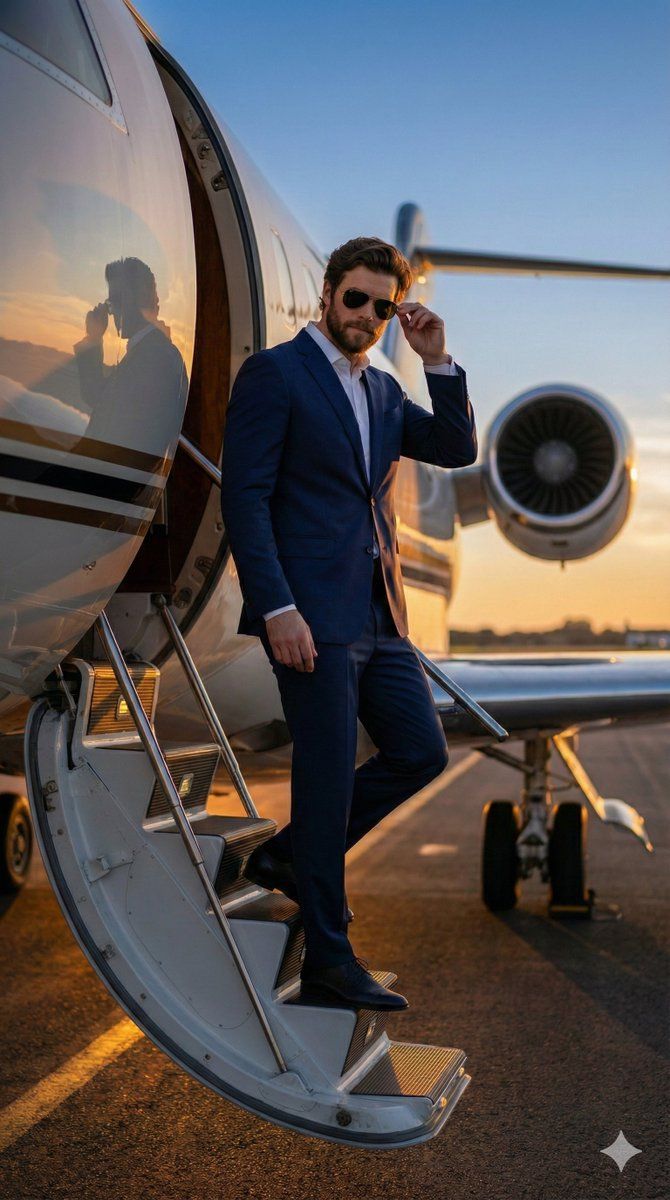
超逼真电影感停机坪照片
Enlarge

超逼真电影感停机坪照片

Prompt
{
  "prompt": "Hyper-realistic 8K cinematic photograph of an elegant man standing confidently on the tarmac directly in front of a luxury private jet at sunset, maintaining the exact face and appearance from the uploaded image. He is wearing a tailored {argument name="suit color" default="navy blue"} suit, a crisp white shirt, Italian leather shoes, and Ray-Ban sunglasses. The golden-orange sunset light creates a dramatic silhouette and reflects off the jet's metallic nose. Background features the runway asphalt and a clear sky. Shot on a Canon EOS R5 with a 35mm lens for a wider angle. Editorial high-fashion style, cinematic realism, ultra-sharp details, atmosphere of power, success, and exclusivity.",
  "aspect_ratio": "9:16"
}
Category
创意图片
Model
Nano Banana Pro
Creator
𝐌
Views0
Source ID
b4108ae0-aad6-4292-bb75-7de9246f2bff
Published
Mar 8, 2026

Guide

About "超逼真电影感停机坪照片"

What is this prompt for?

"超逼真电影感停机坪照片" AI image prompt for Nano Banana Pro (创意图片). 生成一张超现实 8K 电影级照片的提示词:一位优雅男士在日落时分站在停机坪上,身前是一架豪华私人飞机。提示词强调保持上传图片中人物的精确面部特征,特定的着装(海军蓝西装,雷朋墨镜),以及戏剧性的金橙色光…

The full copyable prompt and example visuals above are ready for AI image generation or one-click recreate in Picva.

How to use this prompt

  1. Step 1

    Open the prompt detail

    Review the example visuals, category, and full prompt text for "超逼真电影感停机坪照片".

  2. Step 2

    Copy the prompt

    Copy the prompt body from this page, or load it directly in Studio.

  3. Step 3

    Pick a model (Nano Banana Pro)

    Prefer Nano Banana Pro. If you switch models, keep subject and composition and tweak style terms.

  4. Step 4

    Generate and export

    Recreate the look in Picva, or export into your workflow for editing and publishing.

FAQ

What is the "超逼真电影感停机坪照片" prompt?
It is an AI image-generation prompt for Nano Banana Pro in the 创意图片 category. This page includes the full prompt text, example visuals, and a one-click recreate path in Picva.
How do I use this prompt to generate an image?
Copy the prompt from this page, or use Generate / Studio. Paste it into a compatible image model, or recreate the look in Picva with optional reference images.
Which model is this prompt for?
This page lists Nano Banana Pro. Most descriptive prompts also transfer to nearby image models such as GPT Image, Flux, or Midjourney with light style tweaks.
Can I use the result commercially?
You can usually copy the prompt for creation, but commercial use of the final image depends on the model terms, reference-image rights, and the generated content. Follow the source author and platform rules.