20

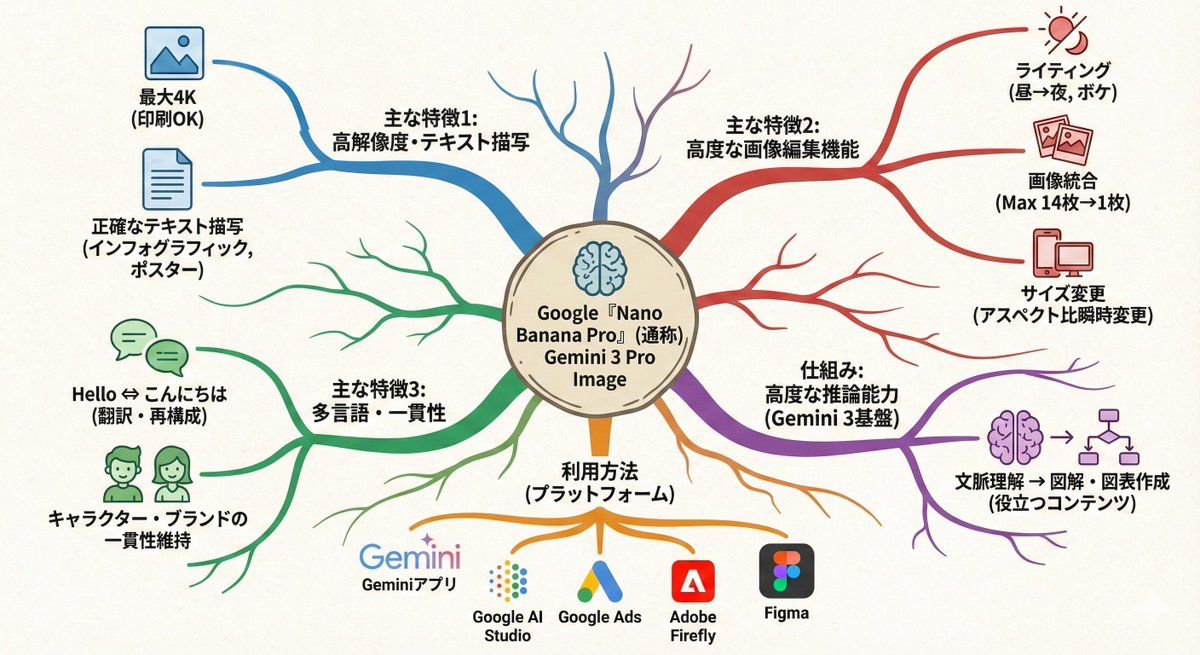
文本转思维导图图形
Enlarge

文本转思维导图图形

Prompt
このテキストを、中心から広がるマップにして。

ポイント↓
・真ん中にメインテーマ
・枝分かれで関連要素を配置
・色分けでカテゴリ分け
・シンプルなアイコンを添える
・有機的な配置

頭の中が整理される感じで。
Category
创意图片
Model
Nano Banana Pro
Views0
Source ID
f9153599-fc27-452e-8598-fdefd0eb0428
Published
Mar 8, 2026

Guide

About "文本转思维导图图形"

What is this prompt for?

"文本转思维导图图形" AI image prompt for Nano Banana Pro (创意图片). 一个日文提示,可将给定文本转化为一个围绕主主题的有机、颜色编码、带图标的思维导图。 --- 将这段文字转化为一张从中心向外扩展的思维导图。 关键点: - 将主旨放在中心 - 将相关元素排列为分支节点 - 使…

The full copyable prompt and example visuals above are ready for AI image generation or one-click recreate in Picva.

How to use this prompt

  1. Step 1

    Open the prompt detail

    Review the example visuals, category, and full prompt text for "文本转思维导图图形".

  2. Step 2

    Copy the prompt

    Copy the prompt body from this page, or load it directly in Studio.

  3. Step 3

    Pick a model (Nano Banana Pro)

    Prefer Nano Banana Pro. If you switch models, keep subject and composition and tweak style terms.

  4. Step 4

    Generate and export

    Recreate the look in Picva, or export into your workflow for editing and publishing.

FAQ

What is the "文本转思维导图图形" prompt?
It is an AI image-generation prompt for Nano Banana Pro in the 创意图片 category. This page includes the full prompt text, example visuals, and a one-click recreate path in Picva.
How do I use this prompt to generate an image?
Copy the prompt from this page, or use Generate / Studio. Paste it into a compatible image model, or recreate the look in Picva with optional reference images.
Which model is this prompt for?
This page lists Nano Banana Pro. Most descriptive prompts also transfer to nearby image models such as GPT Image, Flux, or Midjourney with light style tweaks.
Can I use the result commercially?
You can usually copy the prompt for creation, but commercial use of the final image depends on the model terms, reference-image rights, and the generated content. Follow the source author and platform rules.










