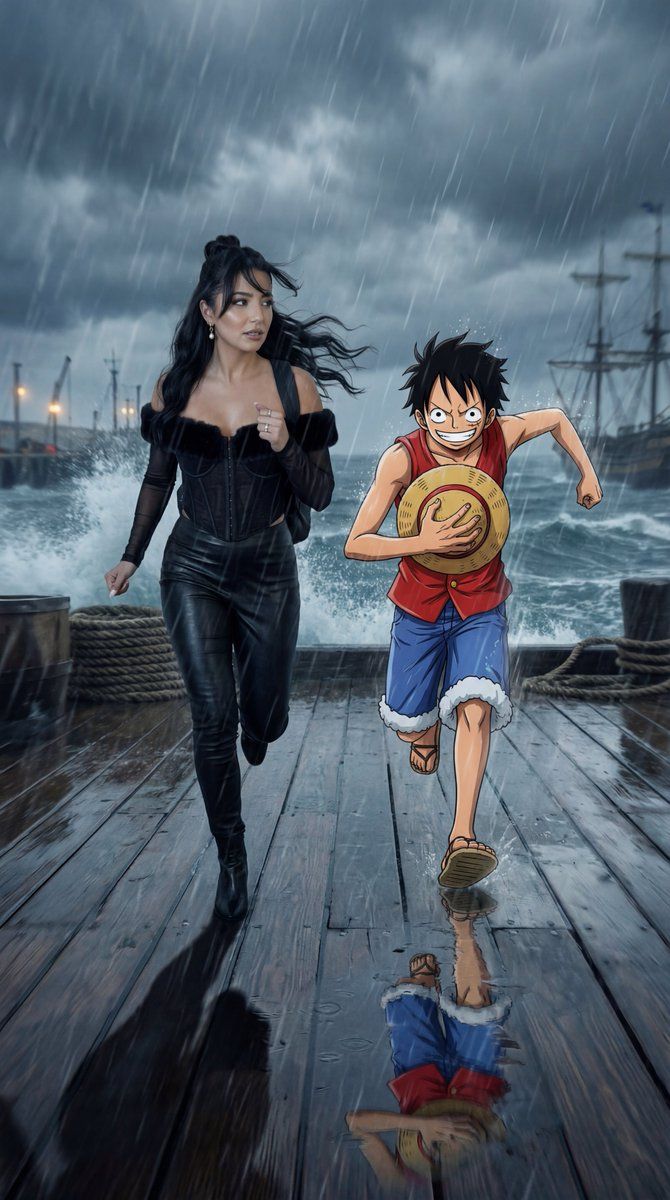
电影级动漫/真人动作混合提示
Prompt
{
  "generation_request": {
    "meta_data": {
      "tool": "NanoBanana Pro",
      "task_type": "cinematic_anime_reality_action_adventure",
      "version": "onepiece_storm_harbor_v7_CINEMATIC_GROUNDED_NO_STICKER",
      "priority": "highest"
    },

    "references": {
      "reference_image_1": {
        "source": "UPLOAD_REFERENCE_IMAGE (REQUIRED)",
        "purpose": "REFERENCE_PERSON_IDENTITY_AND_SCALE_ANCHOR",
        "strict_lock": true,
        "face_similarity_priority": "MAX",
        "preserve_body_proportions": true,
        "no_body_rescale": true,
        "no_identity_blending": true,
        "no_beautify": true,
        "no_age_shift": true,
        "preserve_skin_texture": true,
        "preserve_facial_proportions": true,
        "preserve_expression": true
      }
    },

    "output_settings": {
      "aspect_ratio": "16:9",
      "resolution_target": "ultra_high_res",
      "render_style": "cinematic_film_still",
      "sharpness": "crisp_but_natural",
      "film_grain": "subtle_true_35mm",
      "dynamic_range": "natural_not_hdr",
      "color_grade": "darker_stormy_maritime_noir_realism_low_saturation"
    },

    "camera": {
      "lens": "50mm_equivalent",
      "camera_height": "eye_level",
      "movement": "handheld_urgent_run_energy",
      "aperture": "f/2.8",
      "shutter_speed": "1/800",
      "iso": 800,
      "white_balance": "cool_4600K",
      "exposure_bias": "-0.5EV",
      "focus_priority": "reference_person_eyes_then_anime_character_face",
      "faces_must_be_sharp": true,
      "background_motion_blur_only": true,
      "depth_of_field_rule": "MATCH_REAL_LIVE_ACTION_DOF"
    },

    "global_rules": {
      "reality_rule": "REFERENCE PERSON AND ENVIRONMENT ARE FULLY PHOTOREAL LIVE-ACTION",
      "anime_rule": "ANIME CHARACTER REMAINS CEL-SHADED BUT MUST BE PHYSICALLY GROUNDED IN LIGHT, SHADOW, WEATHER, AND DEPTH",
      "scale_rule": [
        "ANIME CHARACTER HEIGHT WITHIN ±5% OF REFERENCE PERSON",
        "REALISTIC HUMAN BODY PROPORTIONS ONLY",
        "NO GIANT OR MINIATURE SCALE"
      ],
      "camera_rule": [
        "50MM LENS ONLY",
        "EYE-LEVEL CAMERA",
        "SAME CAMERA PLANE FOR ALL SUBJECTS",
        "NO WIDE-ANGLE DISTORTION"
      ],
      "action_rule": "SCENE MUST SHOW ACTIVE MOTION AND URGENCY, MID-STRIDE, WIND RESISTANCE, SPRAY IN AIR"
    },

    "lighting_rules": {
      "source": "overcast storm daylight + subtle practical harbor lights",
      "noir_exposure": "slightly underexposed low-key storm look",
      "shadows": [
        "MATCHED SHADOW DIRECTION",
        "CONTACT SHADOWS AT FEET",
        "CONSISTENT SHADOW SOFTNESS FROM OVERCAST SKY"
      ],
      "anime_lighting_match": "ANIME CHARACTER RECEIVES THE SAME OVERCAST KEY + WET DECK BOUNCE (WITHOUT BECOMING REALISTIC)"
    },

    "creative_prompt": {
      "story_context": "A high-stakes adventure sprint on a stormy harbor pier. Wind and sea spray whip across the frame. The referen"
}
}- Category
- 创意图片
- Model
- Nano Banana Pro
- Creator
- Özge Döner
- Source ID
- fb38acf8-43d8-4d82-aafc-04fa4aebad9b
- Published
- Mar 8, 2026
Views0