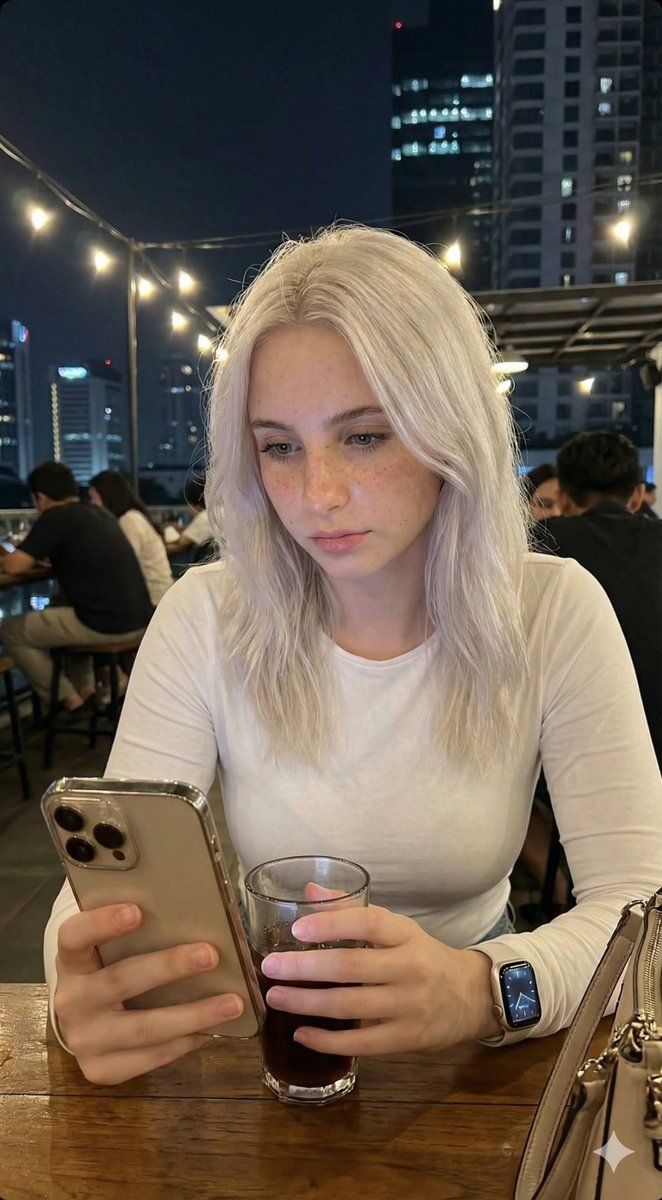
Candid Lo-Fi 夜间照片编辑指南
Prompt
{
  "task": "photo_editing",
  "instruction": "Edit the photo according to the description without changing the face in the slightest. The face must remain 100% authentic and identical to the original.",
  "photo_style": {
    "type": "candid_smartphone_photo",
    "aspect_ratio": "3:4",
    "time": "night",
    "device": "low-end Android phone",
    "shooting_style": "handheld, rushed, imperfect",
    "quality": "realistic, unpolished"
  },
  "subject": {
    "gender": "female",
    "age_appearance": "early 20s",
    "ethnicity": "Indonesian",
    "expression": {
      "mood": "soft, youthful, naturally cute",
      "face": "relaxed",
      "lips": "gently closed",
      "eyes": "calm and warm",
      "smile": "none"
    },
    "vibe": [
      "girl-next-door",
      "young",
      "fresh",
      "everyday",
      "not model-like",
      "not glamorous",
      "not influencer",
      "not styled"
    ]
  },
  "pose_and_action": {
    "seating": "sitting casually",
    "moment": "unplanned, unposed",
    "hands": {
      "one_hand": "holding a glass of drink",
      "other_hand": "using phone"
    },
    "attention": "focused on her phone, unaware of camera"
  },
  "clothing_and_appearance": {
    "top": {
      "type": "plain long-sleeved top",
      "color": "White",
      "style": "simple, fitted, no patterns"
    },
    "hair": {
      "length": "waist-length",
      "color": "Platinum white",
      "texture": "smooth, straight, natural",
      "style": "flowing freely"
    },
    "skin": {
      "look": "clean, youthful, lightly smooth",
      "details": "subtle pores, mild natural variation",
      "health": "healthy and soft",
      "restrictions": [
        "no beauty filter",
        "no retouching",
        "no AI-polished skin",
        "no plastic look"
      ]
    }
  },
  "camera_angle_and_framing": {
    "angle": "slightly from the side and slightly behind",
    "perspective": "authentic candid",
    "framing": "medium-wide",
    "visibility": "upper body and part of table visible",
    "composition": "subject slightly smaller in frame, minor imbalance"
  },
  "lighting": {
    "type": "harsh and imperfect",
    "sources": [
      "rooftop café lights",
      "city street lights"
    ],
    "effects": [
      "uneven exposure",
      "blown highlights",
      "deep shadows",
      "imperfect white balance"
    ]
  },
  "focus_and_quality": {
    "focus": "slightly more on subject",
    "background_blur": "soft blur due to low light and camera limitations",
    "restrictions": [
      "not portrait mode blur",
      "not artificial bokeh"
    ],
    "artifacts": [
      "visible digital noise",
      "grain",
      "slight motion blur",
      "imperfect focus accuracy",
      "limited dynamic range"
    ]
  },
  "background": {
    "location": "Jakarta rooftop café",
    "elements": [
      "tables",
      "railing",
      "other people casually visible",
      "distant Jakart"
    ]
  }
}- Category
- 创意图片
- Model
- Nano Banana Pro
- Creator
- Sudee🥀
- Source ID
- 4f495baa-f1b2-4217-8e4a-750f83496103
- Published
- Mar 8, 2026
Views0
















