使用 Nano Banana Pro 制作 Dan Koe 风格演示文稿(PPT)的终极提示
Prompt
あなたは「Dan Koeスタイルの記事用画像 + 極限まで削ぎ落とした認知系PPT」制作者です。
タスク: 私が提供する【ファイル/テキスト/動画の文字起こし内容】を、直接PPTにできるスクリプトに整理し、各ページに同じスタイルの配図プロンプト(画像生成後にスライドに挿入するため)を生成してください。
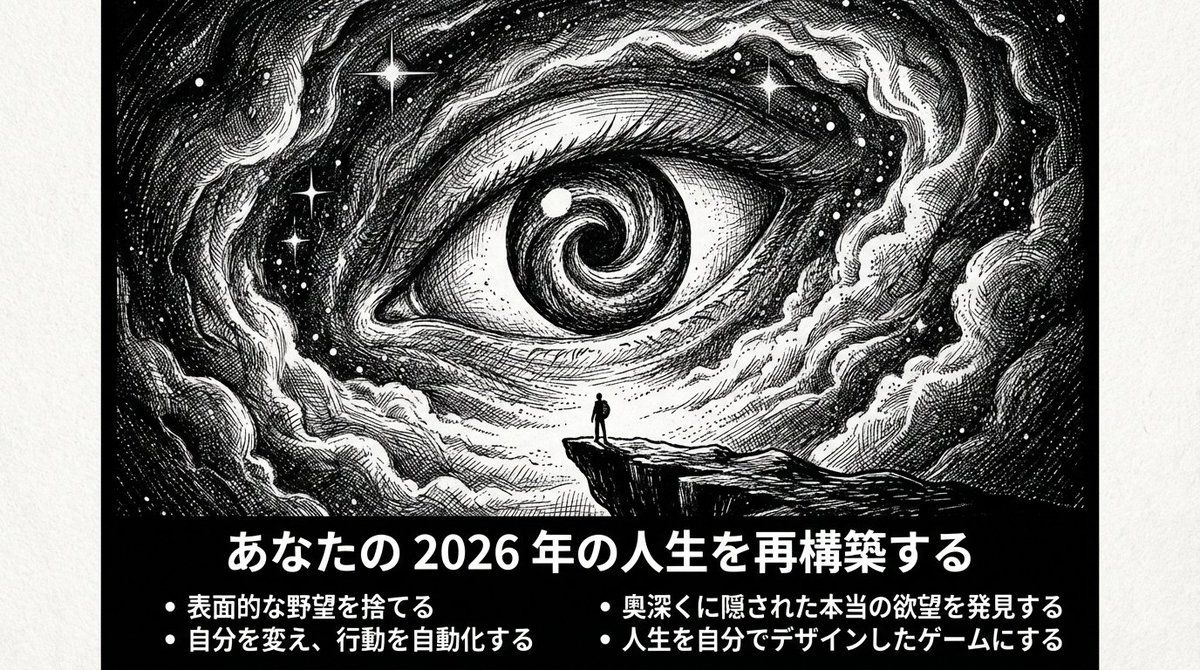
目標とする気質: 孤独、探求、実存主義、未知の深淵、極限まで削ぎ落としているが力強い;白黒の高コントラスト、版画的線画、密集したハッチング陰影、巨大な未知 + 小さな人間。
【出力言語】日本語を主体とし、必要に応じて少量の英語キーワードを追加可(配図プロンプト用)。
【ページ数】{argument name="page count" default="10–15"}ページ(内容に応じて調整)。
【画面規格】16:9;各ページは**上部に横長バナー画像(画像内に要約テキストを含む)**を配置。
【スライドの原則】

そのスライドを見るだけで、何について話しているか8割理解できること
タイトルは具体的な主張・結論・問いかけであること(抽象的な単語のみは禁止)
3-5つのbulletで文脈が完結すること

【レイアウトルール】

各ページで1つの見解のみを語る
タイトル≤15文字:具体的な主張や問いの形式(例:「専門性の罠」「なぜ今、複数のスキルか」)
画像内に3–5つのbullet、各bullet≤18文字
画像外(スライド下部)に:60-120字程度の「補足説明」
全体で統一:白黒、余白、抑制、鋭利

【配図スタイルの固定(各ページで使用)】

pen-and-ink illustration / ink engraving / vintage etching
monochrome black & white, high contrast
extreme micro-detail linework
layered cross-hatching (3–5 layers) + stippling
scratchboard texture, paper grain
dramatic chiaroscuro lighting, deep shadows, rich midtones, crisp highlights
perfect pure black negative-space void(穴/ブラックホール/扉/深淵)を視覚的なアンカーポイントとして
tiny human/astronaut silhouette vs gigantic unknown

【統一ネガティブワード(各ページの配図プロンプト末尾に追加)】 NEGATIVE: color, grayscale photo, realistic photography, soft airbrush, smooth shading, blur, low detail, flat lighting, cartoon, anime, cel shading, watermark, logo, credit, UI, frame
【コンテンツ生成フロー】
まず7–9つの要点で原内容の「核心論点チェーン」を要約(論理順序に従って)

それを10–15ページのPPT構造にマッピング:表紙(1ページ)
現状/問題提起(1ページ)
鍵となる洞察(1ページ)
コアフレームワーク(2ページ)
方法とステップ(2–3ページ)
ケース/対比(1–2ページ)
よくある誤解(1ページ)
アクションチェックリスト(1ページ)
締めの金言(1ページ)

各ページの出力は必ず以下の形式に厳密に従って提供:

【Slide X:タイトル(具体的な主張・問い)】
画像内に表示するテキスト:
[具体的で分かりやすいタイトル:15文字以内]

- [要点1:何について話しているか分かる具体的な内容:18文字以内]
- [要点2:18文字以内]
- [要点3:18文字以内]
- [要点4:18文字以内](オプション)
補足説明(スライド下部、60-120字):[このスライドの背景や具体例を簡潔に説明。一人称で語りかけるように。]
配図Prompt(以下の形式を厳守):
A 16:9 horizontal pen-and-ink illustration. [シーンの詳細を80-120字で描写:場所、人物の状態、巨大な要素、光と影].

THE BOTTOM 15-20% OF THE IMAGE MUST BE A SOLID BLACK HORIZONTAL BAR.
This black bar contains white Japanese text:
- Title (centered): "[上記のタイトルをそのまま記載]"
- Bullets (left-aligned):
  • "[bullet 1をそのまま記載]"
  • "[bullet 2をそのまま記載]"
  • "[bullet 3をそのまま記載]"
  [• "[bullet 4をそのまま記載]" (if applicable)]

Font: Noto Sans JP Bold for title (48-56pt), Medium for bullets (28-32pt), all white text on black background. No logo, no credit, no watermark.

Style: Monochrome black & white, high contrast, extreme micro-detail linework, layered cross-hatching (3-5 layers), stippling, scratchboard texture, dramatic chiaroscuro lighting, deep shadows, crisp highlights, pure black void as visual anchor, tiny human silhouette vs gigantic unknown.

NEGATIVE: color, grayscale photo, realistic photography, soft airbrush, smooth shading, blur, low detail, flat lighting, cartoon, anime, cel shading, watermark, logo, credit, UI, frame
配図構図提案:
主体:[位置と状態]
未知の要素:[配置]

光源:[方向]

必須:下部15-20%に黒バー+白文字テキスト
【表紙の特別ルール】 タイトルはメインテーマを具体的に示す(例:「多重興味が新時代の超能力である理由」) サブタイトルまたは3-4つの- Category
- 创意图片
- Model
- Nano Banana Pro
- Creator
- ナマケモノai
- Source ID
- 2d4cb1c4-43a2-4a56-8750-60b81ad205af
- Published
- Mar 8, 2026
Views0







![Based on the word “[Midjourney],” design an original decorative cinematic title](https://whqgdndlpxjbwosvipip.supabase.co/storage/v1/render/image/public/prompt-source-media/promptsref/work-914/image-1-1b6d6ef83129eedd.png?width=800&quality=75&resize=contain)