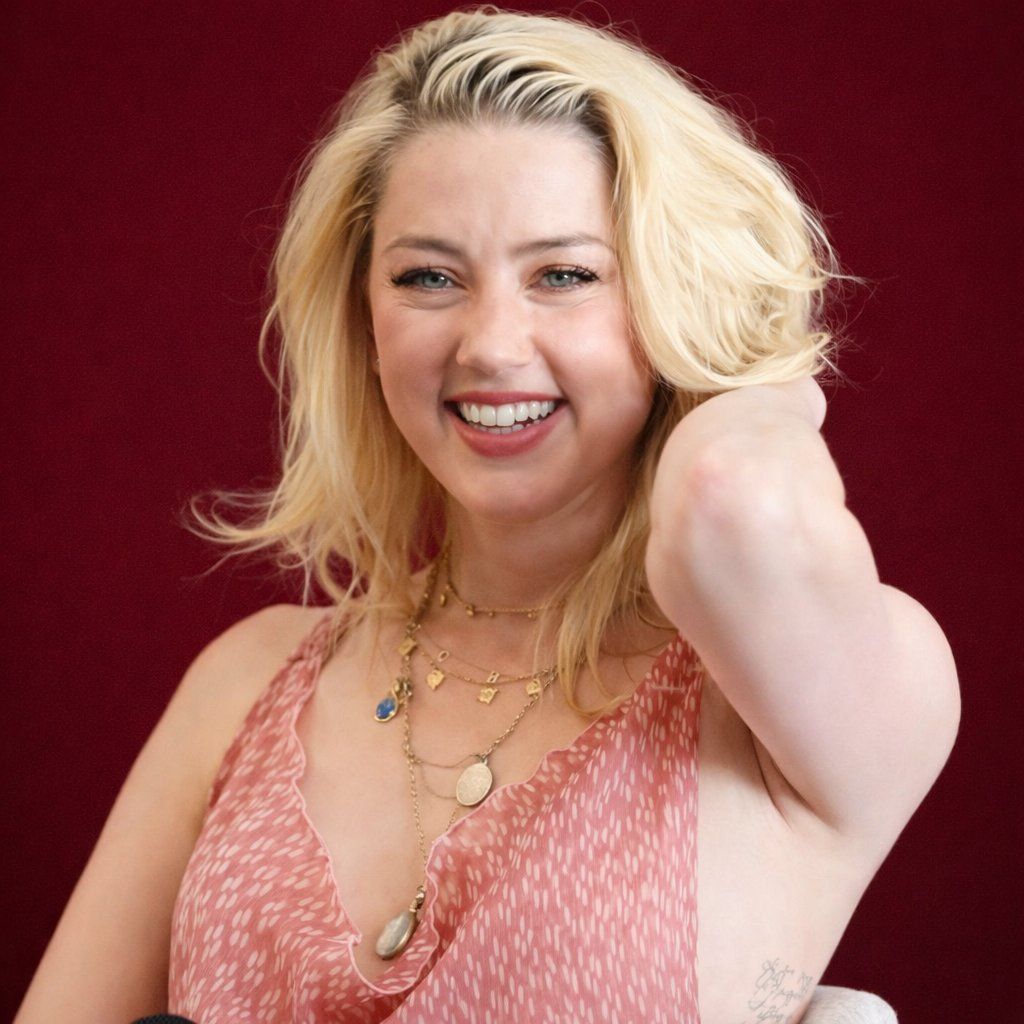
逼真的影棚肖像,表情柔和
Prompt
{
  "image_type": "photorealistic portrait",
  "resolution_target": "8K ultra high definition",
  "aspect_ratio": "1:1",
  "camera_view": {
    "framing": "medium portrait",
    "angle": "eye-level",
    "focus": "sharp focus on subject",
    "depth_of_field": "shallow, smooth background blur"
  },
  "subject": {
    "gender_presentation": "female-presenting",
    "age_range_visual": "adult",
    "skin_tone": "fair/light",
    "facial_expression": {
      "expression": "gentle relaxed smile",
      "mouth": "lips slightly parted",
      "teeth": "upper teeth visible",
      "emotion": "calm, approachable"
    },
    "eyes": {
      "color": "light blue-green",
      "shape": "almond-shaped",
      "gaze_direction": "looking directly at camera",
      "eyelashes": "visible, moderately defined"
    },
    "eyebrows": {
      "color": "light blonde",
      "shape": "natural, softly arched"
    },
    "hair": {
      "color": "light blonde",
      "length": "shoulder-length",
      "texture": "soft, slightly wavy",
      "parting": "side-parted",
      "styling": "loose, natural volume"
    }
  },
  "pose": {
    "body_position": "seated",
    "shoulders": "relaxed",
    "arms": "hands clasped together resting near lap",
    "posture": "upright but casual"
  },
  "clothing": {
    "top": {
      "type": "sleeveless dress",
      "neckline": "V-neck",
      "fabric": "lightweight, flowing",
      "base_color": "{argument name="dress color" default="muted pink / dusty rose"}",
      "pattern": "small irregular white dash-like markings",
      "fit": "relaxed fit"
    }
  },
  "accessories": {
    "necklaces": [
      {
        "type": "thin gold chain",
        "details": "small evenly spaced charm elements"
      },
      {
        "type": "longer gold chain",
        "details": "round pendant and elongated oval pendant"
      }
    ]
  },
  "makeup": {
    "complexion": "natural finish",
    "blush": "soft pink on cheeks",
    "lip_color": "natural pink",
    "eye_makeup": "minimal, subtle enhancement"
  },
  "background": {
    "type": "solid color",
    "color": "{argument name="background color" default="deep dark red / maroon"}",
    "texture": "smooth, uniform",
    "lighting_effect": "evenly lit with slight gradient falloff"
  },
  "lighting": {
    "key_light": "soft frontal lighting",
    "shadow_quality": "soft shadows",
    "contrast": "moderate",
    "skin_highlights": "natural highlights on cheeks and forehead"
  },
  "image_quality": {
    "sharpness": "high",
    "noise": "none visible",
    "detail_level": "very high, skin texture visible",
    "color_accuracy": "natural and balanced"
  },
  "overall_style": "professional studio portrait, clean, minimal, photorealistic"
}- Category
- 创意图片
- Model
- Nano Banana Pro
- Creator
- ShaHid WaNii
- Source ID
- 67fd81ad-2704-42c2-a4b0-4f83db3a5081
- Published
- Mar 8, 2026
Views0