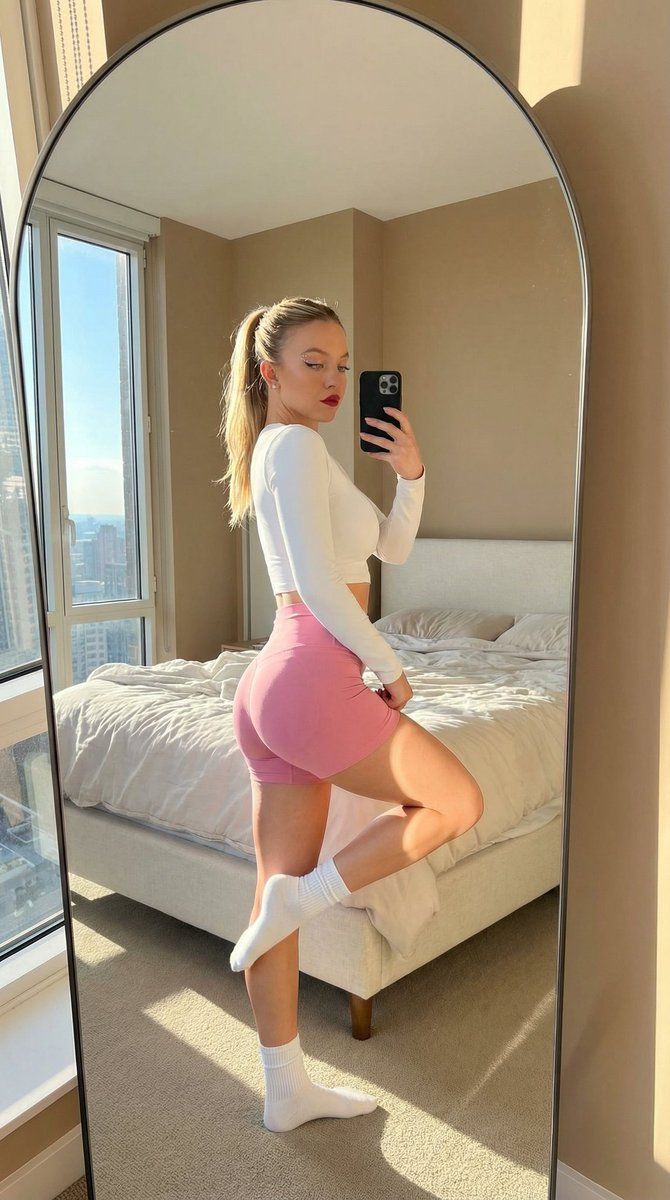
阳光下镜面自拍的详细 JSON 提示
Prompt
{
  "lighting": {
    "source": "natural_sunlight_from_large_window_on_left",
    "quality": "bright_harsh_direct_sunlight",
    "shadows": "strong_defined_shadows_on_subject_legs_and_floor",
    "direction": "side_lighting_from_left",
    "highlights": "bright_highlights_on_subject_leg_shoulder_and_bedding"
  },
  "background": {
    "clutter": "unmade_bed_clothes_on_bed",
    "setting": "bedroom_interior",
    "elements": [
      "large_arched_floor_mirror_with_thin_frame",
      "bed_with_white_duvet_and_grey_striped_throw",
      "large_window_with_city_view_and_blue_sky",
      "tan_textured_walls",
      "white_door",
      "ceiling_light_fixture",
      "laundry_basket",
      "rug_on_floor"
    ],
    "view_outside_window": "buildings_and_bright_blue_sky_with_clouds"
  },
  "typography": {},
  "composition": {
    "type": "mirror_selfie",
    "focus": "subject_and_reflection",
    "balance": "asymmetrical",
    "framing": "full_body_shot_reflected_in_large_arched_mirror",
    "perspective": "eye_level_reflection",
    "depth_of_field": "deep",
    "elements_arrangement": "subject_centered_in_mirror_reflection"
  },
  "color_profile": {
    "palette": "neutral_with_natural_light",
    "saturation": "natural",
    "accent_colors": [
      "#E0C5A8",
      "#2A2A2A"
    ],
    "color_harmony": "complementary_between_warm_indoor_and_cool_outdoor_tones",
    "dominant_colors": [
      "#E8E4DC",
      "#5A5E6B",
      "#FFFFFF",
      "#B38B6D",
      "#3A5F9A"
    ]
  },
  "technical_specs": {
    "lens_type": "wide_angle",
    "resolution": "high_resolution",
    "camera_type": "smartphone_rear_camera",
    "file_format": "JPEG",
    "aspect_ratio": "4:5"
  },
  "subject_analysis": {
    "hair": "long_blonde_wavy_hair_parted_in_middle",
    "pose": "standing_side_profile_left_leg_raised_and_bent_backwards_right_leg_straight_holding_phone_up",
    "attire": {
      "top": "white_long_sleeve_crop_top",
      "bottom": "{argument name=\"shorts color\" default=\"pink\"}_high_waisted_athletic_shorts",
      "footwear": "white_ankle_socks"
    },
    "details": "sunlight_highlighting_leg_muscle",
    "accessories": {
      "phone": "black_smartphone_in_right_hand"
    },
    "subject_type": "young_woman",
    "facial_expression": "neutral_looking_at_phone"
  },
  "artistic_elements": {
    "mood": "relaxed_confident",
    "vibe": "lifestyle_fitness_aesthetic",
    "style": "casual_mirror_selfie",
    "texture": "smooth_mirror_surface_soft_fabric_rough_wall",
    "contrast": "high_contrast_due_to_direct_sunlight"
  },
  "generation_parameters": {
    "seed": 123456789,
    "steps": 30,
    "prompt": "A mirror selfie of a young woman with blonde hair in a white crop top and grey shorts, standing with one leg raised in a sunlit bedroom, reflected in a large arched mirror.",
    "cfg_scale": 7.5,
    "model_version": "v1.5",
    "negative_prompt": "blurry, low quality, distorted reflection, dark"
  }
}- Category
- 创意图片
- Model
- Nano Banana Pro
- Creator
- KeorUnreal
- Source ID
- a097b080-2cf1-4340-ae9a-c80bde32ad9e
- Published
- Mar 8, 2026
Views0