17

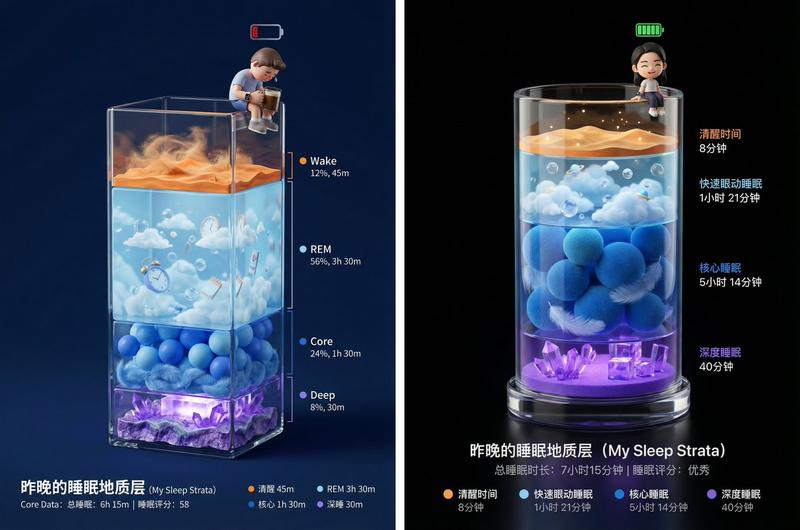
可爱的睡眠报告海报
Enlarge

Example images

可爱的睡眠报告海报

Prompt
任务: 海报设计、睡眠数据可视化艺术。 第一步: 分析 [上传的 Apple Watch 睡眠数据截图],提取清醒、REM、核心、深睡四个阶段的时长比例

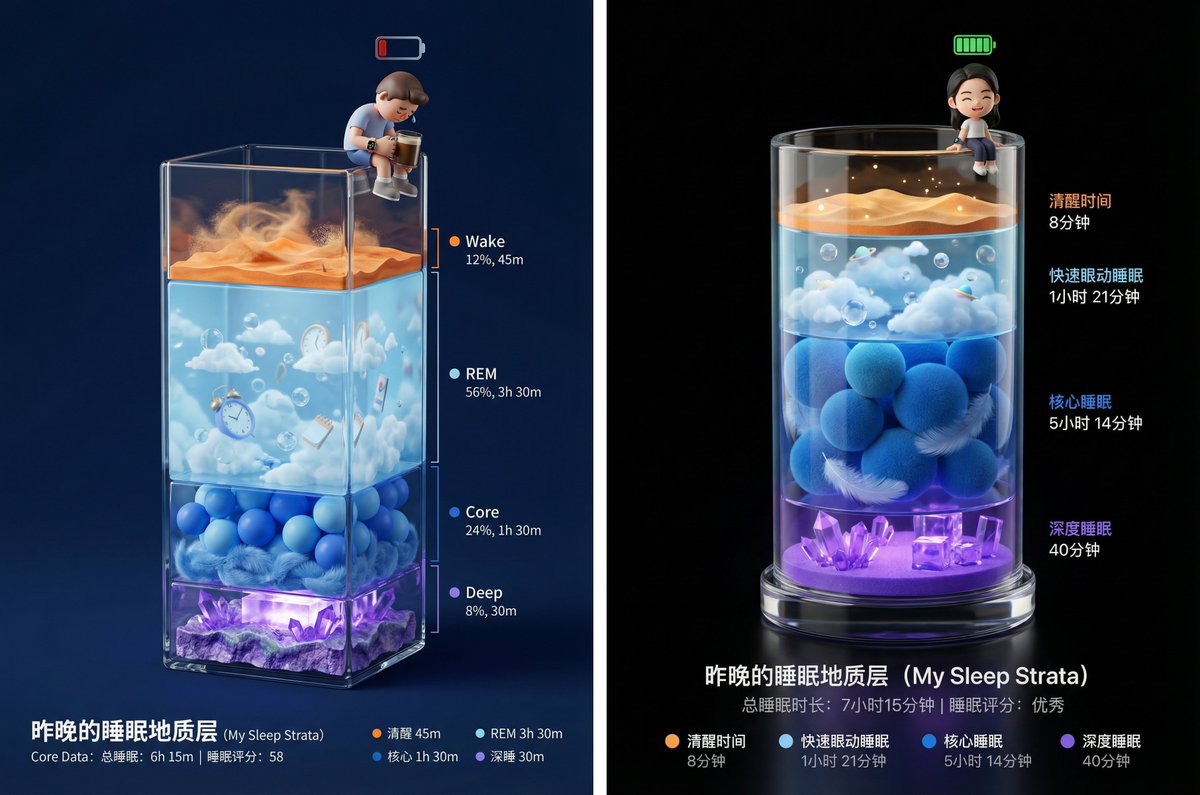
画面描述: 画面主体是一个立体的、垂直长方体透明玻璃容器(类似精致的奖杯底座或地质采样管),放置在深邃的纯色背景中。 容器内部由四种不同颜色的微缩景观层层堆叠而成,每一层的垂直厚度必须根据[上传数据]的时长比例来生成(例如:如果核心睡眠时间最长,那么蓝色的层就应该最厚)。

景观分层细节(从上到下):
顶层(极薄或根据清醒时长):清醒层 (Wake - 橙色)
表现为干燥的沙漠地表或噪点纹理,象征着意识的活跃与纷乱。
第二层:快速眼动层 (REM - 浅蓝色)
表现为漂浮着云朵、气泡或超现实物体的梦幻天空层。材质通透轻盈。
第三层:核心睡眠层 (Core - 深蓝色)
表现为柔软舒适的海洋球堆积层或层叠的羽绒材质,给人平稳安定的感觉。
底层:深度睡眠层 (Deep - 紫罗兰色)
表现为坚硬、厚重的水晶矿洞或发光的能量块堆叠。这是地基,越厚代表睡眠质量越好。

主角(用户形象): 在玻璃容器的最顶端边缘(瓶口处),坐着一个Q版 3D 小人。
动作: 小人的双腿自然垂下,悠闲地坐在上面。
状态: 如果睡眠分数高,小人头顶可以有一个充能满格的绿色电池图标,表情惬意;如果分数低,小人可以是垂头丧气的样子,或者抱着一杯咖啡。
装备: 小人手腕上必须佩戴着一只微缩的智能手表。

光影与渲染: 使用 C4D 或 Blender 风格的 3D 渲染。强调玻璃容器的折射率和各层材质的物理质感(沙子、云朵、海洋球、水晶)。背景为高级黑或深夜蓝,打光重点突出容器内部的通透感和底层的微光。

底部排版: 简洁的数据展示。

主标题:昨晚的睡眠地质层 (My Sleep Strata)

核心数据:总睡眠时长 | 睡眠评分

图例:用四个对应颜色的小圆点标注每一层的名称和具体时长。
Category
创意图片
Model
Nano Banana Pro
Creator
@op7418
Views19
Source ID
3dc14805-713b-40ba-b59f-5fa3f47d6980
Published
Dec 27, 2025

Guide

About "可爱的睡眠报告海报"

What is this prompt for?

"可爱的睡眠报告海报" AI image prompt for Nano Banana Pro (创意图片). 创意图片 Copy it on Picva and recreate the look in one click.

The full copyable prompt and example visuals above are ready for AI image generation or one-click recreate in Picva.

How to use this prompt

  1. Step 1

    Open the prompt detail

    Review the example visuals, category, and full prompt text for "可爱的睡眠报告海报".

  2. Step 2

    Copy the prompt

    Copy the prompt body from this page, or load it directly in Studio.

  3. Step 3

    Pick a model (Nano Banana Pro)

    Prefer Nano Banana Pro. If you switch models, keep subject and composition and tweak style terms.

  4. Step 4

    Generate and export

    Recreate the look in Picva, or export into your workflow for editing and publishing.

FAQ

What is the "可爱的睡眠报告海报" prompt?
It is an AI image-generation prompt for Nano Banana Pro in the 创意图片 category. This page includes the full prompt text, example visuals, and a one-click recreate path in Picva.
How do I use this prompt to generate an image?
Copy the prompt from this page, or use Generate / Studio. Paste it into a compatible image model, or recreate the look in Picva with optional reference images.
Which model is this prompt for?
This page lists Nano Banana Pro. Most descriptive prompts also transfer to nearby image models such as GPT Image, Flux, or Midjourney with light style tweaks.
Can I use the result commercially?
You can usually copy the prompt for creation, but commercial use of the final image depends on the model terms, reference-image rights, and the generated content. Follow the source author and platform rules.