20

时尚杂志封面构图,中景人像,22-28岁东亚年轻女性,清冷御姐气质,凹凸有致身材,黑色长微卷发,淡妆红棕唇,穿搭藏蓝色半高领无袖紧身上衣+灰色高腰包臀半裙+竖线
Click to enlarge

Example images

Posters & TypographyPromptsref图片posters-typography海报与排版

时尚杂志封面构图,中景人像,22-28岁东亚年轻女性,清冷御姐气质,凹凸有致身材,黑色长微卷发,淡妆红棕唇,穿搭藏蓝色半高领无袖紧身上衣+灰色高腰包臀半裙+竖线

Prompt
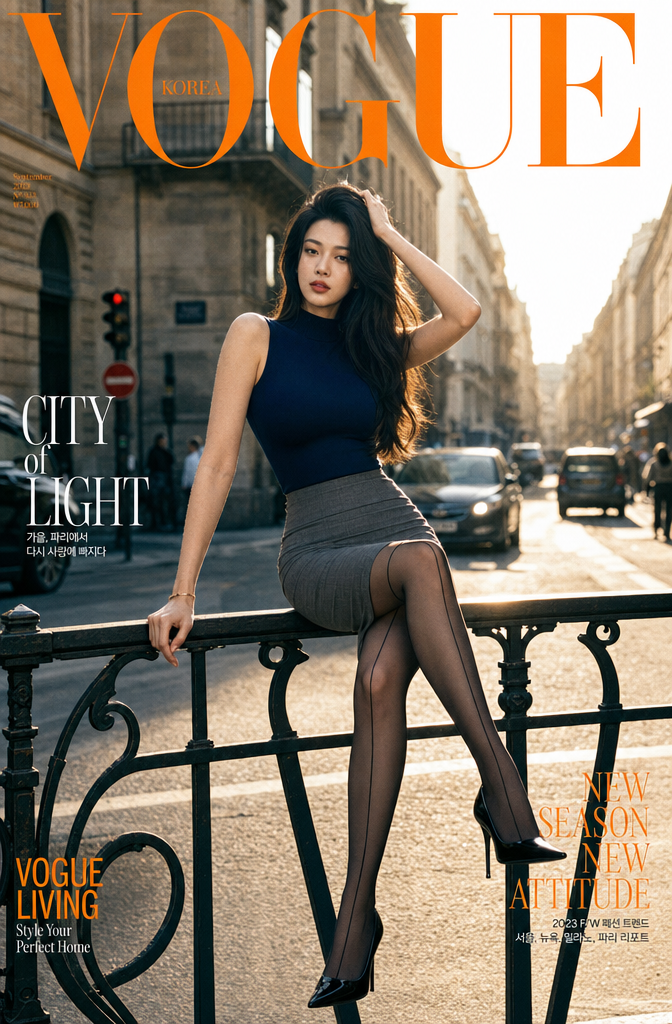
时尚杂志封面构图,中景人像,22-28岁东亚年轻女性,清冷御姐气质,凹凸有致身材,黑色长微卷发,淡妆红棕唇,穿搭藏蓝色半高领无袖紧身上衣+灰色高腰包臀半裙+竖线黑丝袜+黑色尖头细跟高跟鞋,人物侧坐黑色铁艺护栏,一手扶栏杆一手撩头发,单腿搭栏杆,直视镜头从容表情,场景为欧式老建筑沿街城市街道,晴天黄金时刻逆光自然光,清晰金色轮廓光,背景有行驶车辆零散行人,街道透视延伸,浅景深虚化背景突出人物,顶部叠加超大亮橙色粗体标题,柯达135胶片拍摄,轻微自然颗粒感,真实皮肤质感,冷暖对比,暖调环境冷调人物,高级时尚调色,电影感街拍。
Category
Posters & Typography
Model
GPT Image 2
Creator
xie underwood
Source language
zh-CN
Views401
Source ID
16312
Published
Jun 5, 2026
Studio

Guide

About "时尚杂志封面构图,中景人像,22-28岁东亚年轻女性,清冷御姐气质,凹凸有致身材,黑色长微卷发,淡妆红棕唇,穿搭藏蓝色半高领无袖紧身上衣+灰色高腰包臀半裙+竖线"

What is this prompt for?

"时尚杂志封面构图,中景人像,22-28岁东亚年轻女性,清冷御姐气质,凹凸有致身材,黑色长微卷发,淡妆红棕唇,穿搭藏蓝色半高领无袖紧身上衣+灰色高腰包臀半裙+竖线" AI image prompt for GPT Image 2 (Posters & Typography). 时尚杂志封面构图,中景人像,22-28岁…

The full copyable prompt and example visuals above are ready for AI image generation or one-click recreate in Picva.

How to use this prompt

  1. Step 1

    Open the prompt detail

    Review the example visuals, category, and full prompt text for "时尚杂志封面构图,中景人像,22-28岁东亚年轻女性,清冷御姐气质,凹凸有致身材,黑色长微卷发,淡妆红棕唇,穿搭藏蓝色半高领无袖紧身上衣+灰色高腰包臀半裙+竖线".

  2. Step 2

    Copy the prompt

    Copy the prompt body from this page, or load it directly in Studio.

  3. Step 3

    Pick a model (GPT Image 2)

    Prefer GPT Image 2. If you switch models, keep subject and composition and tweak style terms.

  4. Step 4

    Generate and export

    Recreate the look in Picva, or export into your workflow for editing and publishing.

FAQ

What is the "时尚杂志封面构图,中景人像,22-28岁东亚年轻女性,清冷御姐气质,凹凸有致身材,黑色长微卷发,淡妆红棕唇,穿搭藏蓝色半高领无袖紧身上衣+灰色高腰包臀半裙+竖线" prompt?
It is an AI image-generation prompt for GPT Image 2 in the Posters & Typography category. This page includes the full prompt text, example visuals, and a one-click recreate path in Picva.
How do I use this prompt to generate an image?
Copy the prompt from this page, or use Generate / Studio. Paste it into a compatible image model, or recreate the look in Picva with optional reference images.
Which model is this prompt for?
This page lists GPT Image 2. Most descriptive prompts also transfer to nearby image models such as GPT Image, Flux, or Midjourney with light style tweaks.
Can I use the result commercially?
You can usually copy the prompt for creation, but commercial use of the final image depends on the model terms, reference-image rights, and the generated content. Follow the source author and platform rules.