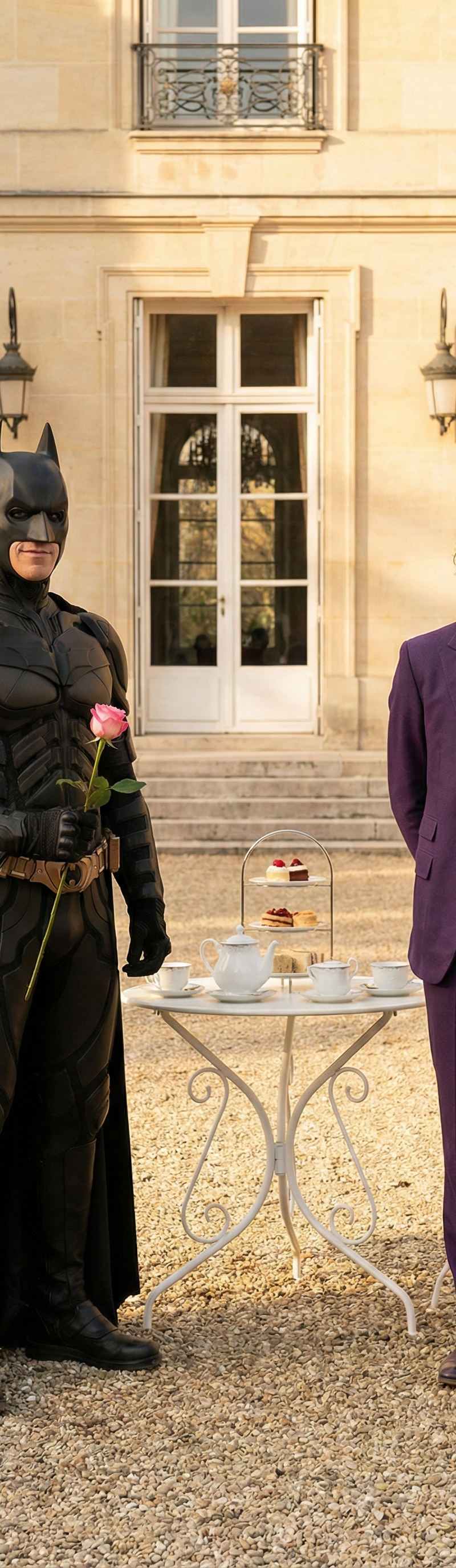
{ "image_generation_prompt": { "subjects": { "count": 2, "description": "Batman
Prompt
{
 "image_generation_prompt": {
 "subjects": {
 "count": 2,
 "description": "Batman and Joker standing side-by-side in a sunlit outdoor courtyard, full-body fashion portrait with character-accurate outfits.",
 "figure_1_left": {
 "identity": "Batman",
 "attire": "Classic Batman suit: matte-black armored batsuit with segmented plating, subtle graphite texture, black utility belt, black gauntlets, and a flowing black cape. Iconic bat emblem on the chest. Black cowl with pointed ears.",
 "accessories": "Optional small prop: holding a single long-stemmed pink rose in the right hand (to keep the original ‘coquette’ contrast).",
 "pose": "Standing with weight on one leg, body angled slightly towards the center, looking towards the left with a confident, calm expression (a restrained smile)."
 },
 "figure_2_right": {
 "identity": "Joker",
 "attire": "Classic Joker suit: vivid purple tailored blazer and trousers, green vest, patterned tie, crisp shirt, and a bright flower on the lapel (yellow or orange). Polished dress shoes. Joker signature styling.",
 "accessories": "Single-strand pearl necklace and pearl drop earrings removed; keep character-appropriate accessories only (lapel flower, gloves optional).",
 "hairstyle": "Slicked-back Joker-green hair.",
 "makeup": "Iconic Joker makeup: pale white face, darkened eyes, bold red grin (clean but theatrical, not smeared).",
 "pose": "Standing straight with hands clasped behind the back, looking towards the left with a smile that feels playful and mischievous."
 }
 },
 "environment": {
 "setting": "Outdoor courtyard in front of a grand beige stone building.",
 "architectural_details": "Large vertical stone blocks, tall French windows or doors with white frames visible in the background, outdoor wall lanterns.",
 "props": "A white wrought-iron bistro table positioned between the subjects, set with a white tea service including a teapot, cups, and a tiered dessert stand.",
 "ground": "Light-colored gravel surface."
 },
 "lighting_and_atmosphere": {
 "type": "Natural sunlight, potentially golden hour or late afternoon.",
 "characteristics": "Bright, warm illumination creating distinct shadows on the building facade and gravel. The mood is sophisticated, cinematic, playful-contrasting (elegant courtyard vs iconic characters), and upbeat.",
 "color_palette": "Beige stone, cream and white props, warm sunlight; strong contrast accents from Batman’s black suit and Joker’s purple/green suit."
 },
 "technical_specifications": {
 "quality": "4k, Ultra HD, Photorealistic.",
 "style": "High-fashion photography, lifestyle portrait, cinematic realism.",
 "camera_settings": "Sharp focus on subjects, high resolution, realistic texture rendering (fabric, armor plating, stone, skin), natural bokeh, cinematic lighting.",
 "aspect_ratio": "Vertical portrait (9:16)"
 }
 }
}- Category
- Charts & Infographics
- Model
- Nano Banana Pro
- Creator
- xie underwood
- Source language
- en
- Source ID
- 268
- Published
- Jan 26, 2026
Views42