16

艺术感的黑白自画像
Enlarge

Example images

艺术感的黑白自画像

Prompt
Prompt:
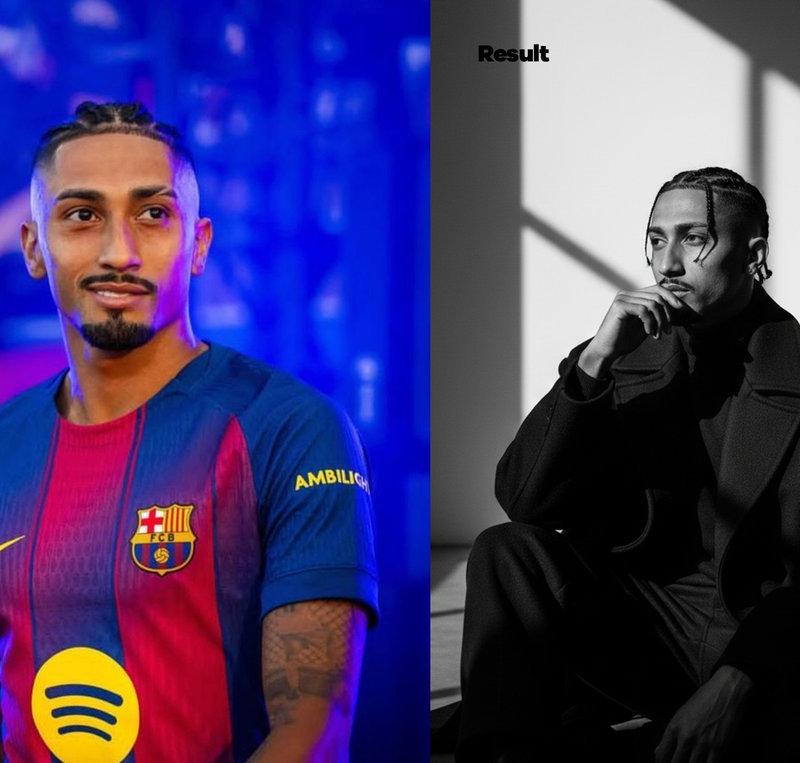
(Use Image uploaded as reference)
A high-contrast black-and-white artistic portrait of me (use my image with 100% accurate facial details). I am seated on the floor in a dramatic, cinematic atmosphere, wearing an oversized dark coat that enhances a stylish and mysterious aura. The pose is introspective and expressive: one hand rests near my mouth while my head is turned slightly to the side, capturing a thoughtful mood. Sharp, moody window shadows fall across the wall behind me, creating a striking balance of light and darkness.
The overall style is minimal, emotional, and cinematic blending elegance, mystery, and sophistication in a timeless black-and-white aesthetic.
4k Resolution, 9:16 ratio.
Ai: Nano Banana
Save for later🙂&
Share your results in the comments below.
Category
Photography & Realism
Model
Nano Banana Pro
Creator
Daniel Peter
Source language
zh-CN
Views0
Source ID
artistic-black-and-white-portrait
Studio

Guide

About "艺术感的黑白自画像"

What is this prompt for?

"艺术感的黑白自画像" AI image prompt for Nano Banana Pro (Photography & Realism). Prompt: (Use Image uploaded as reference) A high-contrast black-and-white artistic por…

The full copyable prompt and example visuals above are ready for AI image generation or one-click recreate in Picva.

How to use this prompt

  1. Step 1

    Open the prompt detail

    Review the example visuals, category, and full prompt text for "艺术感的黑白自画像".

  2. Step 2

    Copy the prompt

    Copy the prompt body from this page, or load it directly in Studio.

  3. Step 3

    Pick a model (Nano Banana Pro)

    Prefer Nano Banana Pro. If you switch models, keep subject and composition and tweak style terms.

  4. Step 4

    Generate and export

    Recreate the look in Picva, or export into your workflow for editing and publishing.

FAQ

What is the "艺术感的黑白自画像" prompt?
It is an AI image-generation prompt for Nano Banana Pro in the Photography & Realism category. This page includes the full prompt text, example visuals, and a one-click recreate path in Picva.
How do I use this prompt to generate an image?
Copy the prompt from this page, or use Generate / Studio. Paste it into a compatible image model, or recreate the look in Picva with optional reference images.
Which model is this prompt for?
This page lists Nano Banana Pro. Most descriptive prompts also transfer to nearby image models such as GPT Image, Flux, or Midjourney with light style tweaks.
Can I use the result commercially?
You can usually copy the prompt for creation, but commercial use of the final image depends on the model terms, reference-image rights, and the generated content. Follow the source author and platform rules.