夸张视角插画风格分析
Prompt
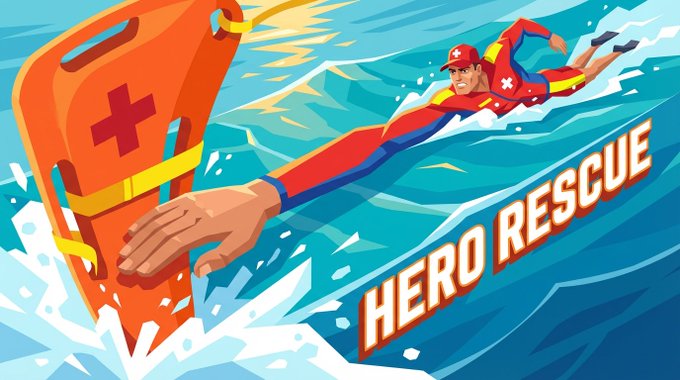
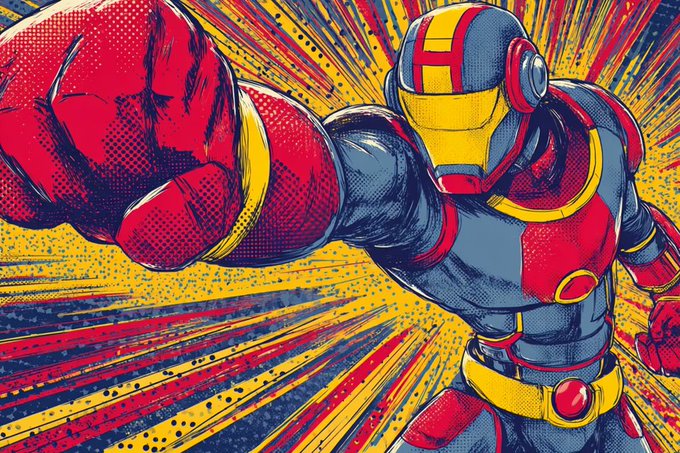
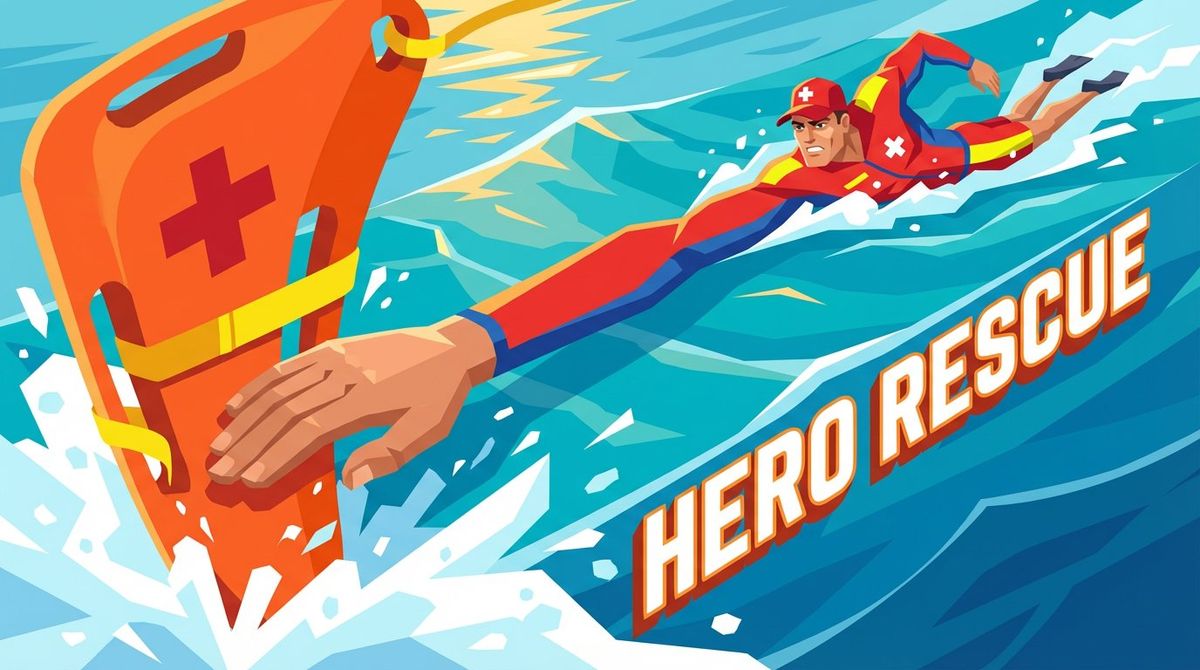
利用 Nano Banana Pro 绘制夸张视角插画风格,昨天现小红书上看到一名博主搞的,挺有意思,但他还在整理提示词,于是我和 Juchats 配合,搞了 60 张图和反复磨合,提炼出了一套提示词,这套提示词可以精准控制:颜色、风格、角色、观察方向、构图方向、延伸物体、特殊视觉、能量特征等,大家可以尝试一下!
🧵Prompt:
Professional flat vector illustration in modern commercial style, depicting [SCENE_DESCRIPTION].
PERSPECTIVE & COMPOSITION:
- Extreme [ANGLE_TYPE] perspective from [STARTING_POINT] looking [VIEWING_DIRECTION] along ONE SINGLE [EXTENDING_OBJECT] toward [END_POINT]
- [EXTENSION_DIRECTION_LAYOUT]
- Single unified viewpoint with continuous depth progression following the SAME [EXTENDING_OBJECT] from [FRONT_END] to [BACK_END]
- Dynamic [COMPOSITION_DIRECTION] composition with exaggerated perspective showing ONE continuous [EXTENDING_OBJECT] extending through entire frame creating sense of [MOTION_CHARACTERISTIC]
- Seamless visual flow showing ONE SINGLE UNIFIED [EXTENDING_OBJECT]: [EXTENSION_DIRECTION_DESCRIPTION] - ALL PARTS OF THE SAME ONE [EXTENDING_OBJECT], NOT separate or duplicate [EXTENDING_OBJECT]
- Smooth depth of field with natural foreground-to-background transition along the length of this SINGLE continuous [EXTENDING_OBJECT]
- Clear visual leading lines following ONE [EXTENDING_OBJECT] creating strong unified depth within unified space
- Balanced negative space with [SPATIAL_EMPHASIS_DIRECTION] emphasis suggesting [ACTION_CHARACTERISTIC]
- Rule of thirds composition with emphasis on [CORE_FOCUS]
- NO duplicate elements, NO multiple [EXTENDING_OBJECT], NO repeated objects - only ONE [EXTENDING_OBJECT], ONE [RELATED_OBJECT], ONE [MAIN_CHARACTER]
COLOR PALETTE:
- [COLOR_TONE_DESCRIPTION] color scheme with [PRIMARY_COLOR_1_AND_APPLICATION], [PRIMARY_COLOR_2_AND_APPLICATION], [PRIMARY_COLOR_3_AND_APPLICATION], [SECONDARY_COLOR_1_AND_APPLICATION], [SECONDARY_COLOR_2_AND_APPLICATION], [ACCENT_COLOR_AND_APPLICATION]
- [SATURATION_CHARACTERISTIC] colors [COLOR_EMOTION_DESCRIPTION]
- [COLOR_STYLE_POSITIONING] color harmony [APPLICATION_SCENARIO_DESCRIPTION]
STYLE & TECHNIQUE:
- Clean 2D flat vector illustration with minimalist approach
- Simplified geometric character design and [ENVIRONMENT_ELEMENTS]
- Crisp linework without heavy outlines
- Flat color blocking with minimal gradients
- Smooth depth transitions without layering artifacts showing ONE continuous [EXTENDING_OBJECT]
- [SPECIAL_VISUAL_EFFECTS] integrated naturally
- Strong perspective distortion on SINGLE [EXTENDING_OBJECT] length from foreground to background
- Modern commercial illustration aesthetic similar to [REFERENCE_APPLICATION_SCENARIO]
KEY ELEMENTS:
- Complete [CHARACTER_TYPE] character in [CORE_ACTION_DESCRIPTION] in background [ACTION_DETAILS]
- ONE SINGLE [EXTENDING_OBJECT] only: [FRONT_END_DESCRIPTION] in foreground, [MIDDLE_SECTION_DESCRIPTION] extending continuously through midground with dramatic foreshortening, [BACK_END_DESCRIPTION] in background
- [RELATED_OBJECT] at/near the [POSITION] in foreground
- Geometric [BACKGROUND_ENVIRONMENT] background with [ENVIRONMENT_DETAILS]
- [DYNAMIC_EFFECT_ELEMENTS] suggesting [ACTION_CHARACTERISTIC]
- Text "[SLOGAN_TEXT]" integrated along the [EXTENDING_OBJECT] trajectory with 3D perspective depth effect, bold modern typography
- ALL elements are singular and unified - no duplicates
MOOD & ATMOSPHERE:
- [EMOTION_KEYWORD_1] and [EMOTION_KEYWORD_2]
- Professional [FIELD_POSITIONING] quality [ATMOSPHERE_DESCRIPTION]
- [SPECIAL_MOMENT_DESCRIPTION]
- Dynamic EXTREME proportions emphasizing [EXAGGERATION_FOCUS]
- Clean, polished, ready-for-publication finish with [ENERGY_CHARACTERISTIC]
CRITICAL REQUIREMENTS:
- Show ONLY ONE [EXTENDING_OBJECT] total in entire image
- This single [EXTENDING_OBJECT] has [FRONT_END] in foreground, [MIDDLE_SECTION] in midground, [BACK_END] in background
- NOT multiple [EXTENDING_OBJECT], NOT duplicate [EXTENDING_OBJECT], NOT separate [EXTENDING_OBJECT] pieces
- ONE continuous unified [EXTENDING_OBJECT] object extending through perspective
- ONE [RELATED_OBJECT] only at the [FRONT_END]
- ONE [MAIN_CHARACTER] only in background
- Avoid any visual duplication or repetition of elements
- Each object appears exactly ONCE in the frame
- Perspective makes the SAME [EXTENDING_OBJECT] look different sizes but it is still ONE [EXTENDING_OBJECT]
- Maintain single continuous camera perspective throughout
- Create STRONG depth progression with dramatic perspective FORESHORTENING along [EXTENDING_OBJECT] axis
- All elements should feel part of one unified [ENVIRONMENT] environment
- Ensure seamless integration of foreground and background within same spatial context
中文变量 Prompt:
Professional flat vector illustration in modern commercial style, depicting「场景完整描述」.
PERSPECTIVE & COMPOSITION:
- Extreme「视角角度」 perspective from「观察起点」 looking「观察方向」 along ONE SINGLE「延伸物体」 toward「观察终点」
- 「延伸方向布局」
- Single unified viewpoint with continuous depth progression following the SAME「延伸物体」 from「前端」 to「后端」
- Dynamic「构图方向」 composition with exaggerated perspective showing ONE continuous「延伸物体」 extending through entire frame creating sense of「运动特征」
- Seamless visual flow showing ONE SINGLE UNIFIED「延伸物体」:「延伸方向描述」 - ALL PARTS OF THE SAME ONE「延伸物体」, NOT separate or duplicate「延伸物体」
- Smooth depth of field with natural foreground-to-background transition along the length of this SINGLE continuous「延伸物体」
- Clear visual leading lines following ONE「延伸物体」 creating strong unified depth within unified space
- Balanced negative space with「空间强调方向」 emphasis suggesting「动作特征」
- Rule of thirds composition with emphasis on「核心表现重点」
- NO duplicate elements, NO multiple「延伸物体」, NO repeated objects - only ONE「延伸物体」, ONE「相关物体」, ONE「主体角色」
COLOR PALETTE:
- 「色彩基调描述」 color scheme with「主色1及应用」,「主色2及应用」,「主色3及应用」,「辅色1及应用」,「辅色2及应用」,「点缀色及应用」
- 「饱和度特征」 colors「色彩情绪描述」
- 「配色风格定位」 color harmony「适用场景描述」
STYLE & TECHNIQUE:
- Clean2D flat vector illustration with minimalist approach
- Simplified geometric character design and「环境元素」
- Crisp linework without heavy outlines
- Flat color blocking with minimal gradients
- Smooth depth transitions without layering artifacts showing ONE continuous「延伸物体」
- 「特殊视觉效果」 integrated naturally
- Strong perspective distortion on SINGLE「延伸物体」 length from foreground to background
- Modern commercial illustration aesthetic similar to「参考应用场景」
KEY ELEMENTS:
- Complete「角色类型」 character in「核心动作描述」 in background「动作细节」
- ONE SINGLE「延伸物体」 only:「前端描述」 in foreground,「中段描述」 extending continuously through midground with dramatic foreshortening,「后端描述」 in background
- 「相关物体」 at/near the「位置」 in foreground
- Geometric「背景环境」 background with「环境细节」
- 「动态效果元素」 suggesting「动作特征」
- Text "「标语文字」" integrated along the「延伸物体」 trajectory with 3D perspective depth effect, bold modern typography
- ALL elements are singular and unified - no duplicates
MOOD & ATMOSPHERE:
-「情绪关键词1」 and「情绪关键词2」
- Professional「领域定位」 quality「氛围描述」
- 「特殊时刻描述」
- Dynamic EXTREME proportions emphasizing「夸张重点」
- Clean, polished, ready-for-publication finish with「能量特征」
CRITICAL REQUIREMENTS:
- Show ONLY ONE「延伸物体」 total in entire image
- This single「延伸物体」 has「前端」 in foreground,「中段」 in midground,「后端」 in background
- NOT multiple「延伸物体」, NOT duplicate「延伸物体」, NOT separate「延伸物体」 pieces
- ONE continuous unified「延伸物体」 object extending through perspective
- ONE「相关物体」 only at the「前端」
- ONE「主体角色」 only in background
- Avoid any visual duplication or repetition of elements
- Each object appears exactly ONCE in the frame
- Perspective makes the SAME「延伸物体」 look different sizes but it is still ONE「延伸物体」
- Maintain single continuous camera perspective throughout
- Create STRONG depth progression with dramatic perspective FORESHORTENING along「延伸物体」 axis
- All elements should feel part of one unified「环境」 environment
- Ensure seamless integration of foreground and background within same spatial context
Direction Control Variables
Five Direction Options:
- L→R
- Composition extends from lower LEFT foreground diagonally upward toward upper RIGHT background
- Lower left to upper right
- R→L
- Composition extends from lower RIGHT foreground diagonally upward toward upper LEFT background
- Lower right to upper left
- C→OUT
- Composition extends from CENTER foreground radiating outward toward surrounding background
- Center to outward
- B→T
- Composition extends from BOTTOM foreground vertically upward toward TOP background along central axis
- Bottom to top
- F→B
- Composition extends from extreme FRONT foreground straight backward toward DEEP background along horizontal axis
- Front to back
Variable Quick Reference Table ①
- [SCENE_DESCRIPTION]
- Complete scene description
- a dynamic ice hockey player performing explosive skating breakthrough
- [ANGLE_TYPE]
- Perspective angle
- low-angle upward / frontal / side-angle
- [STARTING_POINT]
- Observation starting point
- ice level / ground level / court floor
- [VIEWING_DIRECTION]
- Viewing direction
- upward / forward / along trajectory
- [EXTENDING_OBJECT]
- Main extending object
- hockey stick / tennis racket / arm
Variable Quick Reference Table ②
- [END_POINT]
- Observation end point
- player / athlete / character
- [EXTENSION_DIRECTION_LAYOUT]
- Direction layout (5 options)
- See Direction Control Variables above
- [FRONT_END]
- Front end of object
- blade / racket head / fist
- [BACK_END]
- Back end of object
- grip / handle / shoulder
- [COMPOSITION_DIRECTION]
- Composition direction
- diagonal / vertical / horizontal
Variable Quick Reference Table ③
- [MOTION_CHARACTERISTIC]
- Motion characteristic
- explosive velocity / powerful strike
- [EXTENSION_DIRECTION_DESCRIPTION]
- Detailed direction description
- See 5 options above
- [SPATIAL_EMPHASIS_DIRECTION]
- Spatial emphasis
- diagonal / vertical / radial
- [ACTION_CHARACTERISTIC]
- Action characteristic
- explosive power / swift motion
- [CORE_FOCUS]
- Core focus point
- strike power / speed / technique
Variable Quick Reference Table ④
- [RELATED_OBJECT]
- Related object
- puck / ball / target
- [MAIN_CHARACTER]
- Main character
- ice hockey player / tennis player
- [COLOR_TONE_DESCRIPTION]
- Color tone description
- Dynamic ice hockey sport / Fresh beach volleyball
- [PRIMARY_COLOR_1_AND_APPLICATION]
- Primary color 1 and where applied
- vibrant red boxing glove in foreground
- [PRIMARY_COLOR_2_AND_APPLICATION]
- Primary color 2 and where applied
- bold black boxing shorts
Variable Quick Reference Table ⑤
- [PRIMARY_COLOR_3_AND_APPLICATION]
- Primary color 3 and where applied
- electric blue ring ropes
- [SECONDARY_COLOR_1_AND_APPLICATION]
- Secondary color 1 and where applied
- metallic silver championship belt
- [SECONDARY_COLOR_2_AND_APPLICATION]
- Secondary color 2 and where applied
- deep crimson ring canvas
- [ACCENT_COLOR_AND_APPLICATION]
- Accent color and where applied
- golden spotlight glow
- [SATURATION_CHARACTERISTIC]
- Saturation level
- High-energy saturated / Medium bright
Variable Quick Reference Table ⑥
- [COLOR_EMOTION_DESCRIPTION]
- Color emotion
- conveying intensity and power
- [COLOR_STYLE_POSITIONING]
- Color style positioning
- Bold athletic / Fresh outdoor sporty
- [APPLICATION_SCENARIO_DESCRIPTION]
- Application scenario
- suitable for boxing brands and combat sports
- [ENVIRONMENT_ELEMENTS]
- Environment elements
- ice rink / boxing ring / beach
- [SPECIAL_VISUAL_EFFECTS]
- Special visual effects
- Dynamic ice spray / Motion blur
- [REFERENCE_APPLICATION_SCENARIO]
- Reference scenario
- NHL marketing / boxing promotion
- [CHARACTER_TYPE]
- Character type
- ice hockey player / boxer / athlete
- [CORE_ACTION_DESCRIPTION]
- Core action
- explosive skating stance / fighting stance
- [ACTION_DETAILS]
- Action details
- with protective equipment / with guard up
- [FRONT_END_DESCRIPTION]
- Front end description
- oversized blade with puck
- [MIDDLE_SECTION_DESCRIPTION]
- Middle section description
- stick shaft extending
- [BACK_END_DESCRIPTION]
- Back end description
- grip held by player
- [POSITION]
- Position
- blade / front / center
- [BACKGROUND_ENVIRONMENT]
- Background environment
- ice rink / boxing ring / court
- [ENVIRONMENT_DETAILS]
- Environment details
- boards and rink markings / ropes and corner posts
- [DYNAMIC_EFFECT_ELEMENTS]
- Dynamic effect elements
- Flying ice particles / Motion lines
- [SLOGAN_TEXT]
- Slogan text
- Breakaway Speed / Knockout Power
- [EMOTION_KEYWORD_1]
- Emotion keyword 1
- Explosive / Powerful / Dynamic
- [EMOTION_KEYWORD_2]
- Emotion keyword 2
- aggressive / graceful / intense
- [FIELD_POSITIONING]
- Field positioning
- NHL championship / professional boxing
- [ATMOSPHERE_DESCRIPTION]
- Atmosphere description
- intensity with dramatic lighting
- [SPECIAL_MOMENT_DESCRIPTION]
- Special moment
- Triumphant breakthrough moment
- [EXAGGERATION_FOCUS]
- Exaggeration focus
- skating velocity / punch force
- [ENERGY_CHARACTERISTIC]
- Energy characteristic
- intense winter sport energy / combat power
- [ENVIRONMENT]
- Environment
- ice rink / boxing ring / sports arena
- Category
- Photography & Realism
- Model
- Nano Banana Pro
- Creator
- 𝗖𝘆𝗱𝗶𝗮𝗿
- Source ID
- exaggerated-perspective-illustration-style-analysis
Views0