20

谷歌采集紫禁城数据与设计图纸
Enlarge

Example images

谷歌采集紫禁城数据与设计图纸

Prompt
谷歌你很刑,这数据你都采集了
中国北京紫禁城建筑照片展示和设计图纸都被你搞出来了
Nano banana pro提示词:
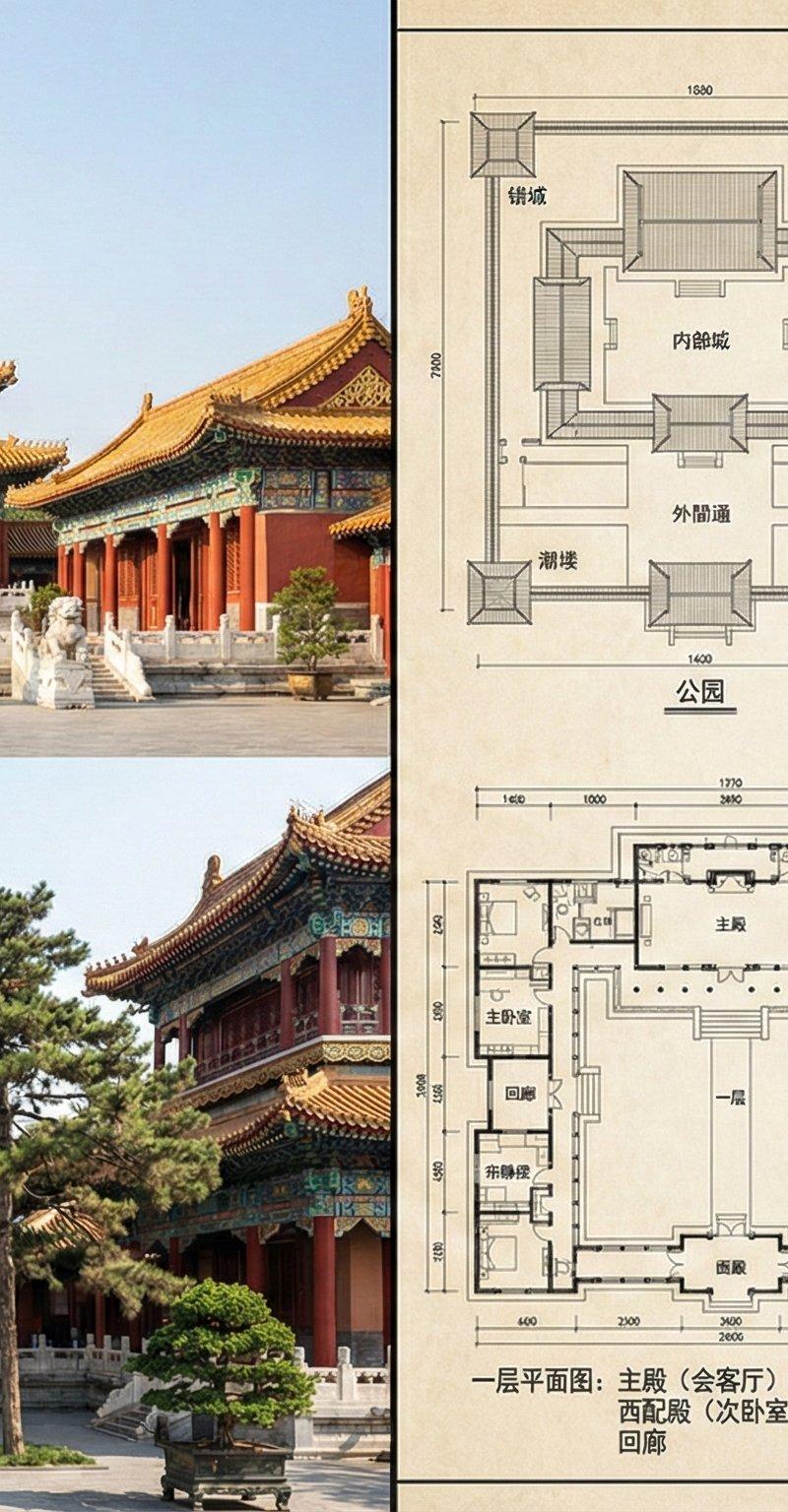
一张分割为两部分的建筑展示图,最左侧三分之一是建成后的实景照片展示,右侧三分之二是详细的建筑设计图纸。
最左侧三分之一(成品展示): 一张宏伟的、以中国北京紫禁城为风格的两层大型院落的实景照片。画面展示了一个阳光照耀下的主庭院,有重檐歇山顶的红墙黄瓦主殿和配殿,屋顶覆盖着金色的琉璃瓦,屋檐下有复杂的斗拱和精美的彩绘(如龙凤图案)。建筑坐落在汉白玉基座上,前方有雕刻的御道和石狮子。庭院内有古老的松柏和精心修剪的盆景。照片风格写实,展现出皇家园林的庄严与辉煌。
右侧三分之二(建筑设计图): 一套详细的、带有传统蓝图风格或墨线风格的两层建筑设计图纸,图纸背景为米色宣纸纹理。
上方是总平面图和立面图,清晰标示出多进院落的布局,包括大门、前朝、后寝区域,以及围墙和角楼。立面图展示了建筑的层次和屋顶曲线。
下方是一层和二层平面图,用中文详细标注了各个功能区,例如:“一层平面图:主殿(会客厅)、东配殿(主卧室)、西配殿(次卧室1)、书房、御膳房、回廊”、“二层平面图:藏书楼、观景台、次卧室2、休息厅”。
图纸的显著位置用中文标注:“项目:北京紫禁城风格私家宅邸”、“建筑面积:约20000平方英尺”、“层数:两层”、“地点:中国北京”。图纸还包含比例尺、指北针和图例说明,线条精确,展现出复杂的木结构梁柱体系。
整张图片通过一条明确的分界线将左侧的实景与右侧的图纸隔开,但两者在主题和风格上保持高度一致,共同呈现这一宏大建筑项目。
Category
Architecture & Spaces
Model
Nano Banana Pro
Creator
松果先森
Source language
zh-CN
Views0
Source ID
google-collects-forbidden-city-data-and-design-plans
Studio

Guide

About "谷歌采集紫禁城数据与设计图纸"

What is this prompt for?

"谷歌采集紫禁城数据与设计图纸" AI image prompt for Nano Banana Pro (Architecture & Spaces). 谷歌你很刑,这数据你都采集了 中国北京紫禁城建筑照片展示和设计图纸都被你搞出来了 Nano banana pro提示词: 一张分割为两部分的建筑展示图,最左侧三分…

The full copyable prompt and example visuals above are ready for AI image generation or one-click recreate in Picva.

How to use this prompt

  1. Step 1

    Open the prompt detail

    Review the example visuals, category, and full prompt text for "谷歌采集紫禁城数据与设计图纸".

  2. Step 2

    Copy the prompt

    Copy the prompt body from this page, or load it directly in Studio.

  3. Step 3

    Pick a model (Nano Banana Pro)

    Prefer Nano Banana Pro. If you switch models, keep subject and composition and tweak style terms.

  4. Step 4

    Generate and export

    Recreate the look in Picva, or export into your workflow for editing and publishing.

FAQ

What is the "谷歌采集紫禁城数据与设计图纸" prompt?
It is an AI image-generation prompt for Nano Banana Pro in the Architecture & Spaces category. This page includes the full prompt text, example visuals, and a one-click recreate path in Picva.
How do I use this prompt to generate an image?
Copy the prompt from this page, or use Generate / Studio. Paste it into a compatible image model, or recreate the look in Picva with optional reference images.
Which model is this prompt for?
This page lists Nano Banana Pro. Most descriptive prompts also transfer to nearby image models such as GPT Image, Flux, or Midjourney with light style tweaks.
Can I use the result commercially?
You can usually copy the prompt for creation, but commercial use of the final image depends on the model terms, reference-image rights, and the generated content. Follow the source author and platform rules.