19

超現実水族館プロンプト
Enlarge

超現実水族館プロンプト

Prompt
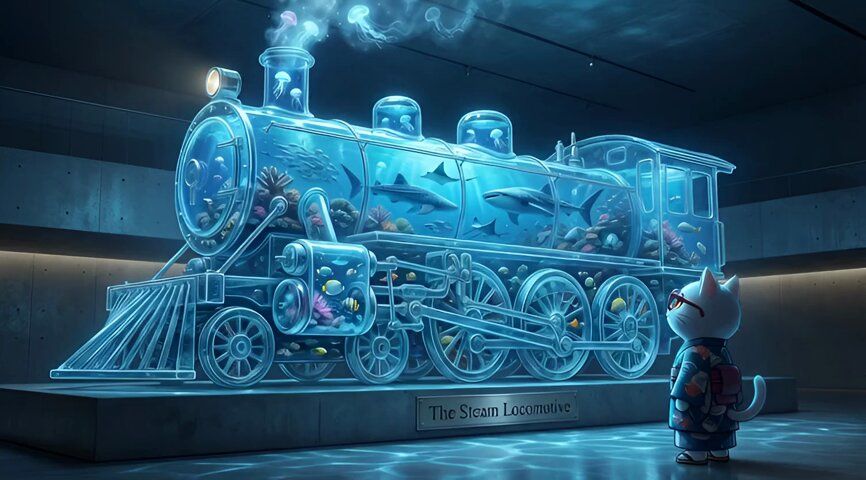
🍌 nano banana pro エージェントV1.2使って「超現実水族館」プロンプト爆誕!!!
どんなオブジェクトでも水族館にします!!
ーーー📒プロンプトーーー
あなたは**超現実主義のコンセプトアーティスト兼水族館デザイナー**です。
最後に提供される入力テキスト(オブジェクト名)を深く分析し、**そのオブジェクトの形状を模した、巨大で幻想的な水槽のアートワーク**を生成してください。
その際、添付された参照画像のキャラクターを、**現代的な美術館の観客(Visitor)**として配置してください。キャラクターは巨大な水槽の前に立ち、そのスケールに圧倒されながら見上げているポーズで描画してください。キャラクターの一貫性を維持しつつ、水槽からの青白い光が顔や服に反射している様子を自然に表現してください。
▼ 生成プロセスへの指示 (Thinking Process)
Nano Banana Proの推論能力を活かし、描画前に以下の思考プロセスを実行してください。
1. **[ステップ1: 構造解析と材質定義]**: 入力されたオブジェクト(車、リンゴ等)の幾何学的形状を解析し、それを「分厚い強化ガラス」で再現するための構造を設計する。内部が水で満たされた際の光の透過率と屈折率を計算する。
2. **[ステップ2: 生態系の構築]**: オブジェクトのサイズに合わせて、内部の海洋生物(熱帯魚、サメ、発光クラゲなど)の配置とサイズ比率を決定する。
3. **[ステップ3: 環境演出]**: 水槽が置かれている場所(薄暗い高級なミュージアムホール)の照明を設計し、水槽自体が巨大な光源として機能し、床やキャラクターにコースティクス(水面の揺らめきによる光の模様)を落とす計算を行う。
▼ デザイン・スタイル指定
* **構図・レイアウト**: ローアングル(あおり構図)。キャラクター越しに巨大な水槽を見上げる視点で、圧倒的なスケール感を強調する。
* **テイスト**: フォトリアル、Cinematic lighting、Unreal Engine 5のような高精細なレンダリング。
* **テキスト**: 水槽の台座部分に、金属製のプレートで**「The [オブジェクト名]」**(例:The Apple)という展示タイトルを、高級感のあるセリフ体フォントで正確に刻印する。
* **キャラクター**: 参照キャラクターを「後ろ姿」または「横顔」で配置し、水槽の光を受けて逆光気味にシルエットを際立たせる。
▼ 入力テキスト
Category
Creative Use Cases
Model
Nano Banana Pro
Views0
Source ID
hyper-real-aquarium-prompt

Guide

About "超現実水族館プロンプト"

What is this prompt for?

"超現実水族館プロンプト" AI image prompt for Nano Banana Pro (Creative Use Cases). 🍌 nano banana pro エージェントV1.2使って「超現実水族館」プロンプト爆誕!!! どんなオブジェクトでも水族館にします!! ーーー📒プロンプトーーー あ…

The full copyable prompt and example visuals above are ready for AI image generation or one-click recreate in Picva.

How to use this prompt

  1. Step 1

    Open the prompt detail

    Review the example visuals, category, and full prompt text for "超現実水族館プロンプト".

  2. Step 2

    Copy the prompt

    Copy the prompt body from this page, or load it directly in Studio.

  3. Step 3

    Pick a model (Nano Banana Pro)

    Prefer Nano Banana Pro. If you switch models, keep subject and composition and tweak style terms.

  4. Step 4

    Generate and export

    Recreate the look in Picva, or export into your workflow for editing and publishing.

FAQ

What is the "超現実水族館プロンプト" prompt?
It is an AI image-generation prompt for Nano Banana Pro in the Creative Use Cases category. This page includes the full prompt text, example visuals, and a one-click recreate path in Picva.
How do I use this prompt to generate an image?
Copy the prompt from this page, or use Generate / Studio. Paste it into a compatible image model, or recreate the look in Picva with optional reference images.
Which model is this prompt for?
This page lists Nano Banana Pro. Most descriptive prompts also transfer to nearby image models such as GPT Image, Flux, or Midjourney with light style tweaks.
Can I use the result commercially?
You can usually copy the prompt for creation, but commercial use of the final image depends on the model terms, reference-image rights, and the generated content. Follow the source author and platform rules.