20

物品拆解图
Enlarge

Example images

物品拆解图

Prompt
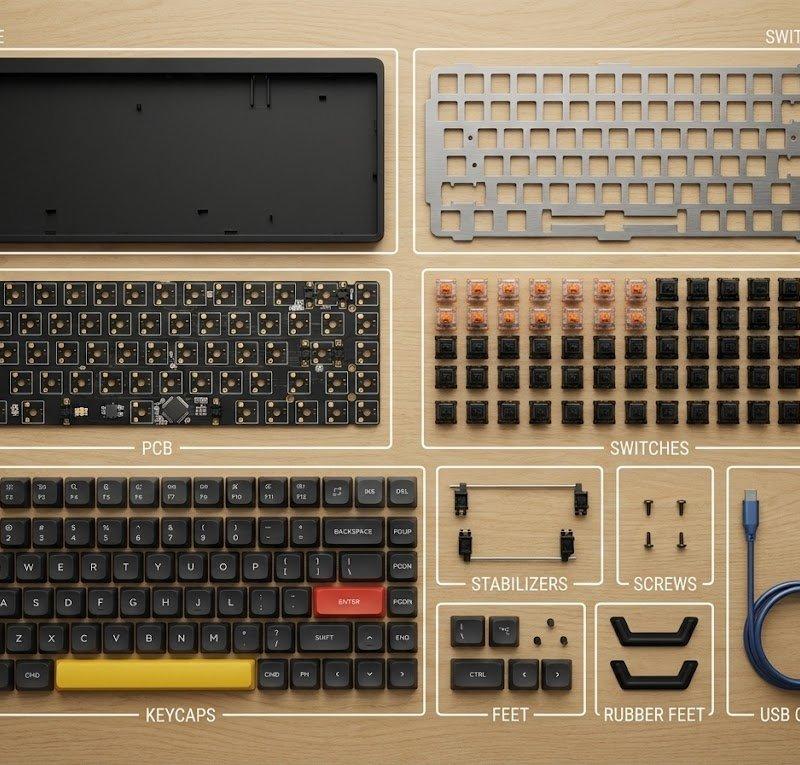
Ultra-realistic 8K flat-lay photo in strict knolling style. Top-down 90º shot of the object from the attached image, fully disassembled into 8–12 key parts and arranged in a clean grid or radial pattern on a minimalist wooden or matte gray table. Even spacing, perfect alignment, no overlaps, no extra objects. Soft, diffused multi-source lighting with subtle shadows, neutral color balance and crisp focus across the whole frame. Highly detailed real-world materials (metal, plastic, rubber grips, circuit boards, screws). For every part, add a thin white rectangular frame and a short, sharp English label in clean sans-serif text, placed beside the component without covering it; annotations must be legible but unobtrusive.
超逼真的 8K 平面照片,采用严格的摆拍风格。从上方俯视 90° 拍摄附图中的物体,将其完全拆解成 8-12 个主要部件,并以简洁的网格或放射状图案排列在极简主义的木质或哑光灰色桌面上。部件间距均匀,完美对齐,无重叠,无多余物体。柔和的漫射多光源照明,阴影微妙,色彩平衡自然,整个画面清晰锐利。高度还原真实材质(金属、塑料、橡胶握把、电路板、螺丝)。每个部件旁边都应添加一个细长的白色矩形框,以及一个简洁清晰的英文标签(无衬线字体),标签应放置在部件旁边,但不能遮挡部件;注释必须清晰易读,但又不影响整体美观。
Category
Photography & Realism
Model
Unknown
Creator
PandaTalk8
Source language
zh-CN
Views0
Source ID
item-disassembly-diagram
Studio

Guide

About "物品拆解图"

What is this prompt for?

"物品拆解图" AI image prompt for Unknown (Photography & Realism). Ultra-realistic 8K flat-lay photo in strict knolling style. Top-down 90º shot of the object from t…

The full copyable prompt and example visuals above are ready for AI image generation or one-click recreate in Picva.

How to use this prompt

  1. Step 1

    Open the prompt detail

    Review the example visuals, category, and full prompt text for "物品拆解图".

  2. Step 2

    Copy the prompt

    Copy the prompt body from this page, or load it directly in Studio.

  3. Step 3

    Pick a model (Unknown)

    Prefer Unknown. If you switch models, keep subject and composition and tweak style terms.

  4. Step 4

    Generate and export

    Recreate the look in Picva, or export into your workflow for editing and publishing.

FAQ

What is the "物品拆解图" prompt?
It is an AI image-generation prompt for Unknown in the Photography & Realism category. This page includes the full prompt text, example visuals, and a one-click recreate path in Picva.
How do I use this prompt to generate an image?
Copy the prompt from this page, or use Generate / Studio. Paste it into a compatible image model, or recreate the look in Picva with optional reference images.
Which model is this prompt for?
This page lists Unknown. Most descriptive prompts also transfer to nearby image models such as GPT Image, Flux, or Midjourney with light style tweaks.
Can I use the result commercially?
You can usually copy the prompt for creation, but commercial use of the final image depends on the model terms, reference-image rights, and the generated content. Follow the source author and platform rules.