Nano Banana Pro プラモデルパッケージ風画像生成プロンプト
Prompt
Nano Banana Proで遊ぼう
【プラモデルパッケージ化プロンプト】
⠀
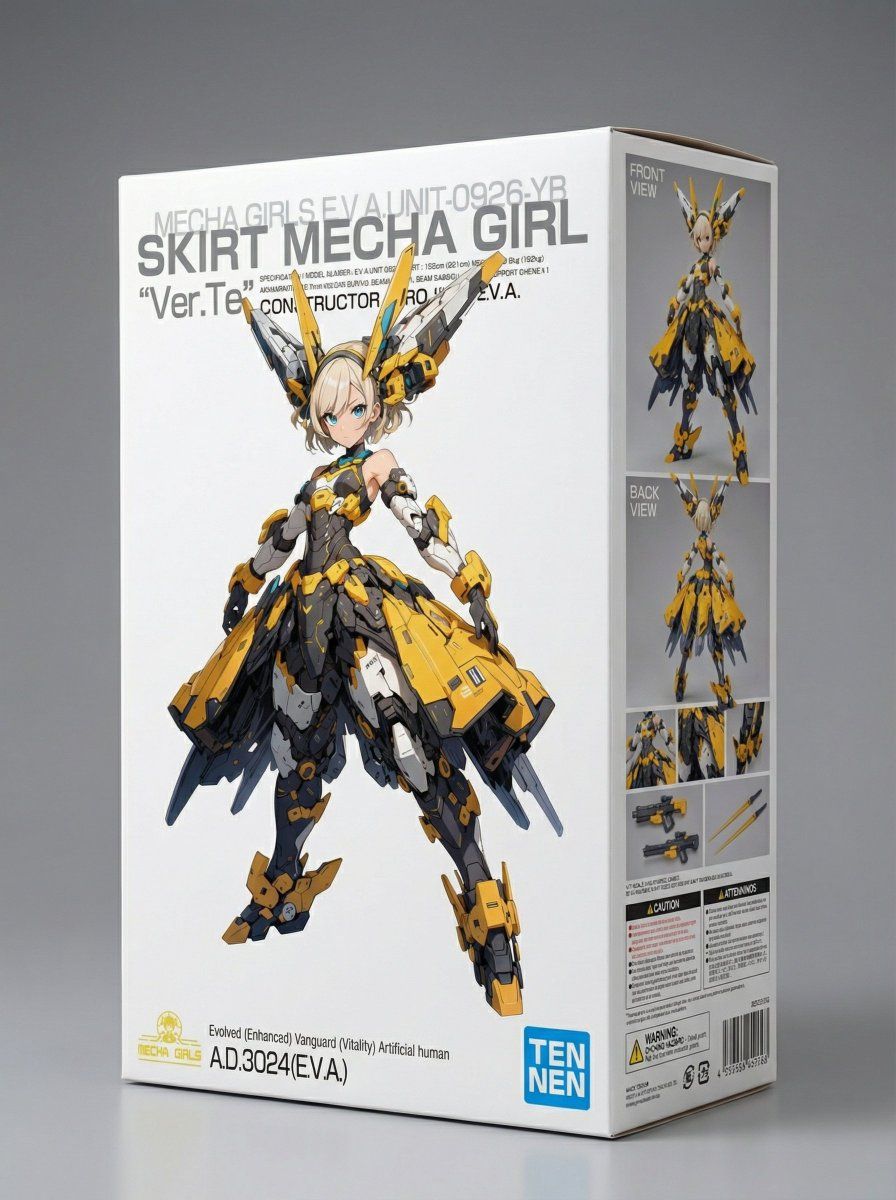
参照画像をプラモデルのパッケージ風の
画像にするプロンプトです。
⠀
⚠️必ず最後までお読みください。
・Nano Banana Pro専用のプロンプトです。
・作例がプロンプトの再現率100%です。
同じ生成結果にするには試行を要します。
・プロンプトの無断転載は禁止します。
・プロンプトの改変は構いませんが
改変の度合いに関わらずsignature
ブロックの改変・削除は禁止します。
・プロンプト使用上の注意を必ず
確認してください(重要)。
⠀
◆概要
参照画像をそれぞれ正面・側面に配置し
「プラモデルのパッケージ風」の
画像として生成します。
⠀
元々「わたしのメカ娘専用」に作った
プロンプトなのでパッケージ側面には
「作例・部分拡大図」のほか
「武器・武装」が描かれます。
「武器・武装」のデザインは
参照画像から推論します。
⠀
作例4枚目のように
「明らかにメカでない」場合は
キャラクターに応じた
武器・武装が描かれます。
不要な場合はプロンプト中の
当該部分を削除してください。
⠀
参照画像が「3枚」必要です。
1・2枚目:パッケージ側面に配置
3枚目:パッケージ正面に配置
※必ずしもフィギュア化画像
である必要はありません。
ひょっとすると
側面は勝手にフィギュア化
されるかもしれません。
※こだわらなければ3枚とも
同じ画像でも生成できます。
⠀
◆使い方
作例と同じように生成するには
下準備が必要です。
⠀
以下、
1枚目の参照画像をA
2枚目の参照画像をB
3枚目の参照画像をC として扱います。
⠀
1.参照画像A・Bを用意する。
A・Bはパッケージ側面に配置されます。
わたしは「再現度にこだわる」ので
A・Bを次のように準備しています。
1)元絵をフィギュア化(A)
2)Aを参照画像として背面図を生成(B)
フィギュア化は何でもできると
思いますがわたしのプロンプトを
リプ欄に置きます。
⠀
2.参照画像Cを用意する
わたしは元々パッケージを意識して
作成していた背景テンプレートが
あるのでこれを使用しています。
(作例1・2・3枚目)
⠀
そういうテンプレートを作って
使っている人はいないと思うので
作ることになると思いますが
別で公開している
【新しいプロフィール画像プロンプト】
を使えばオリジナルロゴの入った
画像を簡単に作ることができます。
(作例4枚目)
プロンプトはリプ欄に置きます。
⠀
3.参照画像を順番にアップロードする
アップロードした順番に従って
プロンプト上でA・B・Cとして
扱われるので間違えないように。
1枚目:正面画像=A
2枚目:背面画像=B
3枚目:パッケージ画像=C です。
⠀
1・2枚目を3枚目のキャラクターとは
違うものにしても特に問題なく
側面に配置されるはずです。
⠀
以上です。
⠀
特にこだわりが無ければ
正面にロゴも不要ですし
事前にフィギュア化して
正面・背面図を用意する
必要も無いです。
⠀
⚠️プロンプト使用上の注意⚠️
本プロンプトには、特定の作品名・作者名・キャラクター名等は一切含まれていませんが、生成モデルの内部処理や学習データに起因する連想まではコントロールできないため、結果として既存作品のキャラクター・商標・ブランドロゴ等に類似または該当する画像が生成される可能性があります。
⠀
生成された画像の利用・公開にあたっては、十分ご注意ください。
⠀
なお、本プロンプトの利用により生成された一切の成果物およびそれに起因するトラブル・損害等について、当方は一切の責任を負いかねます。ご自身の責任と判断においてご利用ください。
◆プロンプト(全文をコピペ)
subject: >
A studio photograph of a physical cardboard box for a 1/7 scale plastic model.
The box is fully printed before photography.
The front face functions as a pure package artwork panel, not an information surface.
composition: >
Three-quarter front view of the box on a neutral studio surface.
The front face is fully visible and displays ONLY Reference Image C,
full-bleed, edge to edge, with no added elements.
Only ONE side panel is visible in the shot.
This visible side panel contains a layout combining Reference Image A and Reference Image B,
along with assembled model examples, close-up detail views, weapon accessories,
and cautionary notes arranged like a real commercial plastic model package.
The opposite side panel is turned away from the camera and not visible.
action: >
Static studio product presentation.
location: >
Seamless neutral studio background with no props.
style: >
Photorealistic studio product photography.
High-end hobby model kit packaging style.
camera_lighting: >
Professional studio lighting with soft key light and subtle rim light.
Sharp focus on the box, shallow depth of field.
colors: >
Neutral background tones.
Accurate printed colors matching the reference images.
text: >
Front face: ZERO generated text, ZERO warnings, ZERO symbols, ZERO labels.
The only visible text on the front face is the text already embedded
within Reference Image C.
All generated text, warnings, and product information appear only
on the visible side panel.
signature:
content: "Prompt by てんねん@ munou_ac"
position: bottom-left
font_color: white
font_size: small
opacity: 0.9
layering: text_layer
edit_instructions: >
Reference Image C must be reproduced exactly on the front face without alteration.
Reference Image A and Reference Image B are integrated as printed images
within the visible side panel layout.
Do not move, reinterpret, or stylize the reference images.
references: >
Reference Image C: front face, full-bleed, exact reproduction.
Reference Image A: used as part of the visible side panel layout.
Reference Image B: used as part of the same visible side panel layout.
extras: >
Ultra-high resolution.
Realistic cardboard thickness, sharp box edges,
subtle print reflections, catalog-quality realism.
- Category
- Photography & Realism
- Model
- Nano Banana Pro
- Creator
- てんねん
- Source ID
- nano-banana-pro-plastic-model-packaging-image-generation-prompt
Views0