20

重新构想的超现实主义广告
Enlarge

重新构想的超现实主义广告

Prompt
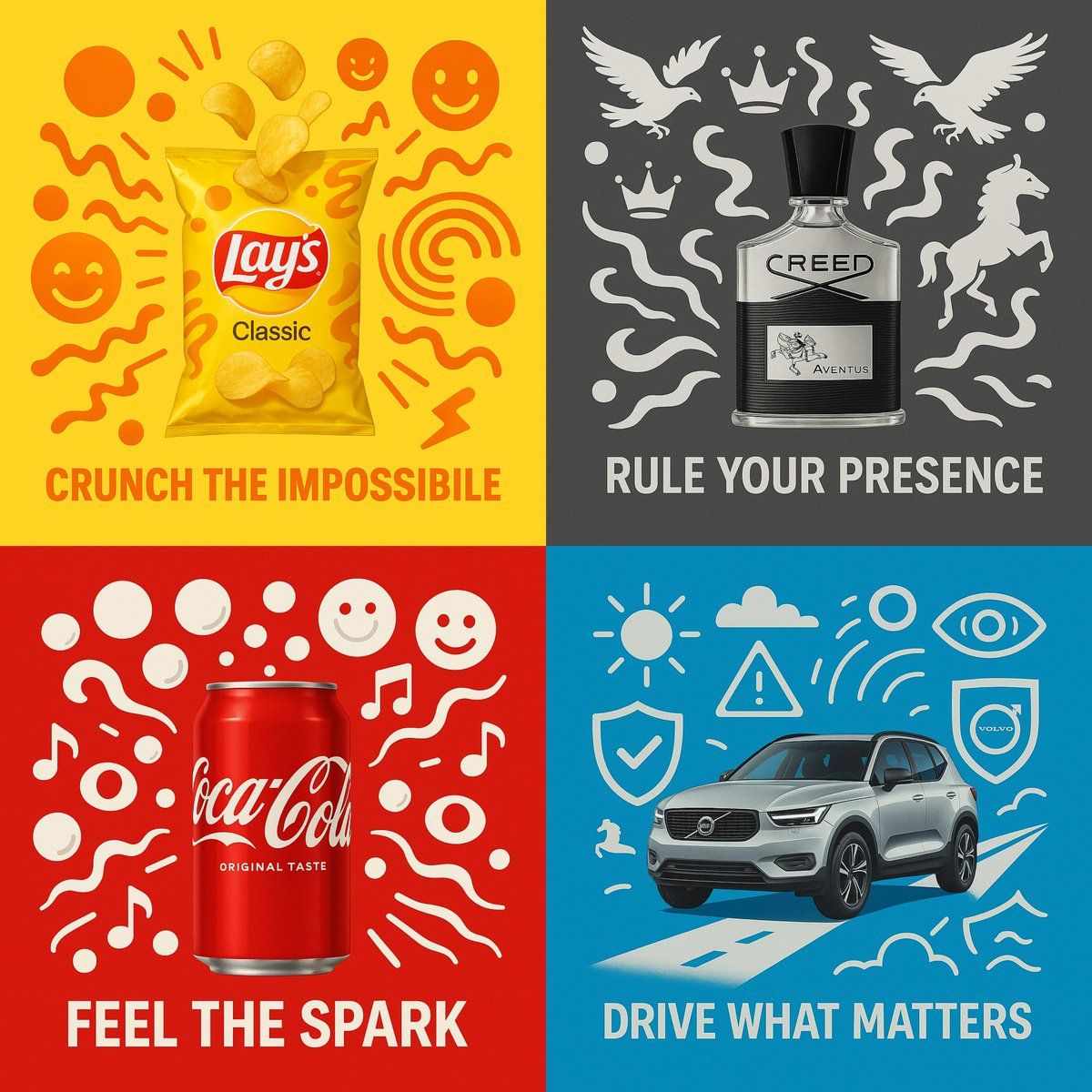
“[Product Name]” placed at the center in full photorealism, surrounded by surreal vector illustrations using exactly two bold, vibrant colors that match the product’s mood.\nThe scene is minimalistic yet energetic, with abstract vector shapes (symbols, lines, expressions, etc.) orbiting or interacting with the product.\nAdd the real logo clearly and integrate a short 3–4 word slogan at the bottom.\nStyle: surreal, high-resolution, minimal, cinematic lighting, 1:1 aspect ratio.
“[产品名称]”以完全逼真的方式放置在中心,周围环绕着超现实主义的矢量插图,使用两种大胆、鲜艳的颜色,与产品的情绪相匹配。\n场景简约而充满活力,抽象的矢量形状(符号、线条、表情等)围绕产品运行或与产品交互。\n清楚地添加真实的 logo,并在底部加入一个 3-4 字的简短标语。\n风格:超现实、高分辨率、极简、电影般的照明、1:1 纵横比。
Category
Photography & Realism
Model
Unknown
Creator
aziz4ai
Views0
Source ID
reimagined-surrealist-ad

Guide

About "重新构想的超现实主义广告"

What is this prompt for?

"重新构想的超现实主义广告" AI image prompt for Unknown (Photography & Realism). “[Product Name]” placed at the center in full photorealism, surrounded by surreal vector il…

The full copyable prompt and example visuals above are ready for AI image generation or one-click recreate in Picva.

How to use this prompt

  1. Step 1

    Open the prompt detail

    Review the example visuals, category, and full prompt text for "重新构想的超现实主义广告".

  2. Step 2

    Copy the prompt

    Copy the prompt body from this page, or load it directly in Studio.

  3. Step 3

    Pick a model (Unknown)

    Prefer Unknown. If you switch models, keep subject and composition and tweak style terms.

  4. Step 4

    Generate and export

    Recreate the look in Picva, or export into your workflow for editing and publishing.

FAQ

What is the "重新构想的超现实主义广告" prompt?
It is an AI image-generation prompt for Unknown in the Photography & Realism category. This page includes the full prompt text, example visuals, and a one-click recreate path in Picva.
How do I use this prompt to generate an image?
Copy the prompt from this page, or use Generate / Studio. Paste it into a compatible image model, or recreate the look in Picva with optional reference images.
Which model is this prompt for?
This page lists Unknown. Most descriptive prompts also transfer to nearby image models such as GPT Image, Flux, or Midjourney with light style tweaks.
Can I use the result commercially?
You can usually copy the prompt for creation, but commercial use of the final image depends on the model terms, reference-image rights, and the generated content. Follow the source author and platform rules.