20

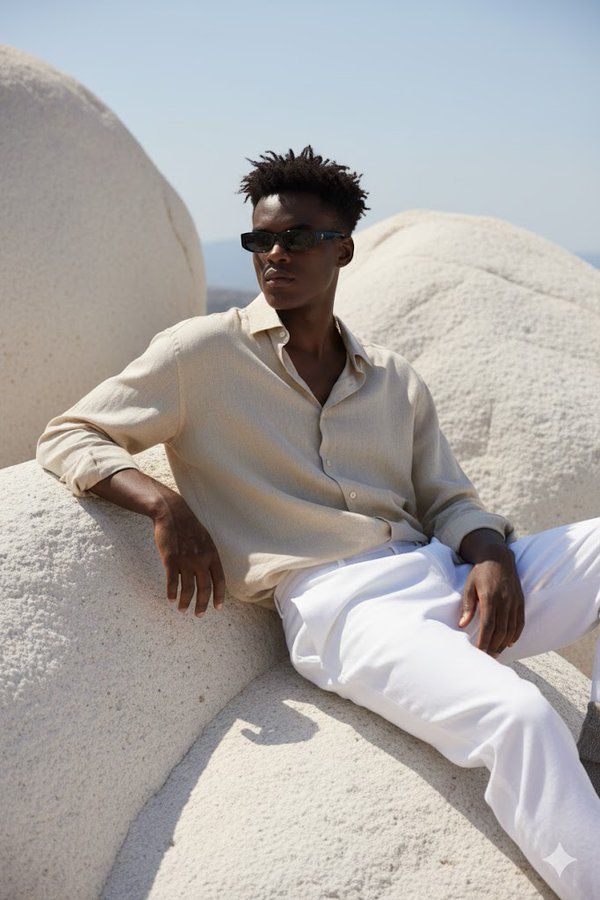
坐在巨大光滑的白色岩层上
Enlarge

坐在巨大光滑的白色岩层上

Prompt
A hyper-realistic portrait of a young man sitting on large, smooth white rocky formations under natural sunlight. He is wearing a loose, slightly crumpled beige linen shirt with the top buttons open, paired with white trousers. His outfit gives a relaxed, Mediterranean vibe.\nHe is leaning back, one arm resting on the rock, and the other hand on his knee, looking slightly to the side. He wears slim black rectangular sunglasses. His hairstyle is short, slightly messy, and the sunlight casts soft shadows across his outfit and the textured rocks.\nThe overall atmosphere is calm, stylish, and Mediterranean-inspired. The face should match exactly with the reference photo.
这幅超现实主义肖像画描绘了一位年轻男子坐在巨大光滑的白色岩层上,沐浴在自然阳光下。他身穿宽松略带褶皱的米色亚麻衬衫,最上面的纽扣敞开着,搭配白色长裤。他的装扮散发着轻松的地中海风情。\n他向后仰着身子,一只手扶着岩石,另一只手放在膝盖上,目光略微侧向一侧。他戴着一副细长的黑色矩形墨镜。他的发型短而略显凌乱,阳光在他的衣服和纹理分明的岩石上投下柔和的阴影。\n整体氛围平静、时尚,充满地中海风情。脸部应该与参考照片完全匹配。
Category
Photography & Realism
Model
Unknown
Creator
eyishazyer
Views0
Source ID
sitting-on-giant-smooth-white-rock-formation

Guide

About "坐在巨大光滑的白色岩层上"

What is this prompt for?

"坐在巨大光滑的白色岩层上" AI image prompt for Unknown (Photography & Realism). A hyper-realistic portrait of a young man sitting on large, smooth white rocky formations u…

The full copyable prompt and example visuals above are ready for AI image generation or one-click recreate in Picva.

How to use this prompt

  1. Step 1

    Open the prompt detail

    Review the example visuals, category, and full prompt text for "坐在巨大光滑的白色岩层上".

  2. Step 2

    Copy the prompt

    Copy the prompt body from this page, or load it directly in Studio.

  3. Step 3

    Pick a model (Unknown)

    Prefer Unknown. If you switch models, keep subject and composition and tweak style terms.

  4. Step 4

    Generate and export

    Recreate the look in Picva, or export into your workflow for editing and publishing.

FAQ

What is the "坐在巨大光滑的白色岩层上" prompt?
It is an AI image-generation prompt for Unknown in the Photography & Realism category. This page includes the full prompt text, example visuals, and a one-click recreate path in Picva.
How do I use this prompt to generate an image?
Copy the prompt from this page, or use Generate / Studio. Paste it into a compatible image model, or recreate the look in Picva with optional reference images.
Which model is this prompt for?
This page lists Unknown. Most descriptive prompts also transfer to nearby image models such as GPT Image, Flux, or Midjourney with light style tweaks.
Can I use the result commercially?
You can usually copy the prompt for creation, but commercial use of the final image depends on the model terms, reference-image rights, and the generated content. Follow the source author and platform rules.