更新版日式 cyber-grunge 监视风格时尚编辑
Prompt
🧩Higgsfield Nano Banana Pro🍌
📹Text to Image
引用元の素晴らしいプロンプトを日本人バージョンにアップデートしました🇯🇵
プロンプト:
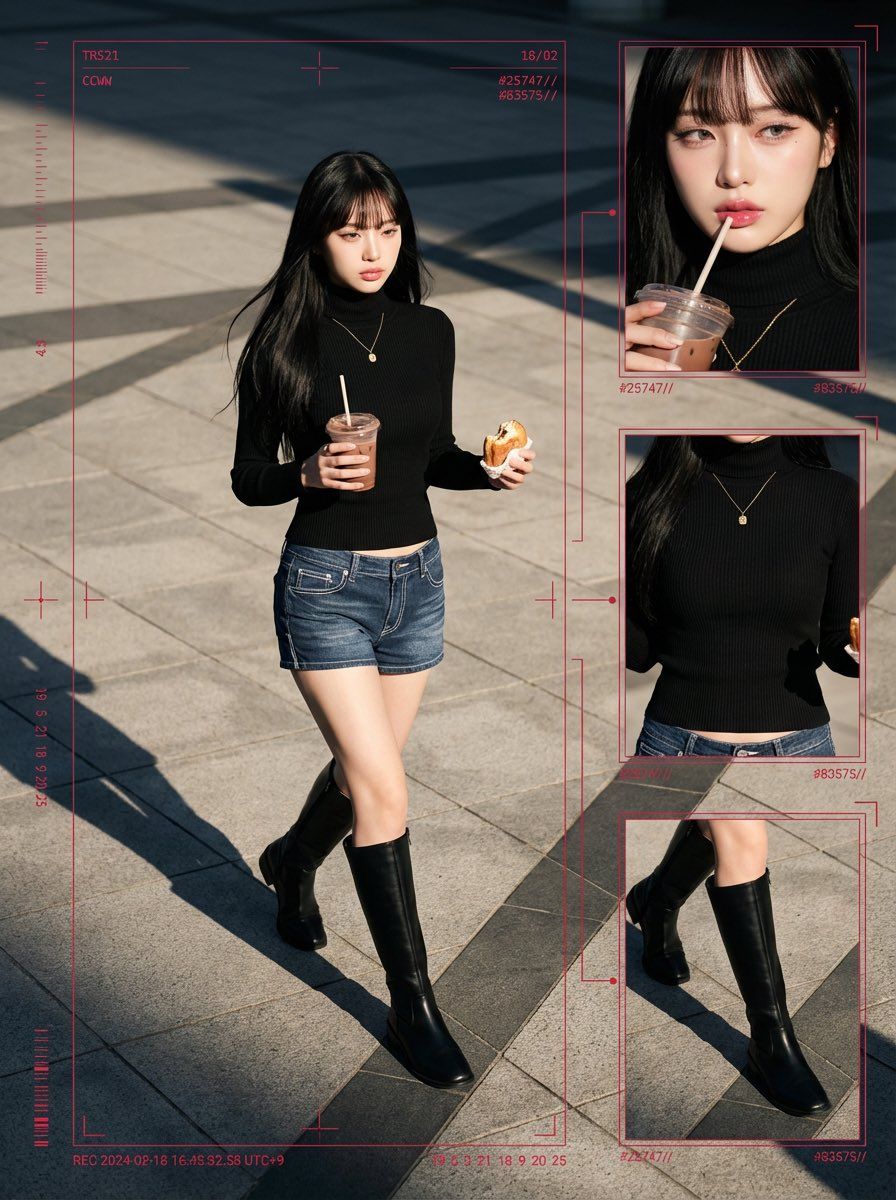
A cyber-grunge surveillance-style fashion editorial featuring a young, beautiful, cute Japanese woman in her early 20s, with large expressive eyes and K-pop idol–inspired makeup. Her makeup highlights flawless radiant skin, soft shimmer around the eyelids, sharp eyeliner, and glossy lips, giving a refined feminine glow.
She has long, sleek black hair with perfectly trimmed bangs, smooth texture, and soft highlights, flowing naturally behind her as she walks.
Her outfit consists of a fitted rib-texture turtle-neck knit top and denim short pants with visible stitching details, slightly low-rise styling, giving a modern Japanese Y2K street flavor. She wears long sleek boots—clean, structured, and stylish—adding elegance and contrast to her exposed legs. Accessorized with a small gold pendant necklace. She holds an iced chocolate/coffee cup with a straw in her left hand and a half-eaten pastry in her right hand.
Her body posture is mid-stride, full-body captured, facing slightly off-center, head angled down slightly with a cool, indifferent expression—visually as if caught candidly by a high-end surveillance system monitoring an urban location.
Scene environment:
A bright late-afternoon plaza with paved concrete tiles. Highly directional sunlight creates long diagonal shadows, deep blacks under the boots, and warm atmospheric highlights. The tone feels cinematic but raw, like real street documentation.
Technical image style:
Hyper-real 8K Ultra-HD clarity, deep focus across full frame, dramatic daylight contrast, color palette composed of urban greys, pure whites, deep blacks, and striking crimson UI overlay accents. 1440 × 1920 resolution, 4:5 editorial framing.
Layout structure:
Editorial collage combining:
● one large main full-body walking shot
+
● three cropped secondary frames:
— close-up of face + makeup styling + drink hand
— torso crop featuring turtle-neck knit texture
— boot-and-legs detail with pavement shadows
These cropped windows connect visually via red surveillance-style vector lines.
UI Overlay Components:
· thin red bounding rectangles
· telemetry-like ID codes
· crosshair alignment marks
· vector targeting lines
· timecode print
· numeric encryption motifs
Example printed graphics:
“TR521”
“CCWW”
“18/02”
“#25747//”
“#83575//”
“19 5 3 21 18 9 20 25”
Atmospheric concept:
Modern cyber-grunge × candid street-watching × dystopian fashion documentation.
Feels like a digital observation archive rather than posed photography.
A stylish mystery aura, privacy-invasion chic, cinematic realism.
Camera Specifications:
Shot from a slightly high-angle perspective, around 35–50mm focal length, long daylight-cast shadows visible, crisp texture on concrete paving, deep-focus realism.
- Category
- Photography & Realism
- Model
- Nano Banana Pro
- Source ID
- updated-japanese-cyber-grunge-surveillance-style-fashion-editorial
Views0