20

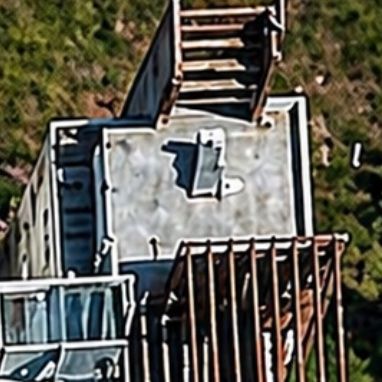
增强屋顶 EO 图像
Enlarge

增强屋顶 EO 图像

Prompt
Using the provided reference image, enhance it as a higher-resolution nadir satellite/aerial crop of the same rooftop scene. Keep the same building geometry, staircase at the top edge, rooftop enclosure, blue-tinted awning at lower left, and brown slatted roof at lower right, but sharpen edges, increase contrast, correct the perspective slightly, and clean up compression noise. Make the rooftop details more legible, especially clarifying the single solar water heater on the white roof as a distinct rectangular panel with its small tank/cylinder attachment and a clear shadow. Preserve the tight cropped composition and realistic Earth-observation imagery look.
Category
Architecture & Spaces
Model
GPT Image 2
Creator
Prabhav
Views1
Source ID
17375
Published
Apr 30, 2026

Guide

About "增强屋顶 EO 图像"

What is this prompt for?

"增强屋顶 EO 图像" AI image prompt for GPT Image 2 (Architecture & Spaces). 此提示词可将模糊的屋顶卫星裁剪图像升级为更清晰、更具可读性的地球观测图像,以便对太阳能热水器等细节进行视觉分析。 Copy it on Picva and recreate th…

The full copyable prompt and example visuals above are ready for AI image generation or one-click recreate in Picva.

How to use this prompt

  1. Step 1

    Open the prompt detail

    Review the example visuals, category, and full prompt text for "增强屋顶 EO 图像".

  2. Step 2

    Copy the prompt

    Copy the prompt body from this page, or load it directly in Studio.

  3. Step 3

    Pick a model (GPT Image 2)

    Prefer GPT Image 2. If you switch models, keep subject and composition and tweak style terms.

  4. Step 4

    Generate and export

    Recreate the look in Picva, or export into your workflow for editing and publishing.

FAQ

What is the "增强屋顶 EO 图像" prompt?
It is an AI image-generation prompt for GPT Image 2 in the Architecture & Spaces category. This page includes the full prompt text, example visuals, and a one-click recreate path in Picva.
How do I use this prompt to generate an image?
Copy the prompt from this page, or use Generate / Studio. Paste it into a compatible image model, or recreate the look in Picva with optional reference images.
Which model is this prompt for?
This page lists GPT Image 2. Most descriptive prompts also transfer to nearby image models such as GPT Image, Flux, or Midjourney with light style tweaks.
Can I use the result commercially?
You can usually copy the prompt for creation, but commercial use of the final image depends on the model terms, reference-image rights, and the generated content. Follow the source author and platform rules.