20

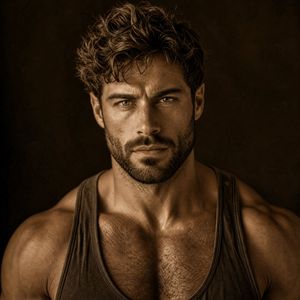
深褐色肌肉男肖像,面部遮挡
Enlarge

深褐色肌肉男肖像,面部遮挡

Prompt
Create a dramatic sepia-toned studio portrait of a {argument name="subject" default="handsome muscular young man"} shown from the upper torso upward, centered and facing forward. He has tousled wavy dark-brown hair with golden rim highlights, broad shoulders, defined chest and collarbones, lightly hairy chest, and wears a dark worn athletic tank top with deep armholes and a scooped neckline. The face is completely obscured by a centered opaque square block in warm medium brown, covering from the forehead area down to the mouth/chin area, leaving hair, ears, neck, shoulders, and torso visible. Use low-key cinematic lighting with a strong warm key light from upper left, subtle rim light on the hair and shoulders, deep shadows, high contrast, realistic skin texture, and a moody vintage sepia color grade. Background is a dark mottled brown studio backdrop with soft vignette and no visible props. Square 1:1 composition, tight crop at the upper arms and chest, photorealistic editorial fitness portrait, sharp detail on hair and torso, shallow depth of field, no text, no watermark.
Category
Photography & Realism
Model
GPT Image 2
Creator
Hendry Lim
Views0
Source ID
24975
Published
Jun 9, 2026

Guide

About "深褐色肌肉男肖像,面部遮挡"

What is this prompt for?

"深褐色肌肉男肖像,面部遮挡" AI image prompt for GPT Image 2 (Photography & Realism). 一张写实的深褐色调情绪化摄影棚肖像,展示了一位身穿背心的肌肉男,其面部被一个实心正方形遮挡,适用于匿名健身或编辑类图像。 Copy it on Picva and recr…

The full copyable prompt and example visuals above are ready for AI image generation or one-click recreate in Picva.

How to use this prompt

  1. Step 1

    Open the prompt detail

    Review the example visuals, category, and full prompt text for "深褐色肌肉男肖像,面部遮挡".

  2. Step 2

    Copy the prompt

    Copy the prompt body from this page, or load it directly in Studio.

  3. Step 3

    Pick a model (GPT Image 2)

    Prefer GPT Image 2. If you switch models, keep subject and composition and tweak style terms.

  4. Step 4

    Generate and export

    Recreate the look in Picva, or export into your workflow for editing and publishing.

FAQ

What is the "深褐色肌肉男肖像,面部遮挡" prompt?
It is an AI image-generation prompt for GPT Image 2 in the Photography & Realism category. This page includes the full prompt text, example visuals, and a one-click recreate path in Picva.
How do I use this prompt to generate an image?
Copy the prompt from this page, or use Generate / Studio. Paste it into a compatible image model, or recreate the look in Picva with optional reference images.
Which model is this prompt for?
This page lists GPT Image 2. Most descriptive prompts also transfer to nearby image models such as GPT Image, Flux, or Midjourney with light style tweaks.
Can I use the result commercially?
You can usually copy the prompt for creation, but commercial use of the final image depends on the model terms, reference-image rights, and the generated content. Follow the source author and platform rules.

