手写数据结构作业照片
Prompt
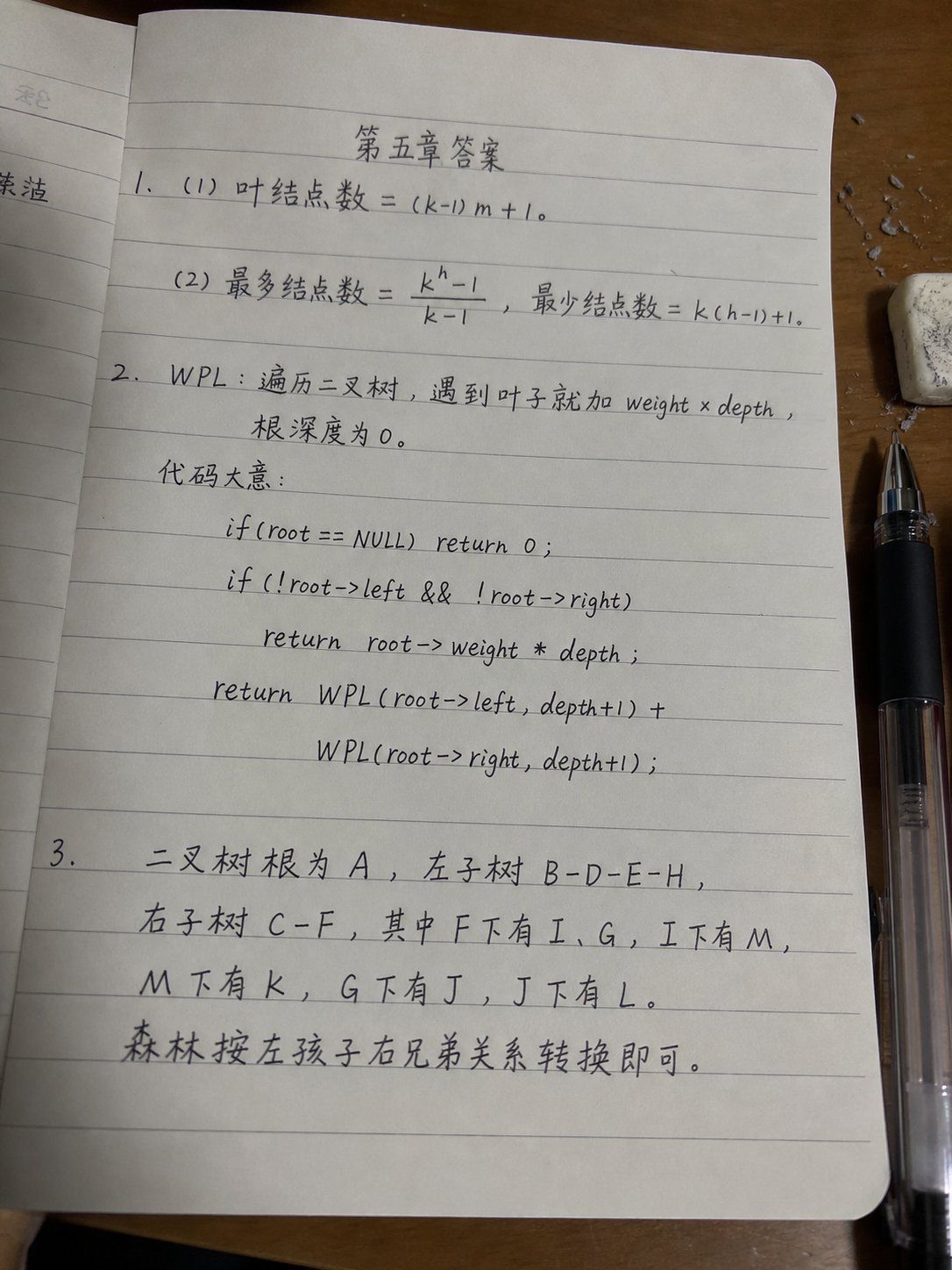
Goal: Create a realistic smartphone photo of a lined notebook page on a wooden desk, showing a handwritten software/data-structure homework answer sheet in slightly messy but believable black gel-pen handwriting. The page title should be centered near the top as {argument name="page title" default="第五章答案"}. Make it look like an actual photo submitted for class, with small imperfections, uneven writing, mild page curvature, shadows, and perspective distortion.

Canvas and camera: Vertical 3:4 photo, shot from above at a slight angle. The main notebook page fills most of the frame, tilted very slightly. The lighting is warm indoor desk lighting, with soft shadows and a realistic phone-camera look, not a flat scan.

Scene details: Use an open notebook with pale gray horizontal ruled lines and rounded page corners. A partial previous page is visible along the left edge. The notebook rests on a medium-brown wooden desk. On the right side, place a black transparent-bodied gel pen vertically near the lower-right edge, and a small white eraser with gray smudges near the upper-right corner. Add a few tiny eraser crumbs or paper debris scattered around the eraser. Keep the page off-white with subtle texture.

Handwritten content: Use Chinese handwritten notes mixed with math and C-style pseudocode. The handwriting should be neat enough to read but intentionally slightly casual and uneven, with natural spacing and occasional slant variation. Write exactly 3 numbered answer sections:

1. Section 1 contains exactly 2 subitems:
 - “(1) 叶结点数 = (k-1)m + 1。”
 - “(2) 最多结点数 = (k^h - 1)/(k - 1),最少结点数 = k(h-1)+1。”

2. Section 2 defines WPL and contains a short explanation plus exactly 5 pseudocode lines. Write:
 - “WPL:遍历二叉树,遇到叶子就加 weight × depth,”
 - “根深度为 0。”
 - “代码大意:”
 Then center or indent the following 5 code lines beneath it:
 - “if(root == NULL) return 0;”
 - “if(!root->left && !root->right)”
 - “return root->weight * depth;”
 - “return WPL(root->left, depth+1) +”
 - “WPL(root->right, depth+1);”

3. Section 3 contains exactly 5 handwritten lines describing binary tree and forest conversion:
 - “二叉树根为 A,左子树 B-D-E-H,”
 - “右子树 C-F,其中 F下有 I、G,I下有 M,”
 - “M下有 K,G下有 J,J下有 L。”
 - “森林按左孩子右兄弟关系转换即可。”
 The section number “3.” should start on the left margin, with the text continuing across the lower half of the page.

Visual style: Photorealistic, natural shadows, realistic lined paper, black ink, casual student handwriting. The writing should look handwritten rather than printed or typeset. Slightly imperfect alignment with ruled lines is desirable.

Constraints: Do not add extra diagrams, stamps, watermarks, decorative graphics, or typed fonts. Keep exactly 3 numbered sections, exactly 2 subitems in section 1, exactly 5 pseudocode lines in section 2, and the listed Chinese homework text only.- Category
- Charts & Infographics
- Model
- GPT Image 2
- Creator
- 余温
- Source ID
- 25232
- Published
- Jun 11, 2026
Views0