20

动态模糊时尚肖像
Enlarge

Example images

动态模糊时尚肖像

Prompt
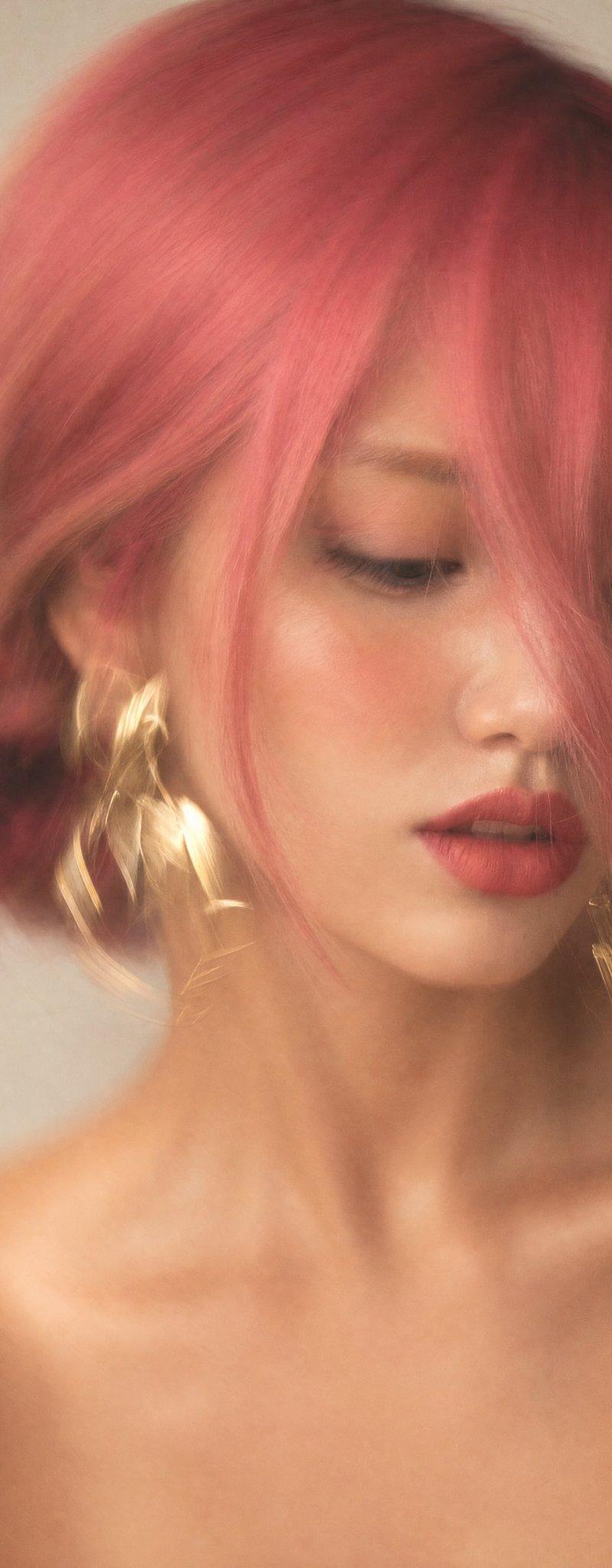
Do not change the face. Preserve 100% facial identity and resemblance. Create an artistic long-exposure fashion portrait of a {argument name="人物" default="woman"}, photographed on a smartphone or camera with intentional motion blur. She has a {argument name="发型" default="loose low braided bun"}, with a long strand of hair covering nearly half of her face. Her gaze is directed downward and to the side, one eye mostly hidden, lips slightly parted. She wears {argument name="配饰" default="large statement gold earrings"}, with bare shoulders visible. Skin is smooth and luminous with soft peach-rose blush, subtle highlighter, defined lashes, light eyeshadow, and matte dusty-rose lips outlined with a slightly darker lip liner. Extreme close-up vertical portrait (9:16), framed from upper chest to head, face filling most of the image and positioned slightly right of center. Neutral light-gray or off-white background. Soft natural window light creates warm, creamy golden tones and gentle facial modeling. Strong intentional motion blur affects the entire frame, especially the earrings and hair, creating elegant golden streaks, while the center of the face remains slightly sharper. Minimal noise, soft contrast, light editing. Mood: mysterious, cinematic, luxurious fashion editorial, atmospheric, elegant, and effortlessly sophisticated.
Category
Photography & Realism
Model
GPT Image 2
Creator
WasifAI
Source language
en
Views0
Source ID
26142
Published
Jun 18, 2026
Studio

Guide

About "动态模糊时尚肖像"

What is this prompt for?

"动态模糊时尚肖像" AI image prompt for GPT Image 2 (Photography & Realism). 一个用于生成具有艺术感动态模糊效果及专业布光时尚肖像的高质量提示词,重点在于保持面部特征。 Copy it on Picva and recreate the look in one…

The full copyable prompt and example visuals above are ready for AI image generation or one-click recreate in Picva.

How to use this prompt

  1. Step 1

    Open the prompt detail

    Review the example visuals, category, and full prompt text for "动态模糊时尚肖像".

  2. Step 2

    Copy the prompt

    Copy the prompt body from this page, or load it directly in Studio.

  3. Step 3

    Pick a model (GPT Image 2)

    Prefer GPT Image 2. If you switch models, keep subject and composition and tweak style terms.

  4. Step 4

    Generate and export

    Recreate the look in Picva, or export into your workflow for editing and publishing.

FAQ

What is the "动态模糊时尚肖像" prompt?
It is an AI image-generation prompt for GPT Image 2 in the Photography & Realism category. This page includes the full prompt text, example visuals, and a one-click recreate path in Picva.
How do I use this prompt to generate an image?
Copy the prompt from this page, or use Generate / Studio. Paste it into a compatible image model, or recreate the look in Picva with optional reference images.
Which model is this prompt for?
This page lists GPT Image 2. Most descriptive prompts also transfer to nearby image models such as GPT Image, Flux, or Midjourney with light style tweaks.
Can I use the result commercially?
You can usually copy the prompt for creation, but commercial use of the final image depends on the model terms, reference-image rights, and the generated content. Follow the source author and platform rules.