15

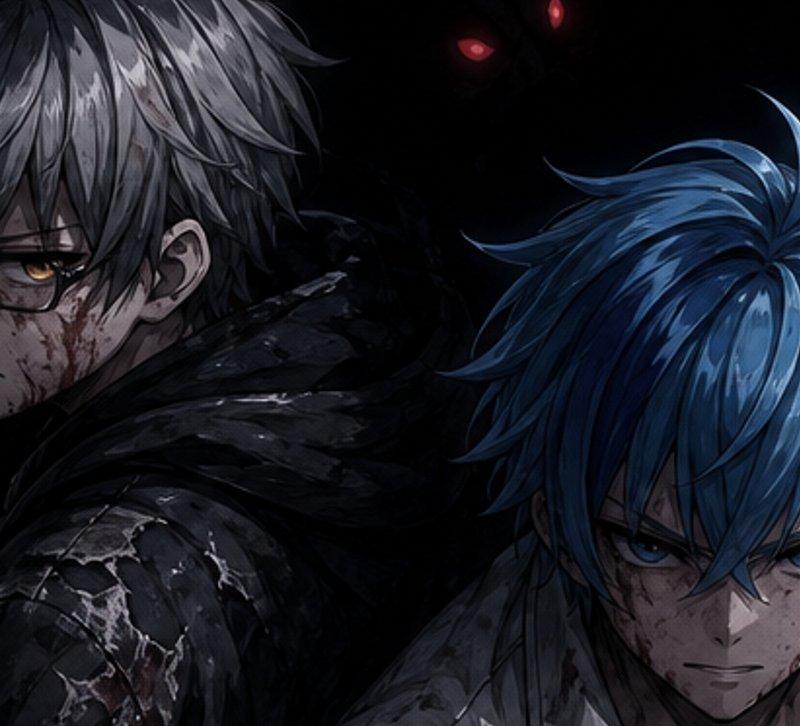
面容隐匿的暗黑动漫战士
Enlarge

Example images

面容隐匿的暗黑动漫战士

Prompt
Create a dark cinematic anime illustration in a gritty semi-realistic style, widescreen 16:9. Show exactly 2 male fantasy warriors from the chest up, standing back-to-back in a nearly black void. The left warrior has {argument name="left character hair color" default="messy silver-gray hair"}, pale skin, a visible ear with a small earring, and wears a tattered black hooded cloak over cracked dark armor; his left hand grips the hilt of a katana or short sword near the lower-left corner. The right warrior has {argument name="right character hair color" default="vivid layered blue hair"}, leans forward slightly, and wears scratched white-silver armor with dark cloth at the neck. Cover each character's face with a large opaque rectangular censor block: exactly 2 blocks total, one dark charcoal square over the left character's face in the upper-left center, and one dark blue-gray vertical rectangle over the right character's face in the lower-right center. In the background, hide shadowy demonic silhouettes with exactly 3 visible glowing red eyes: two near the upper center and one near the upper right. Use dramatic low-key lighting, high contrast, sharp painted hair strands, wet highlights on armor, scratches, grime, and a somber blue-black color palette. No text, no watermark, no extra characters, keep the composition cropped tightly and moody.
Category
Photography & Realism
Model
GPT Image 2
Creator
言峰 空也
Source language
en
Views0
Source ID
26558
Published
Jun 23, 2026
Studio

Guide

About "面容隐匿的暗黑动漫战士"

What is this prompt for?

"面容隐匿的暗黑动漫战士" AI image prompt for GPT Image 2 (Photography & Realism). 一幅充满情绪感的宽屏奇幻动漫场景,描绘了两名背靠背的披甲战士,他们的面部被遮挡,黑暗中闪烁着怪物的眼睛。 Copy it on Picva and recreate the l…

The full copyable prompt and example visuals above are ready for AI image generation or one-click recreate in Picva.

How to use this prompt

  1. Step 1

    Open the prompt detail

    Review the example visuals, category, and full prompt text for "面容隐匿的暗黑动漫战士".

  2. Step 2

    Copy the prompt

    Copy the prompt body from this page, or load it directly in Studio.

  3. Step 3

    Pick a model (GPT Image 2)

    Prefer GPT Image 2. If you switch models, keep subject and composition and tweak style terms.

  4. Step 4

    Generate and export

    Recreate the look in Picva, or export into your workflow for editing and publishing.

FAQ

What is the "面容隐匿的暗黑动漫战士" prompt?
It is an AI image-generation prompt for GPT Image 2 in the Photography & Realism category. This page includes the full prompt text, example visuals, and a one-click recreate path in Picva.
How do I use this prompt to generate an image?
Copy the prompt from this page, or use Generate / Studio. Paste it into a compatible image model, or recreate the look in Picva with optional reference images.
Which model is this prompt for?
This page lists GPT Image 2. Most descriptive prompts also transfer to nearby image models such as GPT Image, Flux, or Midjourney with light style tweaks.
Can I use the result commercially?
You can usually copy the prompt for creation, but commercial use of the final image depends on the model terms, reference-image rights, and the generated content. Follow the source author and platform rules.