20

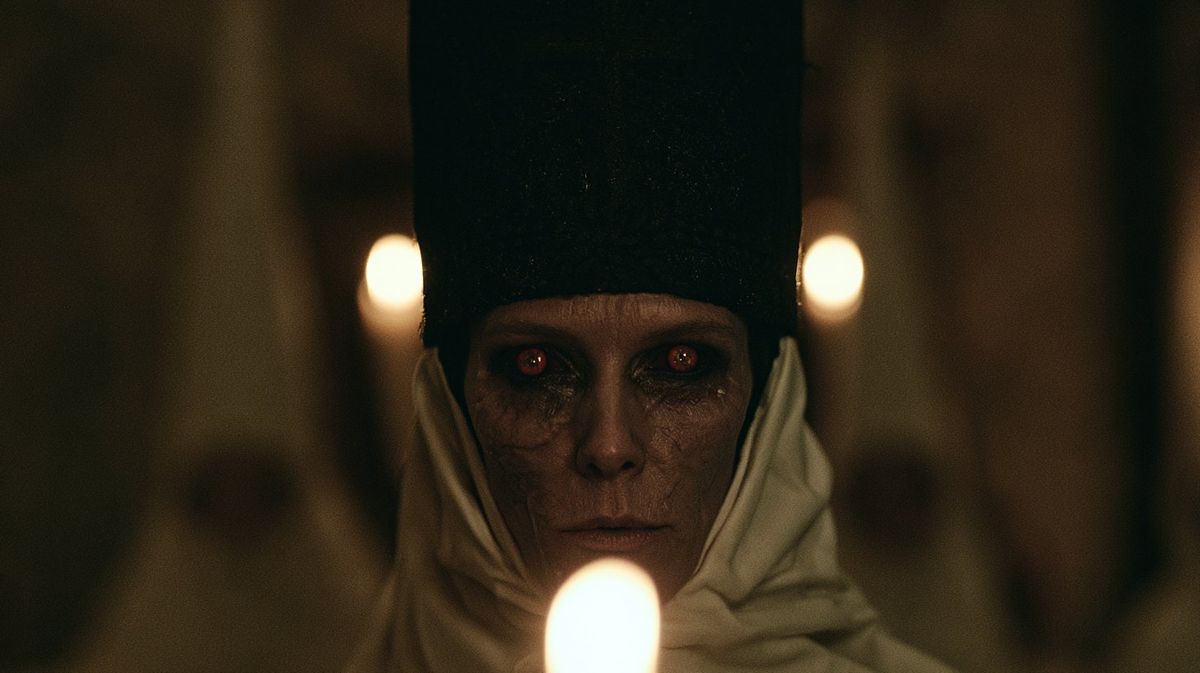
烛光下的神秘女祭司特写
Enlarge

烛光下的神秘女祭司特写

Prompt
Create a dark cinematic horror close-up of {argument name="character name" default="an ominous priestess"} staring directly into the camera inside a dim cathedral or crypt. The subject is centered and symmetrical, an elderly pale woman with gaunt features, cracked dry skin, deep shadowed eye sockets, and glowing red eyes with small eerie reflections. She wears a tall black rectangular headdress rising out of frame and an off-white wrapped hood or veil around her head and shoulders, with heavy folds of fabric framing her face. Place three visible candle flames: one large blurred flame in the extreme foreground at the bottom center partially obscuring her chin, and two smaller blurred flames behind her on the left and right at eye height, creating a ritualistic triangular composition. Use {argument name="lighting style" default="very low-key warm candlelight"}, shallow depth of field, strong background blur, heavy film grain, muted brown-black shadows, and a tense occult atmosphere. Frame as a widescreen 16:9 movie still, face centered, intimate and unsettling, photorealistic, with anamorphic cinematic softness, no text, no watermark.
Category
Photography & Realism
Model
GPT Image 2
Views0
Source ID
26908
Published
Jun 26, 2026

Guide

About "烛光下的神秘女祭司特写"

What is this prompt for?

"烛光下的神秘女祭司特写" AI image prompt for GPT Image 2 (Photography & Realism). 一个电影级恐怖提示词,用于生成一张烛光下神秘女祭司的写实肖像,带有发光的红眼和黑暗的仪式氛围。 Copy it on Picva and recreate the look i…

The full copyable prompt and example visuals above are ready for AI image generation or one-click recreate in Picva.

How to use this prompt

  1. Step 1

    Open the prompt detail

    Review the example visuals, category, and full prompt text for "烛光下的神秘女祭司特写".

  2. Step 2

    Copy the prompt

    Copy the prompt body from this page, or load it directly in Studio.

  3. Step 3

    Pick a model (GPT Image 2)

    Prefer GPT Image 2. If you switch models, keep subject and composition and tweak style terms.

  4. Step 4

    Generate and export

    Recreate the look in Picva, or export into your workflow for editing and publishing.

FAQ

What is the "烛光下的神秘女祭司特写" prompt?
It is an AI image-generation prompt for GPT Image 2 in the Photography & Realism category. This page includes the full prompt text, example visuals, and a one-click recreate path in Picva.
How do I use this prompt to generate an image?
Copy the prompt from this page, or use Generate / Studio. Paste it into a compatible image model, or recreate the look in Picva with optional reference images.
Which model is this prompt for?
This page lists GPT Image 2. Most descriptive prompts also transfer to nearby image models such as GPT Image, Flux, or Midjourney with light style tweaks.
Can I use the result commercially?
You can usually copy the prompt for creation, but commercial use of the final image depends on the model terms, reference-image rights, and the generated content. Follow the source author and platform rules.