20

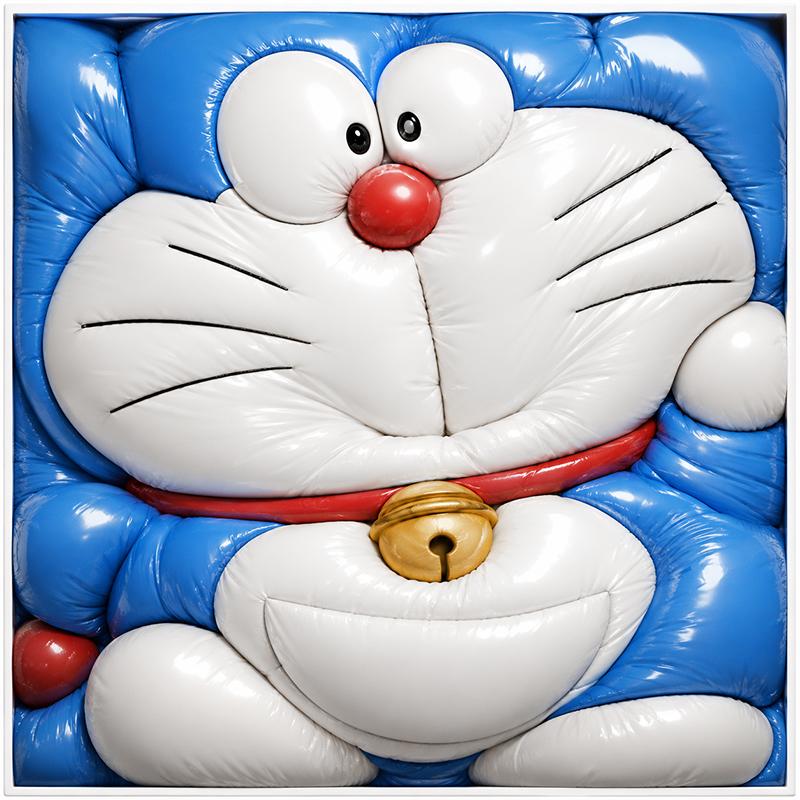
充气哆啦 A 梦气球盒
Enlarge

Example images

充气哆啦 A 梦气球盒

Prompt
Create a square, tightly framed hyperrealistic 3D render of {argument name="character name" default="Doraemon"} transformed into an overinflated glossy balloon sculpture, squeezed into a shallow white square box so every part bulges against the edges. The character has a shiny {argument name="main body color" default="bright blue"} head and body with a white face and belly, two oversized white bulging eyes with small black pupils, one round glossy red nose, six thin black whisker lines total, three on each cheek, a red collar, and one metallic gold bell centered below the face. The inflated vinyl material should show strong specular highlights, soft wrinkles, seams, pinched creases, and pressure folds where the balloon-like forms press together. Composition: front-facing close-up, cropped tightly so the head fills the top two-thirds and the body, paws, belly, and bell fill the lower third; the blue ears/head corners and limbs are compressed into rounded pillow-like blocks along the frame edges. Include exactly 2 eyes, 1 red nose, 6 whisker lines, 1 red collar, 1 gold bell, 2 white feet at the bottom, 2 white hands/paws at the sides, and a thin white square border around the packed form. Use studio lighting, ultra-detailed glossy latex texture, playful surreal toy aesthetic, no text, no background beyond the white tray frame.
Category
Photography & Realism
Model
GPT Image 2
Creator
withgrdnrush
Source language
en
Views0
Source ID
27197
Published
Jun 29, 2026
Studio

Guide

About "充气哆啦 A 梦气球盒"

What is this prompt for?

"充气哆啦 A 梦气球盒" AI image prompt for GPT Image 2 (Photography & Realism). 生成一个光泽感十足、像气球一样的卡通角色,紧密地塞进方形框架中,呈现出超现实的玩具风格视觉效果。 Copy it on Picva and recreate the look…

The full copyable prompt and example visuals above are ready for AI image generation or one-click recreate in Picva.

How to use this prompt

  1. Step 1

    Open the prompt detail

    Review the example visuals, category, and full prompt text for "充气哆啦 A 梦气球盒".

  2. Step 2

    Copy the prompt

    Copy the prompt body from this page, or load it directly in Studio.

  3. Step 3

    Pick a model (GPT Image 2)

    Prefer GPT Image 2. If you switch models, keep subject and composition and tweak style terms.

  4. Step 4

    Generate and export

    Recreate the look in Picva, or export into your workflow for editing and publishing.

FAQ

What is the "充气哆啦 A 梦气球盒" prompt?
It is an AI image-generation prompt for GPT Image 2 in the Photography & Realism category. This page includes the full prompt text, example visuals, and a one-click recreate path in Picva.
How do I use this prompt to generate an image?
Copy the prompt from this page, or use Generate / Studio. Paste it into a compatible image model, or recreate the look in Picva with optional reference images.
Which model is this prompt for?
This page lists GPT Image 2. Most descriptive prompts also transfer to nearby image models such as GPT Image, Flux, or Midjourney with light style tweaks.
Can I use the result commercially?
You can usually copy the prompt for creation, but commercial use of the final image depends on the model terms, reference-image rights, and the generated content. Follow the source author and platform rules.