Storyboard Re-Render 工作流 UI
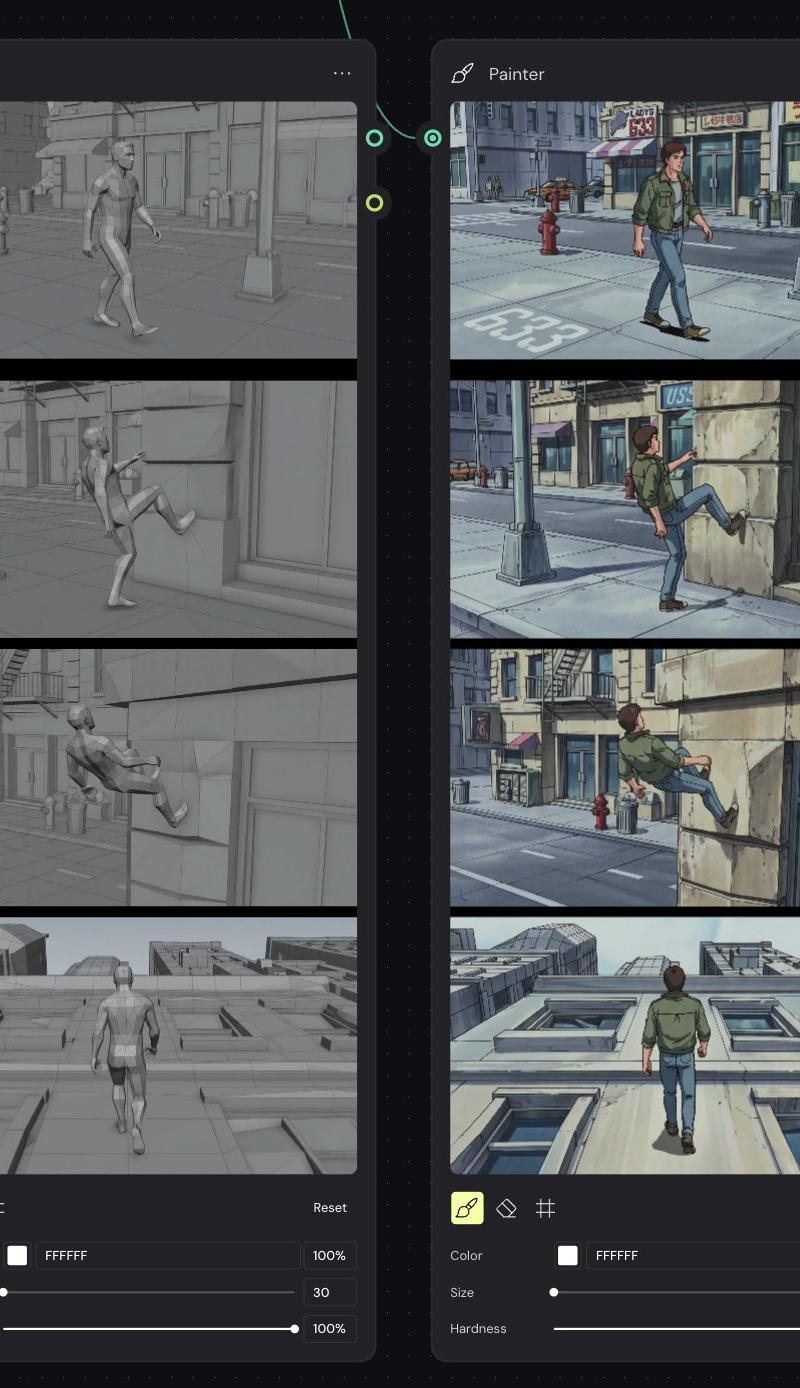
创建一个深色节点图 UI,用于对比灰色 3D 动态分镜与 90 年代动画风格重绘,适用于动画参考工作流。
- Category
- Charts & Infographics
- Model
- GPT Image 2
- Creator
- Finn McKenty
- Source language
- en
- Source ID
- 27505
- Published
- Jul 2, 2026
Full prompt
Goal: Create a dark node-based workflow screenshot showing a side-by-side comparison between a gray 3D animation storyboard and a re-rendered 90s anime-style storyboard, as if inside a visual AI/compositing tool.

Canvas: Landscape 4:3 screen capture on a nearly black dotted grid workspace. Add thin teal curved connector lines between nodes, with small circular input/output ports on the node edges.

Layout: Place exactly 2 tall rounded-rectangle nodes side by side. Both nodes are titled “Painter” at the top left with a small brush/pen icon, and a three-dot menu at the top right. The left node shows the grayscale source storyboard; the right node shows the stylized output storyboard. Each node contains exactly 4 stacked widescreen storyboard frames separated by thick black dividers, followed by a compact painter control panel at the bottom.

Left node storyboard frames: Render all 4 frames as monochrome gray 3D viewport/cinematic previz images with low-saturation clay materials and simple urban geometry. Frame 1: a generic male mannequin walks down a city sidewalk with storefronts, a hydrant, street pole, and road markings. Frame 2: the mannequin raises one leg toward a stone building wall as if beginning to climb. Frame 3: the mannequin is partially up the wall, body leaning back, legs pressed against the facade. Frame 4: rear view of the mannequin walking upward along a vertical building facade, with windows and rooftop perspective visible.

Right node storyboard frames: Recreate the same 4 actions and camera angles, but as detailed {argument name="visual style" default="1990s hand-painted anime cel animation"}. Use a young adult male character with {argument name="character outfit" default="green jacket, blue jeans, and brown shoes"}, brown hair, and realistic anime proportions. Frame 1: he walks along a sunny city sidewalk past storefronts, a red fire hydrant, streetlight, and road marking “633”. Frame 2: he lifts his foot onto a stone wall beside a glass storefront. Frame 3: he climbs higher on the building facade, with street, hydrant, fire escape, and shop signs in the background. Frame 4: rear view as he walks vertically up the pale building wall, windows receding below him and rooftops visible ahead.

Painter controls: At the bottom of each node show exactly 3 tool icons: a highlighted yellow brush icon, an eraser icon, and a grid/hash icon. Include a small “Reset” label on the right. Under the icons show exactly 3 labeled controls: Color with a white swatch and hex text “FFFFFF” plus “100%”; Size with a slider, left node value “30” and right node value “60”; Hardness with a slider and “100%”.

Visual style: Crisp UI mockup, dark charcoal panels, rounded corners, subtle shadows, muted teal connector accents, precise alignment. The left storyboard should look like a gray 3D render, while the right storyboard should look like a polished anime repaint with blue-gray shadows, ink outlines, hand-painted backgrounds, and cinematic framing.

Constraints: Use exactly 2 nodes, exactly 4 storyboard frames per node, and exactly 3 controls per node. Keep all visible UI text in English. Do not add extra panels, logos, watermarks, or explanatory captions outside the node interface.Translations2
Storyboard Re-Render 工作流 UI
zh-CN目标:创建一个深色基于节点的 UI 工作流截图,展示灰色 3D 动画分镜与重绘后的 90 年代动画风格分镜的并排对比,如同在视觉 AI/合成工具中一样。 画布:横向 4:3 屏幕截图,背景为近乎黑色的点阵网格工作区。在节点之间添加细青色曲线连接线,节点边缘带有小型圆形输入/输出端口。 布局:并排放置 2 个高大的圆角矩形节点。两个节点左上角均标有“Painter”标题及一个小画笔/钢笔图标,右上角有三点菜单。左侧节点显示灰度源分镜;右侧节点显示风格化输出分镜。每个节点包含 4 个堆叠的宽屏分镜帧,由粗黑分隔线隔开,底部配有紧凑的 Painter 控制面板。 左侧节点分镜帧:将所有 4 帧渲染为单色灰色 3D 视口/电影预演图像,采用低饱和度粘土材质和简单的城市几何结构。第 1 帧:一个普通男性人体模型走在城市人行道上,背景有店面、消防栓、路灯杆和道路标线。第 2 帧:人体模型向石墙抬起一条腿,仿佛开始攀爬。第 3 帧:人体模型已爬上墙壁一部分,身体后倾,双腿紧贴立面。第 4 帧:人体模型沿垂直建筑立面向上行走的后视图,可见窗户和屋顶透视。 右侧节点分镜帧:重现相同的 4 个动作和摄像机角度,但采用详细的 {argument name="visual style" default="1990s hand-painted anime cel animation"}。使用一名年轻男性角色,穿着 {argument name="character outfit" default="green jacket, blue jeans, and brown shoes"},棕色头发,具有写实的动画比例。第 1 帧:他走在阳光明媚的城市人行道上,经过店面、红色消防栓、路灯和道路标线“633”。第 2 帧:他将脚抬到玻璃店面旁边的石墙上。第 3 帧:他在建筑立面上爬得更高,背景中有街道、消防栓、消防梯和商店招牌。第 4 帧:他垂直走上苍白建筑墙面的后视图,窗户在他下方退去,前方可见屋顶。 Painter 控制:在每个节点底部显示 3 个工具图标:高亮显示的黄色画笔图标、橡皮擦图标和网格/哈希图标。右侧包含一个小的“Reset”标签。图标下方显示 3 个带标签的控件:Color(颜色),配有白色色块和十六进制文本“FFFFFF”及“100%”;Size(大小),配有滑块,左侧节点值为“30”,右侧节点值为“60”;Hardness(硬度),配有滑块和“100%”。 视觉风格:清晰的 UI 模型,深炭灰色面板,圆角,柔和阴影,柔和的青色连接线点缀,精确对齐。左侧分镜应看起来像灰色 3D 渲染,而右侧分镜应看起来像精致的动画重绘,带有蓝灰色阴影、墨水轮廓、手绘背景和电影级构图。 约束:使用 2 个节点,每个节点 4 个分镜帧,每个节点 3 个控件。所有可见的 UI 文本保持为英文。不要在节点界面外添加额外的面板、Logo、水印或说明性文字。
Storyboard Re-Render 工作流 UI
enGoal: Create a dark node-based workflow screenshot showing a side-by-side comparison between a gray 3D animation storyboard and a re-rendered 90s anime-style storyboard, as if inside a visual AI/compositing tool. Canvas: Landscape 4:3 screen capture on a nearly black dotted grid workspace. Add thin teal curved connector lines between nodes, with small circular input/output ports on the node edges. Layout: Place exactly 2 tall rounded-rectangle nodes side by side. Both nodes are titled “Painter” at the top left with a small brush/pen icon, and a three-dot menu at the top right. The left node shows the grayscale source storyboard; the right node shows the stylized output storyboard. Each node contains exactly 4 stacked widescreen storyboard frames separated by thick black dividers, followed by a compact painter control panel at the bottom. Left node storyboard frames: Render all 4 frames as monochrome gray 3D viewport/cinematic previz images with low-saturation clay materials and simple urban geometry. Frame 1: a generic male mannequin walks down a city sidewalk with storefronts, a hydrant, street pole, and road markings. Frame 2: the mannequin raises one leg toward a stone building wall as if beginning to climb. Frame 3: the mannequin is partially up the wall, body leaning back, legs pressed against the facade. Frame 4: rear view of the mannequin walking upward along a vertical building facade, with windows and rooftop perspective visible. Right node storyboard frames: Recreate the same 4 actions and camera angles, but as detailed {argument name="visual style" default="1990s hand-painted anime cel animation"}. Use a young adult male character with {argument name="character outfit" default="green jacket, blue jeans, and brown shoes"}, brown hair, and realistic anime proportions. Frame 1: he walks along a sunny city sidewalk past storefronts, a red fire hydrant, streetlight, and road marking “633”. Frame 2: he lifts his foot onto a stone wall beside a glass storefront. Frame 3: he climbs higher on the building facade, with street, hydrant, fire escape, and shop signs in the background. Frame 4: rear view as he walks vertically up the pale building wall, windows receding below him and rooftops visible ahead. Painter controls: At the bottom of each node show exactly 3 tool icons: a highlighted yellow brush icon, an eraser icon, and a grid/hash icon. Include a small “Reset” label on the right. Under the icons show exactly 3 labeled controls: Color with a white swatch and hex text “FFFFFF” plus “100%”; Size with a slider, left node value “30” and right node value “60”; Hardness with a slider and “100%”. Visual style: Crisp UI mockup, dark charcoal panels, rounded corners, subtle shadows, muted teal connector accents, precise alignment. The left storyboard should look like a gray 3D render, while the right storyboard should look like a polished anime repaint with blue-gray shadows, ink outlines, hand-painted backgrounds, and cinematic framing. Constraints: Use exactly 2 nodes, exactly 4 storyboard frames per node, and exactly 3 controls per node. Keep all visible UI text in English. Do not add extra panels, logos, watermarks, or explanatory captions outside the node interface.