深色模式词典条目应用
创建一个精致的 iPhone 风格词汇应用界面,包含英语词典条目、翻译、插图、发音及底部导航。
- Category
- UI & Interfaces
- Model
- GPT Image 2
- Creator
- Akira
- Source language
- en
- Source ID
- 27600
- Published
- Jul 3, 2026
Full prompt
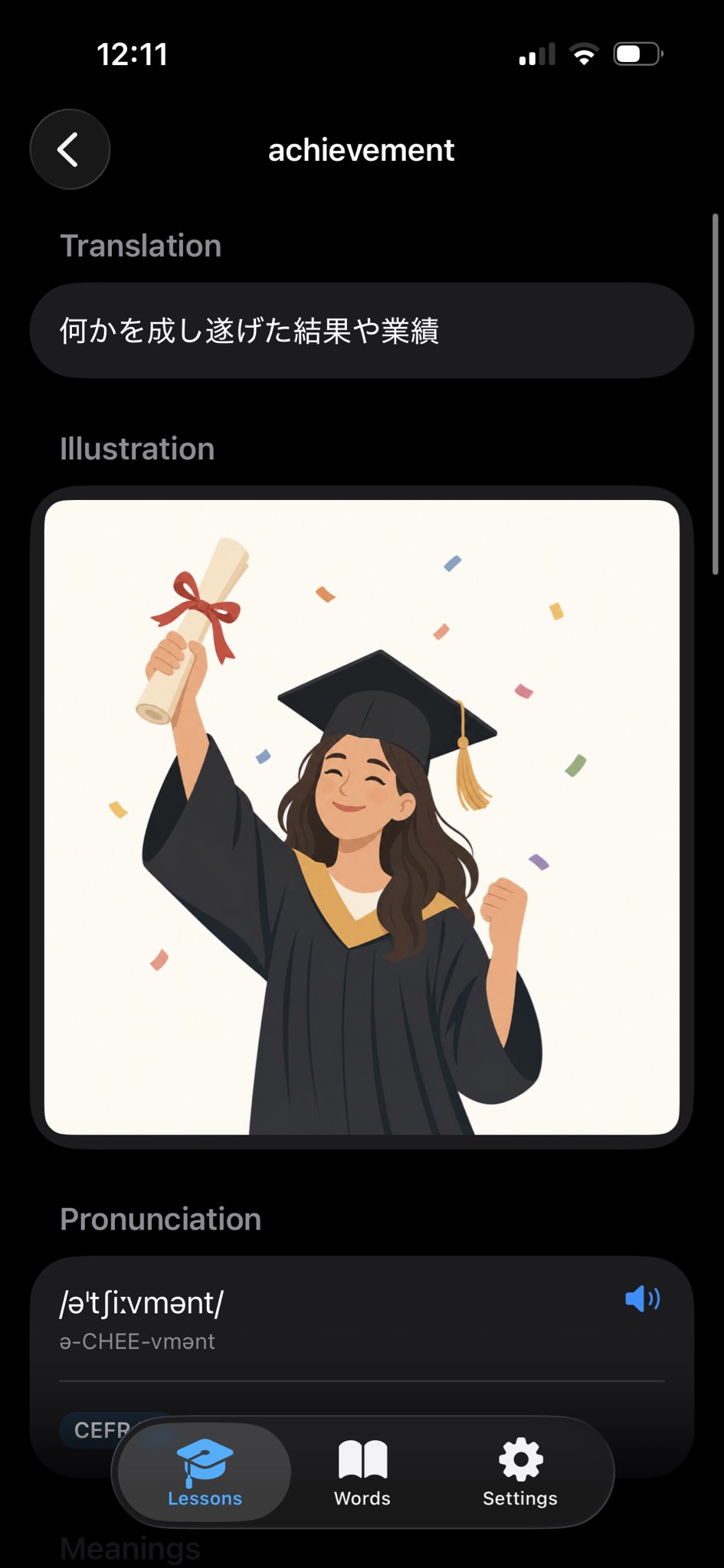
Goal: Create a realistic iPhone screenshot of a sleek dark-mode English dictionary/vocabulary learning app showing the entry for {argument name="word" default="achievement"}.

Canvas: Vertical smartphone screen, 9:16 aspect ratio, black background, iOS-style status bar at the top showing 12:11 on the left and cellular/Wi‑Fi/battery icons on the right. Use rounded cards, soft shadows, and a modern minimal UI.

Layout: Top navigation has exactly 2 elements: a circular dark back button with a white left chevron on the upper left, and the centered page title “achievement” in white. A thin vertical scroll indicator appears along the right edge.

Sections: Show exactly 4 visible content sections in this order: 1) Translation, 2) Illustration, 3) Pronunciation, 4) a partially visible Meanings header at the bottom. Section labels are muted gray, bold, and left aligned.

Text content: Under “Translation,” place one rounded dark pill card containing the Japanese text {argument name="translation text" default="何かを成し遂げた結果や業績"}. Under “Pronunciation,” create one large rounded dark card with the phonetic spelling {argument name="phonetic text" default="/əˈtʃiːvmənt/"}, the readable pronunciation “ə-CHEE-vmənt,” a blue speaker icon on the right, a thin divider line, and a small rounded “CEFR” tag near the lower left.

Illustration: In the Illustration section, place one large rounded rectangle image card with an off-white background. Inside it, draw a cheerful young graduate woman in a black graduation gown and mortarboard with a gold tassel, smiling with eyes closed. She raises a rolled diploma tied with a red ribbon in her left hand and clenches her right fist in celebration. Add colorful rectangular confetti around her. Use a flat vector illustration style, warm colors, clean edges, and no text inside the illustration.

Bottom navigation: Overlay a floating rounded black tab bar at the bottom with exactly 3 tabs: “Lessons” with a blue graduation-cap icon and highlighted gray pill background, “Words” with a white open-book icon, and “Settings” with a white gear icon. The tab bar partially covers the pronunciation card and the faint “Meanings” header.

Visual style: High-fidelity mobile app mockup, dark theme, iOS proportions, rounded corners, subtle gradients, white and gray typography, blue accent color, polished product screenshot. Avoid extra words, extra icons, watermarks, or browser chrome.
Translations
深色模式词典条目应用
enGoal: Create a realistic iPhone screenshot of a sleek dark-mode English dictionary/vocabulary learning app showing the entry for {argument name="word" default="achievement"}. Canvas: Vertical smartphone screen, 9:16 aspect ratio, black background, iOS-style status bar at the top showing 12:11 on the left and cellular/Wi‑Fi/battery icons on the right. Use rounded cards, soft shadows, and a modern minimal UI. Layout: Top navigation has exactly 2 elements: a circular dark back button with a white left chevron on the upper left, and the centered page title “achievement” in white. A thin vertical scroll indicator appears along the right edge. Sections: Show exactly 4 visible content sections in this order: 1) Translation, 2) Illustration, 3) Pronunciation, 4) a partially visible Meanings header at the bottom. Section labels are muted gray, bold, and left aligned. Text content: Under “Translation,” place one rounded dark pill card containing the Japanese text {argument name="translation text" default="何かを成し遂げた結果や業績"}. Under “Pronunciation,” create one large rounded dark card with the phonetic spelling {argument name="phonetic text" default="/əˈtʃiːvmənt/"}, the readable pronunciation “ə-CHEE-vmənt,” a blue speaker icon on the right, a thin divider line, and a small rounded “CEFR” tag near the lower left. Illustration: In the Illustration section, place one large rounded rectangle image card with an off-white background. Inside it, draw a cheerful young graduate woman in a black graduation gown and mortarboard with a gold tassel, smiling with eyes closed. She raises a rolled diploma tied with a red ribbon in her left hand and clenches her right fist in celebration. Add colorful rectangular confetti around her. Use a flat vector illustration style, warm colors, clean edges, and no text inside the illustration. Bottom navigation: Overlay a floating rounded black tab bar at the bottom with exactly 3 tabs: “Lessons” with a blue graduation-cap icon and highlighted gray pill background, “Words” with a white open-book icon, and “Settings” with a white gear icon. The tab bar partially covers the pronunciation card and the faint “Meanings” header. Visual style: High-fidelity mobile app mockup, dark theme, iOS proportions, rounded corners, subtle gradients, white and gray typography, blue accent color, polished product screenshot. Avoid extra words, extra icons, watermarks, or browser chrome.
深色模式词典条目应用
zh-CN目标:创建一个逼真的 iPhone 截图,展示一个时尚的深色模式英语词典/词汇学习应用,显示 {argument name="word" default="achievement"} 的词条。 画布:垂直智能手机屏幕,9:16 纵横比,黑色背景,顶部显示 iOS 风格状态栏(左侧显示 12:11,右侧显示蜂窝网络/Wi-Fi/电池图标)。使用圆角卡片、柔和阴影和现代极简 UI。 布局:顶部导航栏包含 2 个元素:左上角带有白色左箭头的圆形深色返回按钮,以及居中的白色页面标题“achievement”。右侧边缘显示一条细长的垂直滚动条。 部分:按顺序显示 4 个可见内容区域:1) 翻译,2) 插图,3) 发音,4) 底部部分可见的“含义”标题。区域标签为柔和的灰色、加粗且左对齐。 文本内容:在“翻译”下方,放置一个圆角深色胶囊卡片,包含日语文本 {argument name="translation text" default="何かを成し遂げた結果や業績"}。在“发音”下方,创建一个大的圆角深色卡片,包含音标 {argument name="phonetic text" default="/əˈtʃiːvmənt/"}、可读发音“ə-CHEE-vmənt”、右侧的蓝色扬声器图标、一条细分割线,以及左下角的一个小型圆角“CEFR”标签。 插图:在“插图”部分,放置一个大的圆角矩形图片卡片,背景为灰白色。卡片内绘制一名快乐的年轻女毕业生,身穿黑色学士服,头戴带有金色流苏的学士帽,闭眼微笑。她左手举着系有红色丝带的卷轴文凭,右手握拳庆祝。周围添加彩色矩形纸屑。使用扁平矢量插图风格,暖色调,边缘清晰,插图内无文字。 底部导航:在底部覆盖一个悬浮的圆角黑色标签栏,包含 3 个标签:“Lessons”(带有蓝色学士帽图标和高亮灰色胶囊背景)、“Words”(带有白色打开的书本图标)和“Settings”(带有白色齿轮图标)。标签栏部分遮挡了发音卡片和模糊的“含义”标题。 视觉风格:高保真移动应用模型,深色主题,iOS 比例,圆角,微妙的渐变,白色和灰色字体,蓝色强调色,精致的产品截图。避免多余的文字、图标、水印或浏览器边框。