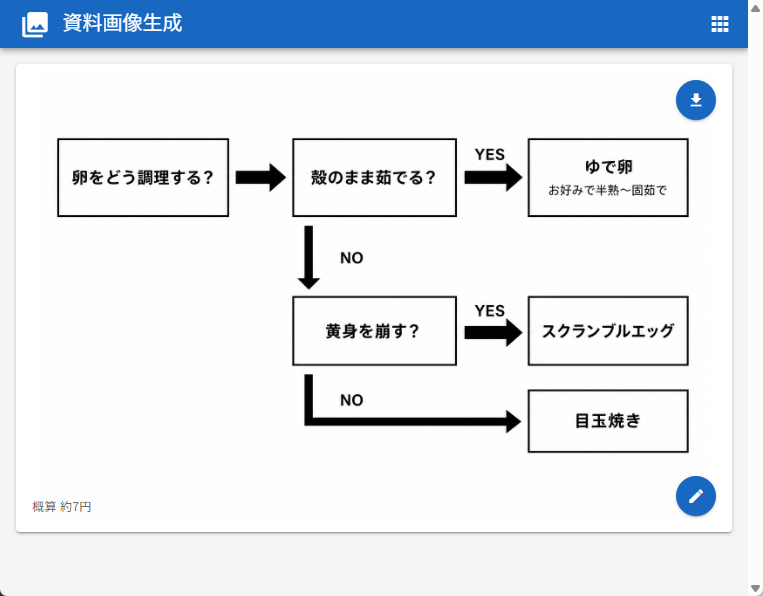
日式鸡蛋烹饪流程图 UI
生成一张简洁的 Web 应用截图,展示用于选择鸡蛋烹饪方式的日式决策流程图。
- Category
- Charts & Infographics
- Model
- GPT Image 2
- Creator
- Tanaka Seigo
- Source language
- en
- Source ID
- 28048
- Published
- Jul 8, 2026
Full prompt
Goal: Create a clean web-app screenshot showing a generated document image: a simple Japanese decision flowchart for how to cook eggs.

Canvas: 762×596 px desktop browser/app view. Light gray page background with a bright blue top app bar spanning the full width. The app bar contains a small white image icon at far left, the Japanese title {argument name="app title" default="資料画像生成"} in white, and a small white grid/menu icon at the far right. A subtle scrollbar is visible on the right edge.

Main card layout: Center a large white rounded rectangle card with a faint drop shadow, about 718×468 px, starting below the blue header. Inside the card is a black-and-white flowchart on a white field, leaving generous margins. Add two floating circular blue action buttons on the right side of the card: one near the upper-right with a white download arrow icon, and one near the lower-right with a white pencil/edit icon.

Flowchart elements: Use exactly 6 rectangular outlined boxes with white fill and black borders, connected by exactly 5 thick black arrows. All text is Japanese and bold black unless noted.
1. Left box: 「卵をどう調理する?」
2. Top middle box: 「殻のまま茹でる?」
3. Top right box: main text 「ゆで卵」 with smaller subtitle 「お好みで半熟〜固茹で」
4. Middle lower box: 「黄身を崩す?」
5. Middle right box: 「スクランブルエッグ」
6. Bottom right box: 「目玉焼き」

Flowchart connections and labels: A right-pointing arrow connects box 1 to box 2. From box 2, a right-pointing arrow labeled 「YES」 above it connects to box 3. From box 2, a downward arrow labeled 「NO」 to the right descends to box 4. From box 4, a right-pointing arrow labeled 「YES」 above it connects to box 5. From box 4, a thick path goes downward then right, labeled 「NO」 near the turn, ending with a right-pointing arrow into box 6.

Footer text: At the lower-left inside the card, add small gray Japanese text {argument name="cost note" default="概算 約7円"}.

Visual style: Minimal monochrome flowchart, clean sans-serif Japanese UI font, thick black arrows, crisp rectangular outlines, lots of white space, realistic screenshot-like UI rendering. Avoid extra boxes, extra icons, decorative colors inside the chart, watermarks, or additional explanatory text.
Translations
日式鸡蛋烹饪流程图 UI
enGoal: Create a clean web-app screenshot showing a generated document image: a simple Japanese decision flowchart for how to cook eggs. Canvas: 762×596 px desktop browser/app view. Light gray page background with a bright blue top app bar spanning the full width. The app bar contains a small white image icon at far left, the Japanese title {argument name="app title" default="資料画像生成"} in white, and a small white grid/menu icon at the far right. A subtle scrollbar is visible on the right edge. Main card layout: Center a large white rounded rectangle card with a faint drop shadow, about 718×468 px, starting below the blue header. Inside the card is a black-and-white flowchart on a white field, leaving generous margins. Add two floating circular blue action buttons on the right side of the card: one near the upper-right with a white download arrow icon, and one near the lower-right with a white pencil/edit icon. Flowchart elements: Use exactly 6 rectangular outlined boxes with white fill and black borders, connected by exactly 5 thick black arrows. All text is Japanese and bold black unless noted. 1. Left box: 「卵をどう調理する?」 2. Top middle box: 「殻のまま茹でる?」 3. Top right box: main text 「ゆで卵」 with smaller subtitle 「お好みで半熟〜固茹で」 4. Middle lower box: 「黄身を崩す?」 5. Middle right box: 「スクランブルエッグ」 6. Bottom right box: 「目玉焼き」 Flowchart connections and labels: A right-pointing arrow connects box 1 to box 2. From box 2, a right-pointing arrow labeled 「YES」 above it connects to box 3. From box 2, a downward arrow labeled 「NO」 to the right descends to box 4. From box 4, a right-pointing arrow labeled 「YES」 above it connects to box 5. From box 4, a thick path goes downward then right, labeled 「NO」 near the turn, ending with a right-pointing arrow into box 6. Footer text: At the lower-left inside the card, add small gray Japanese text {argument name="cost note" default="概算 約7円"}. Visual style: Minimal monochrome flowchart, clean sans-serif Japanese UI font, thick black arrows, crisp rectangular outlines, lots of white space, realistic screenshot-like UI rendering. Avoid extra boxes, extra icons, decorative colors inside the chart, watermarks, or additional explanatory text.
日式鸡蛋烹饪流程图 UI
zh-CN目标:创建一个简洁的 Web 应用截图,展示生成的文档图像:一张简单的日式鸡蛋烹饪决策流程图。 画布:762×596 像素的桌面浏览器/应用视图。浅灰色页面背景,顶部有一个横跨全宽的亮蓝色应用栏。应用栏最左侧有一个白色小图标,中间是白色的日文标题 {argument name="app title" default="資料画像生成"},最右侧有一个白色网格/菜单图标。右侧边缘可见一个细微的滚动条。 主卡片布局:在蓝色页眉下方居中放置一个带有淡淡投影的白色圆角矩形卡片,尺寸约为 718×468 像素。卡片内部是一个位于白色区域上的黑白流程图,留有充足的边距。在卡片右侧添加两个悬浮的蓝色圆形操作按钮:一个靠近右上角,带有白色下载箭头图标;另一个靠近右下角,带有白色铅笔/编辑图标。 流程图元素:使用 6 个带有白色填充和黑色边框的矩形框,由 5 个粗黑色箭头连接。除非另有说明,所有文字均为加粗的黑色日文。 1. 左侧框:「卵をどう調理する?」 2. 顶部中间框:「殻のまま茹でる?」 3. 顶部右侧框:主文本「ゆで卵」,下方有较小的副标题「お好みで半熟〜固茹で」 4. 中间下方框:「黄身を崩す?」 5. 中间右侧框:「スクランブルエッグ」 6. 底部右侧框:「目玉焼き」 流程图连接与标签:一个向右的箭头将框 1 连接到框 2。从框 2 出发,上方标注「YES」的向右箭头连接到框 3。从框 2 出发,右侧标注「NO」的向下箭头连接到框 4。从框 4 出发,上方标注「YES」的向右箭头连接到框 5。从框 4 出发,一条粗路径先向下再向右,转弯处附近标注「NO」,末端以一个向右的箭头指向框 6。 页脚文本:在卡片内部左下角,添加一行灰色的小字日文 {argument name="cost note" default="概算 約7円"}。 视觉风格:极简黑白流程图,简洁的无衬线日文 UI 字体,粗黑色箭头,清晰的矩形轮廓,留白充足,呈现真实的截图式 UI 渲染。避免添加多余的框、图标、图表内的装饰性颜色、水印或额外的说明文字。