动漫角色生成工作流
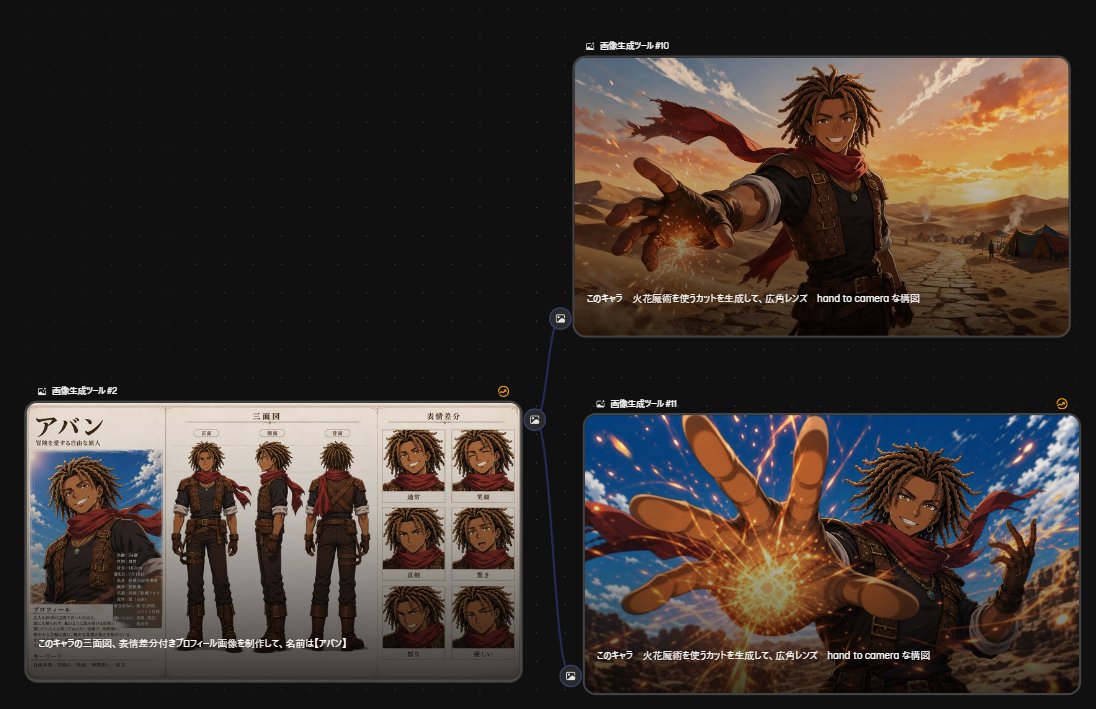
一个深色调的 AI 工具对比画布,展示了一个角色设定图如何输入并生成两张电影感动漫动作画面。
- Category
- Charts & Infographics
- Model
- GPT Image 2
- Creator
- ジジはAI漫画部族
- Source language
- en
- Source ID
- 28173
- Published
- Jul 9, 2026
Full prompt
Goal: Create a dark UI-style comparison canvas showing three generated anime-image results connected in a workflow graph, as if viewed inside an image generation tool.

Canvas: Wide 16:9 screenshot composition with a nearly black dotted-grid background. Use subtle blue connector lines and small circular image-node icons between panels. The layout contains exactly 3 rounded rectangular panels: 1 large character sheet panel on the lower left, 1 cinematic panel on the upper right, and 1 cinematic panel on the lower right.

Layout: Place the lower-left panel as the source reference node, labeled in small white Japanese text above it: 「画像生成ツール #2」. From its right side, draw a branching blue connector line to the two right panels. Label the upper-right panel 「画像生成ツール #10」 and the lower-right panel 「画像生成ツール #1」. Add tiny yellow circular refresh-style icons near the top-right corner of the right-side panels. Keep all panels with thin gray borders, rounded corners, and faint drop shadows.

Left panel content: Show a detailed anime character design sheet for {argument name="character name" default="Aban"}, a tan-skinned young male adventurer with medium-length brown dreadlocks, athletic build, confident expression, sleeveless dark tunic, brown leather vest with straps, fingerless gloves, dark pants, boots, pendant necklace, and a flowing red scarf. The sheet contains exactly 3 full-body turnaround views in the center: front view, side view, and back view. It also contains exactly 6 expression portrait boxes on the right arranged in a 2-column by 3-row grid: normal smile, broad grin, serious, surprised, angry, and sad. On the left side of the sheet, include a larger bust portrait under a large Japanese name title 「アバン」, with small Japanese profile text blocks and stat-like labels beneath. Use beige parchment paper, clean black manga-style line art, and muted watercolor anime coloring.

Upper-right panel content: Show the same character in a cinematic desert scene at sunset, framed from waist up with a dramatic wide-angle lens. He smiles confidently while reaching one hand toward the camera, fingers foreshortened, with a glowing orange fire-magic spark forming near his palm. His red scarf blows behind him. The background has cracked desert ground, distant tents, low mountains, warm orange clouds, and golden sunlight. Add a white Japanese caption along the lower edge of the image: 「このキャラ 火花魔術を使うカットを生成して、広角レンズ hand to camera な構図」.

Lower-right panel content: Show a more dynamic anime action version of the same scene, closer to the camera and more intense. The character reaches one large foreshortened hand directly toward the viewer, with a bright circular burst of fiery magic at the palm, orange sparks flying across the frame, blue sky behind him, desert cliffs in the distance, and his red scarf whipping dramatically. Use high-energy perspective, strong motion, vivid lighting, and sharp anime rendering. Repeat the same white Japanese caption along the bottom: 「このキャラ 火花魔術を使うカットを生成して、広角レンズ hand to camera な構図」.

Visual style: Sleek AI-tool screenshot aesthetic, dark interface, crisp panel edges, small UI labels, anime fantasy illustration inside each panel. The character should remain consistent across all 3 panels: {argument name="hair color" default="brown dreadlocks"}, tan skin, red scarf, leather adventurer outfit, friendly but heroic personality. Use the magic effect color {argument name="magic color" default="orange fire"} and the environment {argument name="setting" default="desert at sunset"}.

Constraints: Include exactly 3 main image panels, exactly 3 full-body turnaround views, exactly 6 expression portraits, exactly 2 right-side cinematic action images, and exactly 1 branching connector from the left panel to the two right panels. Keep the Japanese text legible enough to read where specified, but do not add extra large titles outside the UI labels.
Translations
动漫角色生成工作流
enGoal: Create a dark UI-style comparison canvas showing three generated anime-image results connected in a workflow graph, as if viewed inside an image generation tool. Canvas: Wide 16:9 screenshot composition with a nearly black dotted-grid background. Use subtle blue connector lines and small circular image-node icons between panels. The layout contains exactly 3 rounded rectangular panels: 1 large character sheet panel on the lower left, 1 cinematic panel on the upper right, and 1 cinematic panel on the lower right. Layout: Place the lower-left panel as the source reference node, labeled in small white Japanese text above it: 「画像生成ツール #2」. From its right side, draw a branching blue connector line to the two right panels. Label the upper-right panel 「画像生成ツール #10」 and the lower-right panel 「画像生成ツール #1」. Add tiny yellow circular refresh-style icons near the top-right corner of the right-side panels. Keep all panels with thin gray borders, rounded corners, and faint drop shadows. Left panel content: Show a detailed anime character design sheet for {argument name="character name" default="Aban"}, a tan-skinned young male adventurer with medium-length brown dreadlocks, athletic build, confident expression, sleeveless dark tunic, brown leather vest with straps, fingerless gloves, dark pants, boots, pendant necklace, and a flowing red scarf. The sheet contains exactly 3 full-body turnaround views in the center: front view, side view, and back view. It also contains exactly 6 expression portrait boxes on the right arranged in a 2-column by 3-row grid: normal smile, broad grin, serious, surprised, angry, and sad. On the left side of the sheet, include a larger bust portrait under a large Japanese name title 「アバン」, with small Japanese profile text blocks and stat-like labels beneath. Use beige parchment paper, clean black manga-style line art, and muted watercolor anime coloring. Upper-right panel content: Show the same character in a cinematic desert scene at sunset, framed from waist up with a dramatic wide-angle lens. He smiles confidently while reaching one hand toward the camera, fingers foreshortened, with a glowing orange fire-magic spark forming near his palm. His red scarf blows behind him. The background has cracked desert ground, distant tents, low mountains, warm orange clouds, and golden sunlight. Add a white Japanese caption along the lower edge of the image: 「このキャラ 火花魔術を使うカットを生成して、広角レンズ hand to camera な構図」. Lower-right panel content: Show a more dynamic anime action version of the same scene, closer to the camera and more intense. The character reaches one large foreshortened hand directly toward the viewer, with a bright circular burst of fiery magic at the palm, orange sparks flying across the frame, blue sky behind him, desert cliffs in the distance, and his red scarf whipping dramatically. Use high-energy perspective, strong motion, vivid lighting, and sharp anime rendering. Repeat the same white Japanese caption along the bottom: 「このキャラ 火花魔術を使うカットを生成して、広角レンズ hand to camera な構図」. Visual style: Sleek AI-tool screenshot aesthetic, dark interface, crisp panel edges, small UI labels, anime fantasy illustration inside each panel. The character should remain consistent across all 3 panels: {argument name="hair color" default="brown dreadlocks"}, tan skin, red scarf, leather adventurer outfit, friendly but heroic personality. Use the magic effect color {argument name="magic color" default="orange fire"} and the environment {argument name="setting" default="desert at sunset"}. Constraints: Include exactly 3 main image panels, exactly 3 full-body turnaround views, exactly 6 expression portraits, exactly 2 right-side cinematic action images, and exactly 1 branching connector from the left panel to the two right panels. Keep the Japanese text legible enough to read where specified, but do not add extra large titles outside the UI labels.
动漫角色生成工作流
zh-CN目标:创建一个深色 UI 风格的对比画布,展示三个生成的动漫图像结果,并以工作流图表的形式连接,如同在图像生成工具中查看一样。 画布:16:9 的宽屏截图构图,背景为近乎黑色的点阵网格。使用细微的蓝色连接线和面板间的小型圆形图像节点图标。布局包含 3 个圆角矩形面板:左下角为 1 个大型角色设定面板,右上角和右下角各为 1 个电影感面板。 布局:将左下角面板作为源参考节点,上方用小号白色日语文本标注:「画像生成ツール #2」。从其右侧引出一条分支蓝色连接线,连接至右侧的两个面板。将右上角面板标注为「画像生成ツール #10」,右下角面板标注为「画像生成ツール #1」。在右侧面板的右上角附近添加微小的黄色圆形刷新图标。所有面板均保持细灰色边框、圆角和淡淡的投影效果。 左侧面板内容:展示 {argument name="character name" default="Aban"} 的详细动漫角色设定图,他是一位肤色黝黑的年轻男性冒险家,留着中等长度的棕色脏辫,体格健壮,表情自信,身穿无袖深色束腰外衣,搭配带绑带的棕色皮背心、露指手套、深色长裤、靴子、吊坠项链和飘逸的红色围巾。设定图中心包含 3 个全身转向视图:正面、侧面和背面。右侧包含 6 个表情肖像框,按 2 列 3 行排列:正常微笑、开怀大笑、严肃、惊讶、愤怒和悲伤。在设定图左侧,包含一个较大的半身肖像,下方有大号日语名称标题「アバン」,以及下方的日语个人资料文本块和类似属性的标签。使用米色羊皮纸质感、干净的黑色漫画风格线条以及柔和的水彩动漫配色。 右上角面板内容:展示同一角色在日落时分沙漠场景中的电影感画面,采用腰部以上的广角镜头构图。他自信地微笑着,一只手伸向镜头,手指透视缩短,手掌附近形成闪烁的橙色火魔法火花。他的红色围巾在身后飘扬。背景为龟裂的沙漠地面、远处的帐篷、低矮的山脉、温暖的橙色云彩和金色的阳光。在图像下边缘添加白色日语字幕:「このキャラ 火花魔術を使うカットを生成して、広角レンズ hand to camera な構図」。 右下角面板内容:展示同一场景更具动态感的动漫动作版本,镜头更近,画面更激烈。角色将一只巨大的透视缩短的手直接伸向观众,手掌处有明亮的圆形火魔法爆发,橙色火花飞溅整个画面,身后是蓝天,远处是沙漠悬崖,红色围巾剧烈飘动。使用高能透视、强烈的动感、生动的光影和锐利的动漫渲染。在底部重复相同的白色日语字幕:「このキャラ 火花魔術を使うカットを生成して、広角レンズ hand to camera な構図」。 视觉风格:时髦的 AI 工具截图美学,深色界面,清晰的面板边缘,小型 UI 标签,每个面板内均为动漫奇幻插画。角色在所有 3 个面板中应保持一致:{argument name="hair color" default="棕色脏辫"}、黝黑皮肤、红色围巾、皮质冒险家服装、友好而英勇的个性。使用魔法效果颜色 {argument name="magic color" default="橙色火焰"} 以及环境 {argument name="setting" default="日落时的沙漠"}。 约束:包含 3 个主要图像面板,3 个全身转向视图,6 个表情肖像,2 个右侧电影感动作图像,以及 1 条从左侧面板到右侧两个面板的分支连接线。保持日语文本在指定位置清晰可读,但不要在 UI 标签之外添加额外的大标题。