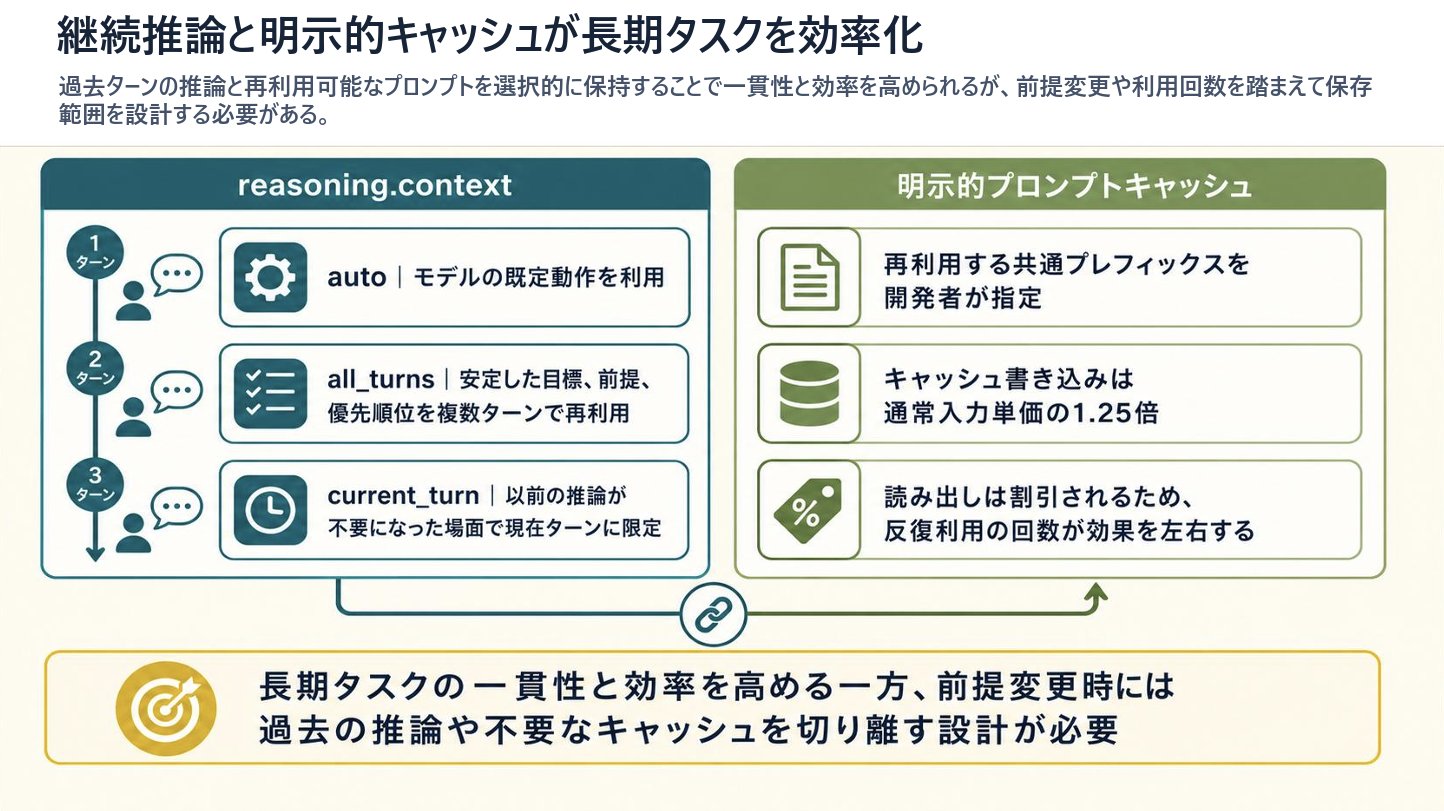
推理上下文与 Prompt Cache 演示幻灯片
生成一张 16:9 的日文技术信息图幻灯片,解释用于长周期 AI 任务的连续推理上下文和显式 Prompt Cache。
- Category
- Charts & Infographics
- Model
- GPT Image 2
- Creator
- 炎鎮🔥 - ₿onochin -
- Source language
- en
- Source ID
- 28531
- Published
- Jul 12, 2026
Full prompt
Goal: Create a clean 16:9 Japanese business/technical infographic slide about how continuous reasoning context and explicit prompt caching improve long-running task efficiency. Use a polished PowerPoint-native infographic look with dense but readable explanatory text.

Canvas: 16:9 landscape slide, warm off-white background, dark navy text, teal and olive green accent colors, thin rounded borders, subtle shadows, generous margins. Leave no photo-realistic elements; use flat vector icons and crisp typography.

Top text area: Place a large bold Japanese headline at the top left: {argument name="headline text" default="継続推論と明示的キャッシュが長期タスクを効率化"}. Under it, add a smaller semibold lead sentence: {argument name="lead text" default="過去ターンの推論と再利用可能なプロンプトを選択的に保持することで一貫性と効率を高められるが、前提変更や利用回数を踏まえて保存範囲を設計する必要がある。"}

Main layout: Two large rounded rectangular panels sit side by side beneath the lead sentence. The left panel is teal and titled “reasoning.context”; the right panel is olive green and titled “明示的プロンプトキャッシュ”. Connect the panels with a thin line and a small circular chain-link icon centered between them near the bottom, suggesting coordination between reasoning context and cache. A small upward green arrow near the right panel points back toward it.

Left panel details: Include exactly 3 vertically stacked turn markers on the far left, connected by a vertical line with a downward arrow. The markers are labeled “1ターン”, “2ターン”, and “3ターン”. Next to each marker, show a small person icon and speech bubble. To the right, include exactly 3 horizontal rounded cards with teal icon blocks and Japanese explanatory text: 1) gear icon, “auto|モデルの既定動作を利用”; 2) checklist icon, “all_turns|安定した目標、前提、優先順位を複数ターンで再利用”; 3) clock icon, “current_turn|以前の推論が不要になった場面で現在ターンに限定”.

Right panel details: Include exactly 3 horizontal rounded cards with olive icon blocks and Japanese explanatory text: 1) document icon, “再利用する共通プレフィックスを開発者が指定”; 2) database cylinder icon, “キャッシュ書き込みは通常入力単価の1.25倍”; 3) percent tag icon, “読み出しは割引されるため、反復利用の回数が効果を左右する”.

Bottom conclusion band: Across the bottom, create one wide rounded rectangle callout with a thin yellow border. On the left of the band place a gold target icon with an arrow. To the right, place a bold Japanese conclusion: {argument name="conclusion text" default="長期タスクの一貫性と効率を高める一方、前提変更時には過去の推論や不要なキャッシュを切り離す設計が必要"}.

Visual style: Japanese corporate slide design, crisp vector line icons, rounded rectangles, light cream background, teal left section, olive right section, yellow conclusion accent, strong hierarchy, highly legible Japanese sans-serif typography, no decorative clutter.

Constraints: Preserve the exact count of elements: 2 main panels, 3 left turn markers, 3 left option cards, 3 right cache cards, 1 central chain-link connector, 1 bottom conclusion callout, and 1 target icon. Do not add extra panels, extra cards, watermarks, logos, or decorative characters. Keep all slide text inside the infographic sharp and readable.
Translations
推理上下文与 Prompt Cache 演示幻灯片
enGoal: Create a clean 16:9 Japanese business/technical infographic slide about how continuous reasoning context and explicit prompt caching improve long-running task efficiency. Use a polished PowerPoint-native infographic look with dense but readable explanatory text. Canvas: 16:9 landscape slide, warm off-white background, dark navy text, teal and olive green accent colors, thin rounded borders, subtle shadows, generous margins. Leave no photo-realistic elements; use flat vector icons and crisp typography. Top text area: Place a large bold Japanese headline at the top left: {argument name="headline text" default="継続推論と明示的キャッシュが長期タスクを効率化"}. Under it, add a smaller semibold lead sentence: {argument name="lead text" default="過去ターンの推論と再利用可能なプロンプトを選択的に保持することで一貫性と効率を高められるが、前提変更や利用回数を踏まえて保存範囲を設計する必要がある。"} Main layout: Two large rounded rectangular panels sit side by side beneath the lead sentence. The left panel is teal and titled “reasoning.context”; the right panel is olive green and titled “明示的プロンプトキャッシュ”. Connect the panels with a thin line and a small circular chain-link icon centered between them near the bottom, suggesting coordination between reasoning context and cache. A small upward green arrow near the right panel points back toward it. Left panel details: Include exactly 3 vertically stacked turn markers on the far left, connected by a vertical line with a downward arrow. The markers are labeled “1ターン”, “2ターン”, and “3ターン”. Next to each marker, show a small person icon and speech bubble. To the right, include exactly 3 horizontal rounded cards with teal icon blocks and Japanese explanatory text: 1) gear icon, “auto|モデルの既定動作を利用”; 2) checklist icon, “all_turns|安定した目標、前提、優先順位を複数ターンで再利用”; 3) clock icon, “current_turn|以前の推論が不要になった場面で現在ターンに限定”. Right panel details: Include exactly 3 horizontal rounded cards with olive icon blocks and Japanese explanatory text: 1) document icon, “再利用する共通プレフィックスを開発者が指定”; 2) database cylinder icon, “キャッシュ書き込みは通常入力単価の1.25倍”; 3) percent tag icon, “読み出しは割引されるため、反復利用の回数が効果を左右する”. Bottom conclusion band: Across the bottom, create one wide rounded rectangle callout with a thin yellow border. On the left of the band place a gold target icon with an arrow. To the right, place a bold Japanese conclusion: {argument name="conclusion text" default="長期タスクの一貫性と効率を高める一方、前提変更時には過去の推論や不要なキャッシュを切り離す設計が必要"}. Visual style: Japanese corporate slide design, crisp vector line icons, rounded rectangles, light cream background, teal left section, olive right section, yellow conclusion accent, strong hierarchy, highly legible Japanese sans-serif typography, no decorative clutter. Constraints: Preserve the exact count of elements: 2 main panels, 3 left turn markers, 3 left option cards, 3 right cache cards, 1 central chain-link connector, 1 bottom conclusion callout, and 1 target icon. Do not add extra panels, extra cards, watermarks, logos, or decorative characters. Keep all slide text inside the infographic sharp and readable.
推理上下文与 Prompt Cache 演示幻灯片
zh-CN目标:制作一张 16:9 的日文商务/技术信息图幻灯片,展示连续推理上下文和显式 Prompt Cache 如何提高长周期任务的效率。采用精致的 PowerPoint 原生信息图风格,包含密集但易读的说明文字。 画布:16:9 横向幻灯片,暖米白色背景,深蓝色文字,青色和橄榄绿强调色,细圆角边框,柔和阴影,宽裕的页边距。不使用照片级真实元素;使用扁平化矢量图标和清晰的排版。 顶部文本区域:在左上角放置一个醒目的大号日文标题:{argument name="headline text" default="持续推理与显式缓存提升长周期任务效率"}。下方添加一句较小的半粗体引导句:{argument name="lead text" default="通过选择性保留过往轮次的推理和可重用的 Prompt,可以提升一致性和效率,但需要根据前提变更和使用频率来设计保存范围。"} 主要布局:引导句下方并排放置两个大型圆角矩形面板。左侧面板为青色,标题为“reasoning.context”;右侧面板为橄榄绿,标题为“显式 Prompt Cache”。用细线和一个位于底部中心的小圆形链条图标连接两个面板,暗示推理上下文与缓存之间的协调。右侧面板附近有一个指向它的小型绿色向上箭头。 左侧面板细节:最左侧包含 3 个垂直堆叠的轮次标记,由带向下箭头的垂直线连接。标记分别标注为“1 轮次”、“2 轮次”和“3 轮次”。每个标记旁边显示一个小人图标和对话气泡。右侧包含 3 个水平圆角卡片,带有青色图标块和日文说明文字:1) 齿轮图标,“auto|利用模型的默认行为”;2) 清单图标,“all_turns|在多个轮次中重用稳定的目标、前提和优先级”;3) 时钟图标,“current_turn|在不再需要之前推理的场景下,仅限于当前轮次”。 右侧面板细节:包含 3 个水平圆角卡片,带有橄榄色图标块和日文说明文字:1) 文档图标,“开发者指定要重用的公共前缀”;2) 数据库圆柱图标,“缓存写入成本通常为输入单价的 1.25 倍”;3) 百分比标签图标,“读取会有折扣,因此重复利用的次数决定了效果”。 底部结论栏:在底部创建一个带有细黄色边框的宽圆角矩形标注框。在标注框左侧放置一个带箭头的金色目标图标。右侧放置一句醒目的日文结论:{argument name="conclusion text" default="在提升长周期任务一致性和效率的同时,当前提发生变更时,需要设计切断过往推理或不必要缓存的机制"}。 视觉风格:日式企业幻灯片设计,清晰的矢量线条图标,圆角矩形,浅米色背景,青色左侧区域,橄榄色右侧区域,黄色结论强调,强烈的层级感,高度可读的日文无衬线字体,无装饰性杂乱元素。 约束:保留元素的精确数量:2 个主面板,3 个左侧轮次标记,3 个左侧选项卡,3 个右侧缓存卡,1 个中央链条连接器,1 个底部结论标注框,以及 1 个目标图标。不要添加额外的面板、卡片、水印、Logo 或装饰性字符。保持幻灯片内所有文字清晰易读。