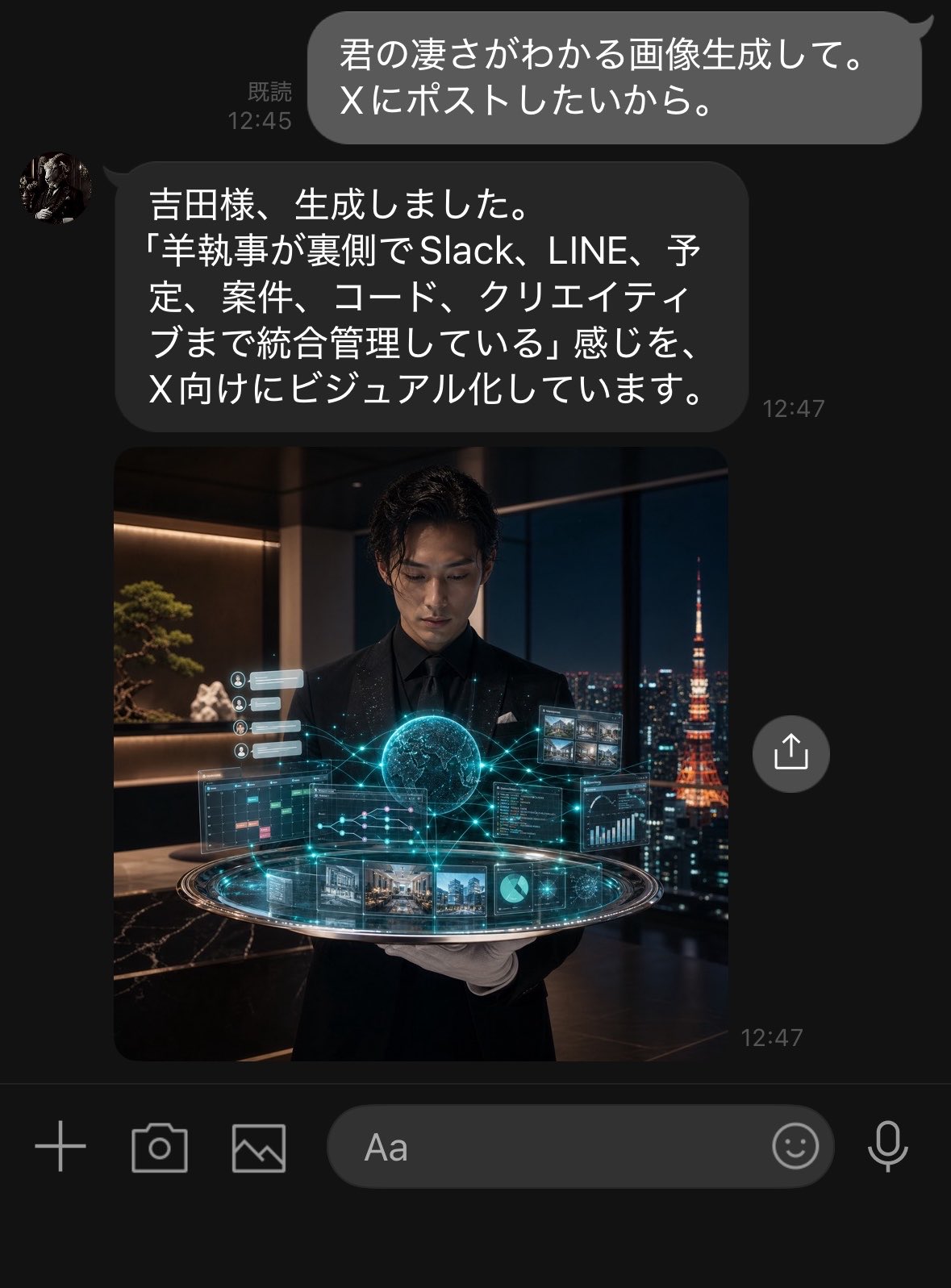
深色模式 LINE AI 助手聊天截图
生成一张逼真的深色模式 LINE 对话截图,展示 AI 助手返回一张电影质感的未来主义管家图像,适用于社交媒体发布。
- Category
- UI & Interfaces
- Model
- GPT Image 2
- Creator
- 吉田春輝(Haruki Yoshida)
- Source language
- en
- Source ID
- 28534
- Published
- Jul 12, 2026
Full prompt
Goal: Create a realistic dark-mode LINE chat screenshot showing an AI assistant responding to a user and returning a generated image.

Canvas: Vertical smartphone screenshot, approximately 768×1008 px, black/dark charcoal background, cropped like a native messaging app screen. Use LINE-style typography and spacing.

Layout: Show exactly 2 chat messages and exactly 1 embedded image preview. At the top right, place one outgoing rounded gray speech bubble with white Japanese text and a small read receipt/time on its left. Below it, place one incoming dark gray rounded speech bubble aligned left with a small circular avatar to its left, Japanese text inside, and a timestamp to the lower right. Directly beneath the assistant message, show one large square image preview aligned with the incoming message column. Add one circular share/upload button floating to the right of the image preview. At the bottom, include the LINE input toolbar with exactly 6 visible controls: plus icon, camera icon, gallery/image icon, rounded text input field labeled “Aa”, smiley icon, and microphone icon.

Text content: The outgoing user bubble should read {argument name="user message" default="君の凄さがわかる画像生成して。\nXにポストしたいから。"}. Show the read receipt and time as “既読 12:45”. The incoming assistant bubble should read {argument name="assistant message" default="吉田様、生成しました。\n「羊執事が裏側でSlack、LINE、予定、案件、コード、クリエイティブまで統合管理している」感じを、\nX向けにビジュアル化しています。"}. Show the assistant timestamp as “12:47”, and also a small “12:47” timestamp near the lower right of the image preview.

Embedded image details: The image preview is a cinematic photorealistic square scene of a young Japanese male butler in a black suit, black shirt, and white gloves, standing in a luxurious high-rise office at night. He holds or presents a glowing futuristic holographic control platform. The hologram contains exactly 9 visible UI elements: 1 glowing central globe/brain-like sphere, 1 circular platform ring, 1 left calendar/task panel, 1 right code/dashboard panel, 1 upper-right grid of small image thumbnails, 1 bottom strip of project/image cards, 1 small pie chart tile, 1 small line graph/data tile, and 1 left vertical stack of tiny notification cards. Cyan-blue network lines connect the elements. Through the large window behind him, show a nighttime Tokyo skyline with Tokyo Tower glowing orange on the right. Interior details include warm shelf lighting, a bonsai-like plant, dark marble surfaces, and luxury office ambience.

Visual style: Highly realistic iPhone screenshot aesthetic, dark mode UI, subtle antialiasing, rounded bubbles, white Japanese text, accurate chat spacing, cinematic embedded image with teal holographic glow and warm night lighting. The assistant avatar is a small circular profile photo resembling a dark classical statue or butler portrait.

Constraints: Keep all visible UI text legible and in Japanese exactly as specified. Do not add extra messages, extra buttons, watermarks, app headers, or notification bars. The screenshot should feel like a real LINE conversation where an AI secretary has generated and returned the image.
Translations
深色模式 LINE AI 助手聊天截图
enGoal: Create a realistic dark-mode LINE chat screenshot showing an AI assistant responding to a user and returning a generated image. Canvas: Vertical smartphone screenshot, approximately 768×1008 px, black/dark charcoal background, cropped like a native messaging app screen. Use LINE-style typography and spacing. Layout: Show exactly 2 chat messages and exactly 1 embedded image preview. At the top right, place one outgoing rounded gray speech bubble with white Japanese text and a small read receipt/time on its left. Below it, place one incoming dark gray rounded speech bubble aligned left with a small circular avatar to its left, Japanese text inside, and a timestamp to the lower right. Directly beneath the assistant message, show one large square image preview aligned with the incoming message column. Add one circular share/upload button floating to the right of the image preview. At the bottom, include the LINE input toolbar with exactly 6 visible controls: plus icon, camera icon, gallery/image icon, rounded text input field labeled “Aa”, smiley icon, and microphone icon. Text content: The outgoing user bubble should read {argument name="user message" default="君の凄さがわかる画像生成して。\nXにポストしたいから。"}. Show the read receipt and time as “既読 12:45”. The incoming assistant bubble should read {argument name="assistant message" default="吉田様、生成しました。\n「羊執事が裏側でSlack、LINE、予定、案件、コード、クリエイティブまで統合管理している」感じを、\nX向けにビジュアル化しています。"}. Show the assistant timestamp as “12:47”, and also a small “12:47” timestamp near the lower right of the image preview. Embedded image details: The image preview is a cinematic photorealistic square scene of a young Japanese male butler in a black suit, black shirt, and white gloves, standing in a luxurious high-rise office at night. He holds or presents a glowing futuristic holographic control platform. The hologram contains exactly 9 visible UI elements: 1 glowing central globe/brain-like sphere, 1 circular platform ring, 1 left calendar/task panel, 1 right code/dashboard panel, 1 upper-right grid of small image thumbnails, 1 bottom strip of project/image cards, 1 small pie chart tile, 1 small line graph/data tile, and 1 left vertical stack of tiny notification cards. Cyan-blue network lines connect the elements. Through the large window behind him, show a nighttime Tokyo skyline with Tokyo Tower glowing orange on the right. Interior details include warm shelf lighting, a bonsai-like plant, dark marble surfaces, and luxury office ambience. Visual style: Highly realistic iPhone screenshot aesthetic, dark mode UI, subtle antialiasing, rounded bubbles, white Japanese text, accurate chat spacing, cinematic embedded image with teal holographic glow and warm night lighting. The assistant avatar is a small circular profile photo resembling a dark classical statue or butler portrait. Constraints: Keep all visible UI text legible and in Japanese exactly as specified. Do not add extra messages, extra buttons, watermarks, app headers, or notification bars. The screenshot should feel like a real LINE conversation where an AI secretary has generated and returned the image.
深色模式 LINE AI 助手聊天截图
zh-CN目标:创建一张逼真的深色模式 LINE 聊天截图,展示 AI 助手回复用户并返回一张生成图像。 画布:竖屏手机截图,尺寸约为 768×1008 像素,黑色/深炭灰色背景,裁剪效果如同原生聊天应用界面。使用 LINE 风格的字体和间距。 布局:展示 2 条聊天消息和 1 个嵌入式图像预览。右上角放置一个圆角灰色气泡,内含白色日文文本,左侧带有“已读”和时间。下方放置一个左对齐的深灰色圆角气泡,左侧带有圆形头像,内部为日文文本,右下角带有时间戳。在助手消息正下方,显示一个与消息列对齐的大型正方形图像预览。在图像预览右侧浮动一个圆形分享/上传按钮。底部包含 LINE 输入工具栏,显示 6 个控件:加号图标、相机图标、相册/图像图标、标有“Aa”的圆角文本输入框、笑脸图标和麦克风图标。 文本内容:用户发送的气泡应显示为 {argument name="user message" default="君の凄さがわかる画像生成して。\nXにポストしたいから。"}。显示“已读 12:45”字样。助手回复的气泡应显示为 {argument name="assistant message" default="吉田様、生成しました。\n「羊執事が裏側でSlack、LINE、予定、案件、コード、クリエイティブまで統合管理している」感じを、\nX向けにビジュアル化しています。"}。助手消息的时间戳显示为“12:47”,图像预览的右下角也显示一个小型的“12:47”时间戳。 嵌入图像细节:图像预览为电影级逼真的正方形场景,一名年轻的日本男性管家身穿黑色西装、黑色衬衫并戴着白手套,站在夜晚豪华的高层办公室中。他手持或展示着一个发光的未来主义全息控制平台。全息图中包含 9 个可见的 UI 元素:1 个发光的中央球体/大脑状球体、1 个圆形平台环、1 个左侧日历/任务面板、1 个右侧代码/仪表盘面板、1 个右上角的小型图像缩略图网格、1 个底部的项目/图像卡片条、1 个小型饼图磁贴、1 个小型折线图/数据磁贴,以及 1 个左侧垂直堆叠的小型通知卡片。青蓝色网络线条连接着这些元素。透过他身后的落地窗,展示夜晚的东京天际线,右侧可见发着橙光的东京塔。室内细节包括温暖的架子灯光、盆景植物、深色大理石表面和奢华的办公氛围。 视觉风格:高度逼真的 iPhone 截图美学,深色模式 UI,细腻的抗锯齿效果,圆角气泡,白色日文文本,精准的聊天间距,带有青色全息光效和温暖夜间灯光的电影级嵌入图像。助手头像为一个小型圆形个人资料照片,类似于深色古典雕像或管家肖像。 约束:保持所有可见的 UI 文本清晰可读,并严格按照指定的日文内容显示。不要添加额外的消息、按钮、水印、应用标题栏或通知栏。截图应呈现出真实的 LINE 对话感,即 AI 秘书已生成并返回了该图像。