Pachinko 物理调试布局
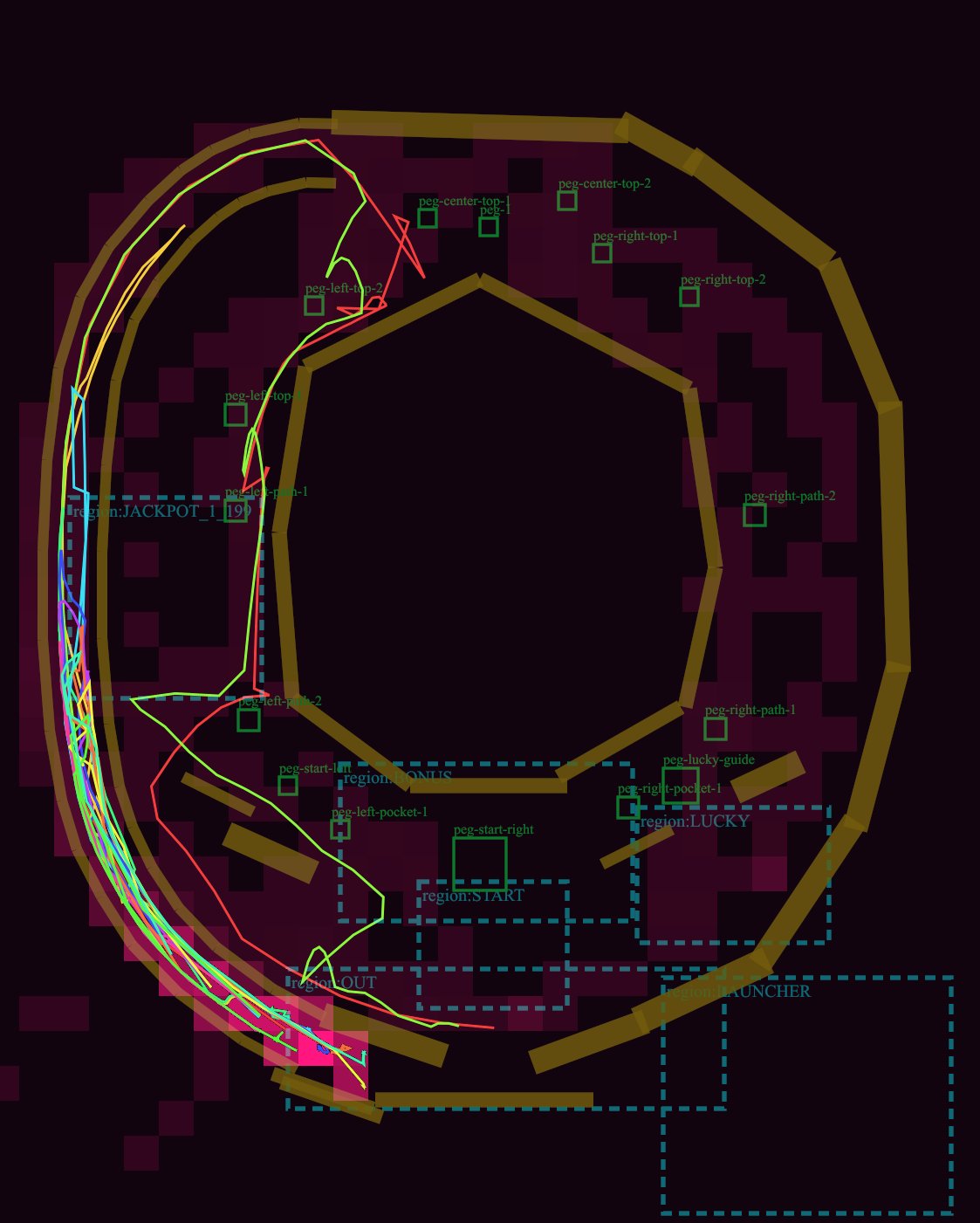
一张深色调的 Pachinko 游戏项目技术示意图,包含轨道、钉子标签、虚线区域以及用于游戏布局审查的霓虹灯模拟球体轨迹。
- Category
- Charts & Infographics
- Model
- GPT Image 2
- Creator
- Maoku
- Source language
- en
- Source ID
- 28538
- Published
- Jul 12, 2026
Full prompt
Goal: Create a dark technical debug visualization of a pachinko machine playfield layout, showing ball lanes, collision rails, pegs, named gameplay regions, and simulated ball trajectories.

Canvas: Square-ish 4:5 technical diagram on a nearly black burgundy background, with a transparent-engineering-overlay feel. Use a dark maroon grid of blocky rectangular obstacle silhouettes behind the layout.

Main layout: Draw a large pachinko board occupying almost the full canvas. The board is formed by thick angular golden-brown rails: one large outer oval/octagonal loop around the perimeter, one large inner polygonal ring around an empty central dark void, and several short rail segments near the bottom and lower-right. Keep the rails chunky, beveled, and slightly translucent, like debug collision geometry.

Trajectory paths: Add exactly 5 thin neon ball-path traces over the rails and lanes: 1 cyan path hugging the far-left launch lane, 1 hot pink path weaving near the left edge and bottom exit, 1 lime green path that curves from the upper-left across the mid-left and down to the bottom, 1 red path that crosses sharply through the left-middle and upper-left, and 1 yellow path following the outer left arc. The paths should overlap and look like simulated pachinko ball travel, with sharp turns and curved segments.

Debug regions: Draw dashed cyan rectangular region boxes with small cyan labels. Include exactly 7 labeled regions: "region:JACKPOT_1" at left-middle, "region:STATIC" near the lower-left/middle, "region:START" centered lower-middle, "region:LUCKY" right-lower-middle, "region:LAUNCHER" bottom-right, "region:OUT" lower-left exit area, and one tall dashed launch/channel region along the left side.

Pegs and labels: Add exactly 15 small green square peg markers with green debug labels. Place them around the central playfield: 2 near the upper-left labeled "peg-left-top-1" and "peg-left-top-2"; 3 near the top center labeled "peg-center-top-1", "peg-center-top-2", and "peg-1"; 3 on the upper-right labeled "peg-right-top-1", "peg-right-top-2", and "peg-right-path-2"; 3 on the lower-right/lower-middle labeled "peg-right-path-1", "peg-lucky-guide", and "peg-right-pocket-1"; 4 in the lower-left/lower-middle labeled "peg-left-path-1", "peg-left-pocket-1", "peg-start-left", and "peg-start-right". Make labels small, thin, and green, as if from a game-engine editor overlay.

Additional details: Include one tiny cyan number box reading "19" near the left-middle jackpot area. Add a few small red guide triangles and line fragments near the top-left lane. The diagram should look like a GPT-generated game-layout review screenshot rather than polished UI art.

Visual style: Low-light debug render, dark maroon and black palette, golden collision rails, cyan dashed UI overlays, green peg annotations, neon trajectory lines. No photorealism, no characters, no real pachinko machine cabinet, no decorative anime art.

Customizable concept: Build the layout as a {argument name="machine type" default="pachinko"} physics debug map titled by implication around {argument name="gameplay focus" default="ball trajectory and lane review"}. Use rail color {argument name="rail color" default="muted golden brown"}, background color {argument name="background color" default="near-black burgundy"}, and trajectory colors {argument name="trajectory colors" default="cyan, hot pink, lime green, red, yellow"}.
Translations
Pachinko 物理调试布局
enGoal: Create a dark technical debug visualization of a pachinko machine playfield layout, showing ball lanes, collision rails, pegs, named gameplay regions, and simulated ball trajectories. Canvas: Square-ish 4:5 technical diagram on a nearly black burgundy background, with a transparent-engineering-overlay feel. Use a dark maroon grid of blocky rectangular obstacle silhouettes behind the layout. Main layout: Draw a large pachinko board occupying almost the full canvas. The board is formed by thick angular golden-brown rails: one large outer oval/octagonal loop around the perimeter, one large inner polygonal ring around an empty central dark void, and several short rail segments near the bottom and lower-right. Keep the rails chunky, beveled, and slightly translucent, like debug collision geometry. Trajectory paths: Add exactly 5 thin neon ball-path traces over the rails and lanes: 1 cyan path hugging the far-left launch lane, 1 hot pink path weaving near the left edge and bottom exit, 1 lime green path that curves from the upper-left across the mid-left and down to the bottom, 1 red path that crosses sharply through the left-middle and upper-left, and 1 yellow path following the outer left arc. The paths should overlap and look like simulated pachinko ball travel, with sharp turns and curved segments. Debug regions: Draw dashed cyan rectangular region boxes with small cyan labels. Include exactly 7 labeled regions: "region:JACKPOT_1" at left-middle, "region:STATIC" near the lower-left/middle, "region:START" centered lower-middle, "region:LUCKY" right-lower-middle, "region:LAUNCHER" bottom-right, "region:OUT" lower-left exit area, and one tall dashed launch/channel region along the left side. Pegs and labels: Add exactly 15 small green square peg markers with green debug labels. Place them around the central playfield: 2 near the upper-left labeled "peg-left-top-1" and "peg-left-top-2"; 3 near the top center labeled "peg-center-top-1", "peg-center-top-2", and "peg-1"; 3 on the upper-right labeled "peg-right-top-1", "peg-right-top-2", and "peg-right-path-2"; 3 on the lower-right/lower-middle labeled "peg-right-path-1", "peg-lucky-guide", and "peg-right-pocket-1"; 4 in the lower-left/lower-middle labeled "peg-left-path-1", "peg-left-pocket-1", "peg-start-left", and "peg-start-right". Make labels small, thin, and green, as if from a game-engine editor overlay. Additional details: Include one tiny cyan number box reading "19" near the left-middle jackpot area. Add a few small red guide triangles and line fragments near the top-left lane. The diagram should look like a GPT-generated game-layout review screenshot rather than polished UI art. Visual style: Low-light debug render, dark maroon and black palette, golden collision rails, cyan dashed UI overlays, green peg annotations, neon trajectory lines. No photorealism, no characters, no real pachinko machine cabinet, no decorative anime art. Customizable concept: Build the layout as a {argument name="machine type" default="pachinko"} physics debug map titled by implication around {argument name="gameplay focus" default="ball trajectory and lane review"}. Use rail color {argument name="rail color" default="muted golden brown"}, background color {argument name="background color" default="near-black burgundy"}, and trajectory colors {argument name="trajectory colors" default="cyan, hot pink, lime green, red, yellow"}.
Pachinko 物理调试布局
zh-CN目标:创建一个深色调的 Pachinko 机器项目布局技术调试可视化图,展示球体通道、碰撞轨道、钉子、命名的游戏区域以及模拟的球体轨迹。 画布:4:5 比例的方形技术图表,背景为近乎黑色的酒红色,具有透明工程叠加层的质感。在布局后方使用深栗色的块状矩形障碍物轮廓网格。 主要布局:绘制一个占据几乎整个画布的大型 Pachinko 项目。项目由粗壮的角状金棕色轨道构成:外围有一个大的椭圆形/八边形环,中央空心区域周围有一个大的多边形内环,底部和右下角有几个短轨道段。保持轨道厚实、带有斜角且略微半透明,看起来像调试用的碰撞几何体。 轨迹路径:在轨道和通道上添加 5 条细长的霓虹灯球体路径轨迹:1 条青色路径紧贴最左侧的发射通道,1 条亮粉色路径在左边缘和底部出口附近穿梭,1 条柠檬绿路径从左上角弯曲穿过左中区域并向下延伸至底部,1 条红色路径急剧穿过左中和左上区域,以及 1 条黄色路径沿着左侧外弧线移动。路径应相互重叠,看起来像模拟的 Pachinko 球体运动,带有急转弯和曲线段。 调试区域:绘制青色虚线矩形区域框,并带有小型青色标签。包含 7 个标记区域:“region:JACKPOT_1”位于左中,“region:STATIC”位于左下/中部附近,“region:START”位于中下部,“region:LUCKY”位于右下中部,“region:LAUNCHER”位于右下角,“region:OUT”位于左下出口区域,以及沿左侧的一条长虚线发射/通道区域。 钉子与标签:添加 15 个小型绿色方形钉子标记,并配有绿色调试标签。将它们放置在中央项目周围:2 个靠近左上角,标记为“peg-left-top-1”和“peg-left-top-2”;3 个靠近顶部中心,标记为“peg-center-top-1”、“peg-center-top-2”和“peg-1”;3 个在右上角,标记为“peg-right-top-1”、“peg-right-top-2”和“peg-right-path-2”;3 个在右下/右中,标记为“peg-right-path-1”、“peg-lucky-guide”和“peg-right-pocket-1”;4 个在左下/左中,标记为“peg-left-path-1”、“peg-left-pocket-1”、“peg-start-left”和“peg-start-right”。标签应保持小巧、纤细且为绿色,如同游戏引擎编辑器的叠加层。 其他细节:在左中部的 Jackpot 区域附近包含一个微小的青色数字框,显示“19”。在左上通道附近添加一些红色引导三角形和线条碎片。该图表应看起来像 GPT 生成的游戏布局审查截图,而非精美的 UI 艺术作品。 视觉风格:低光调试渲染,深栗色和黑色调色板,金色碰撞轨道,青色虚线 UI 叠加层,绿色钉子注释,霓虹轨迹线。无写实感,无角色,无真实的 Pachinko 机器机柜,无装饰性动漫艺术。 可自定义概念:将布局构建为 {argument name="machine type" default="pachinko"} 物理调试地图,标题隐含 {argument name="gameplay focus" default="ball trajectory and lane review"}。使用轨道颜色 {argument name="rail color" default="muted golden brown"},背景颜色 {argument name="background color" default="near-black burgundy"},以及轨迹颜色 {argument name="trajectory colors" default="cyan, hot pink, lime green, red, yellow"}。