20

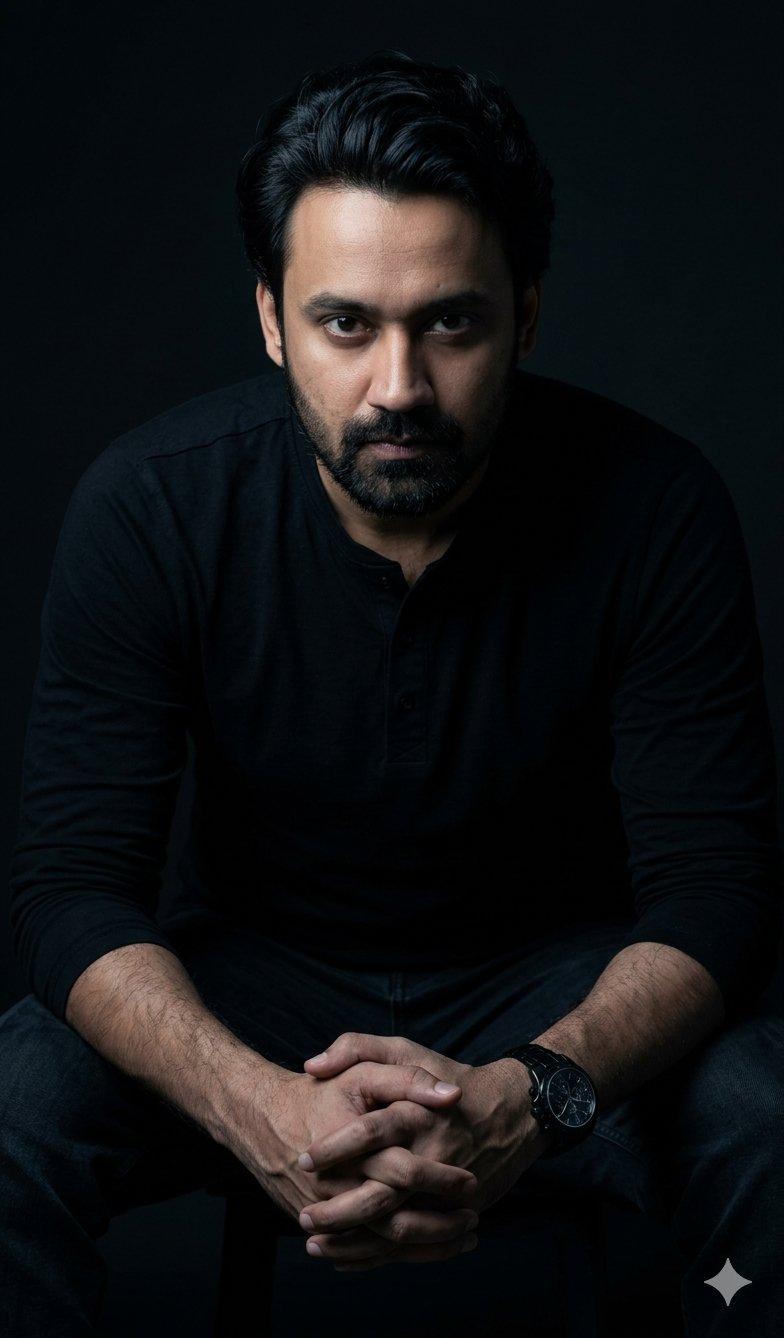
Powerful Studio Portrait with Low-Key Lighting
Enlarge

Example images

Powerful Studio Portrait with Low-Key Lighting

Prompt
A hyper-realistic cinematic full upper-body portrait of a man seated and leaning forward with both hands clasped together resting in front of him, elbows on knees in a powerful, composed, and commanding pose. Wearing an all-black long-sleeve henley shirt and dark trousers, a luxury black chronograph watch on the left wrist. Studio dark background — pure deep black with near-invisible shadow detail, low-key dramatic lighting with a single soft key light source hitting the face and forearms from slightly above and to the side, creating sharp contrast between illuminated skin and dark clothing that almost disappears into the background. Ultra-detailed skin texture on hands and forearms with visible veins. The gaze is direct, intense, and unwavering — looking straight into the camera with calm dominance. Photorealistic 8K studio portrait photography, shot on Canon EF 85mm f/1.2L lens, shallow depth of field with background falling into pure black. Color palette is near-monochromatic — deep blacks, cool shadows, and warm neutral skin tones only. Mood is powerful, mysterious, and quietly dominant — like a CEO, a villain, or an elite operator.
Use the exact facial structure, features, and likeness from the provided reference image — including face shape, eyes, nose, jawline, and stubble. Apply only the above lighting, pose, wardrobe, and studio style to the reference face without altering any facial characteristics.
Category
Charts & Infographics
Model
nano-banana-pro
Creator
Ahmad Faraz
Source language
en
Views3.1K
Source ID
24710
Published
Jun 8, 2026
Studio

Guide

About "Powerful Studio Portrait with Low-Key Lighting"

What is this prompt for?

"Powerful Studio Portrait with Low-Key Lighting" AI image prompt for nano-banana-pro (Charts & Infographics). A dramatic, high-contrast studio portrait of a ma…

The full copyable prompt and example visuals above are ready for AI image generation or one-click recreate in Picva.

How to use this prompt

  1. Step 1

    Open the prompt detail

    Review the example visuals, category, and full prompt text for "Powerful Studio Portrait with Low-Key Lighting".

  2. Step 2

    Copy the prompt

    Copy the prompt body from this page, or load it directly in Studio.

  3. Step 3

    Pick a model (nano-banana-pro)

    Prefer nano-banana-pro. If you switch models, keep subject and composition and tweak style terms.

  4. Step 4

    Generate and export

    Recreate the look in Picva, or export into your workflow for editing and publishing.

FAQ

What is the "Powerful Studio Portrait with Low-Key Lighting" prompt?
It is an AI image-generation prompt for nano-banana-pro in the Charts & Infographics category. This page includes the full prompt text, example visuals, and a one-click recreate path in Picva.
How do I use this prompt to generate an image?
Copy the prompt from this page, or use Generate / Studio. Paste it into a compatible image model, or recreate the look in Picva with optional reference images.
Which model is this prompt for?
This page lists nano-banana-pro. Most descriptive prompts also transfer to nearby image models such as GPT Image, Flux, or Midjourney with light style tweaks.
Can I use the result commercially?
You can usually copy the prompt for creation, but commercial use of the final image depends on the model terms, reference-image rights, and the generated content. Follow the source author and platform rules.