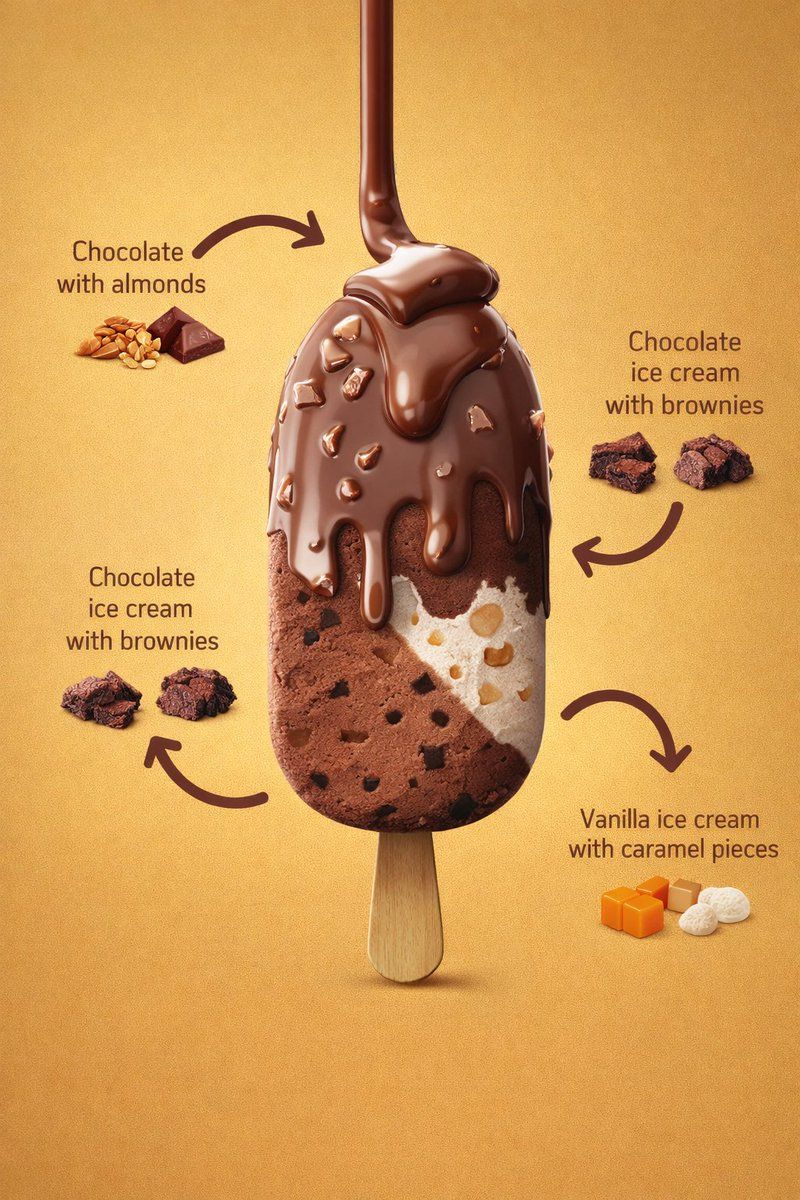
Skincare product shot v2: GPT Image 2 prompt
Prompt
{
 "resolution": "8K",
 "aspect_ratio": "3:4",
 "image_type": "photorealistic commercial product render",
 "scene_description": {
 "main_subject": "A vertically centered ice cream bar on a wooden stick",
 "orientation": "upright, front-facing, slightly elevated perspective",
 "composition": "single product centered with surrounding ingredient callouts and curved arrows"
 },
 "background": {
 "color": "warm golden-yellow gradient",
 "texture": "smooth, matte, evenly lit",
 "lighting_falloff": "subtle vignette, darker towards edges"
 },
 "lighting": {
 "type": "studio lighting",
 "key_light": "soft frontal light highlighting chocolate gloss",
 "fill_light": "balanced fill to preserve texture detail",
 "specular_highlights": "visible on melted chocolate coating",
 "shadows": "soft shadow beneath ice cream stick"
 },
 "ice_cream_bar": {
 "shape": "rounded rectangular bar",
 "surface": "smooth with visible embedded inclusions",
 "layers": [
 {
 "layer_position": "top coating",
 "material": "milk chocolate",
 "state": "melted and dripping",
 "texture": "glossy, thick, fluid",
 "details": [
 "multiple chocolate drips flowing downward",
 "irregular almond pieces embedded in coating",
 "rounded drip edges with gravity pull"
 ]
 },
 {
 "layer_position": "left interior",
 "material": "chocolate ice cream",
 "texture": "dense, creamy",
 "details": [
 "small dark brownie chunks evenly dispersed",
 "matte finish compared to outer chocolate"
 ]
 },
 {
 "layer_position": "right interior",
 "material": "vanilla ice cream",
 "texture": "smooth and creamy",
 "details": [
 "visible caramel pieces",
 "light beige caramel chunks with rounded edges"
 ]
 }
 ]
 },
 "stick": {
 "material": "light natural wood",
 "texture": "smooth with subtle grain",
 "shape": "rounded edges, flat profile",
 "visibility": "fully visible below ice cream bar"
 },
 "ingredient_callouts": {
 "style": {
 "arrows": "curved, thick, dark brown",
 "text_color": "dark brown",
 "font_style": "clean sans-serif",
 "layout": "balanced around product"
 },
 "labels": [
 {
 "text": "Chocolate with almonds",
 "position": "top-left",
 "visual_aid": [
 "whole almonds",
 "small chocolate squares"
 ]
 },
 {
 "text": "Chocolate ice cream with brownies",
 "position": "left-middle",
 "visual_aid": [
 "brownie chunks"
 ]
 },
 {
 "text": "Chocolate ice cream with brownies",
 "position": "right-middle",
 "visual_aid": [
 "brownie chunks"
 ]
 },
 {
 "text": "Vanilla ice cream with caramel pieces",
 "position": "bottom-right",
 "visual_aid": [
 "caramel cubes",
 "white vanilla pieces"
 ]
 }
 ]
 },
 "color_palette": {
 "primary_colors": [
 "milk chocolate brown",
 "golden yellow",
 "cream white"
 ],
 "secondary_colors": [
 "dark brownie brown",
 "light caramel orange",
 "almond beige"
 ]
 },
 "render_quality": {
 "sharpness": "extreme micro-detail visibility",
 "texture_fidelity": "high realism",
 "noise": "none",
 "depth_of_field": "moderate, product fully in focus"
 },
 "style_tags": [
 "luxury dessert advertising",
 "hyper-realistic food photography",
 "commercial product render",
 "clean studio composition"
 ]
}- Category
- Products & E-commerce
- Model
- GPT Image 2
- Creator
- Shahid Wani
- Source ID
- 2020329970497999135
- Published
- Feb 8, 2026
Views0


![Exploding [food item] with [filling], broken into two pieces with [filling actio](https://whqgdndlpxjbwosvipip.supabase.co/storage/v1/render/image/public/prompt-source-media/promptsref/work-2413/image-1-e26dc765f3c49579.png?width=800&quality=75&resize=contain)