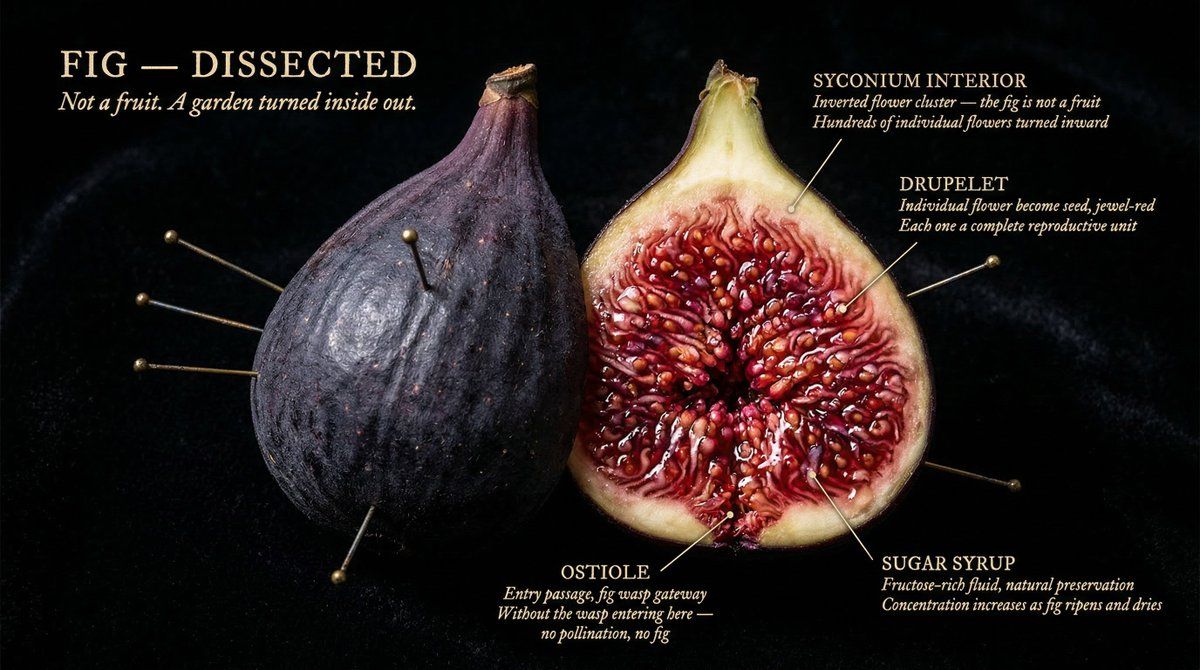
Caravaggio specimen cross-section: GPT Image 2 prompt
Prompt
[NATURAL OBJECT] dissected as if by a master naturalist who found it in the wild. Split and pinned open like a specimen, but lit as if Caravaggio worked for National Geographic.
Every internal structure glowing with its own material truth. Cross-section so sharp it feels violent. Interior so beautiful it feels sacred. The full object present, one half intact, one half opened to its core, every layer at the resolution of obsession.
Background: pure black velvet. The object floats in it like something precious and dangerous.
Labels pressed close, handwritten-weight serif, never floating: "[STRUCTURE]" / "[MATERIAL TRUTH]" / "[AGE OR SCALE]"
"[OBJECT] DISSECTED" title in warm ivory caps, upper left. "[One line that makes you lean closer]" italic beneath.
Mood: Audubon illustration meets Caravaggio meets the most beautiful science photograph ever taken. 4K, specimen lighting, extraordinary interior detail, nothing clinical, everything alive.
- Category
- Products & E-commerce
- Model
- GPT Image 2
- Creator
- Alexandra Aisling
- Source ID
- 2036472105223467305
- Published
- Mar 24, 2026
Views0

![PROMPT TO ART Luxury [PRODUCT] Floating luxury product, deep colorish scene, mi](https://cdn.pixshop.app/prompt-library/tweet-2008016478315192836/preview-0-1767800963938-0bsp2loq.jpeg)







![Exploding [food item] with [filling], broken into two pieces with [filling actio](https://whqgdndlpxjbwosvipip.supabase.co/storage/v1/render/image/public/prompt-source-media/promptsref/work-2413/image-1-e26dc765f3c49579.png?width=800&quality=75&resize=contain)
