20

时尚剪贴簿页面布局生成
Enlarge

时尚剪贴簿页面布局生成

Prompt
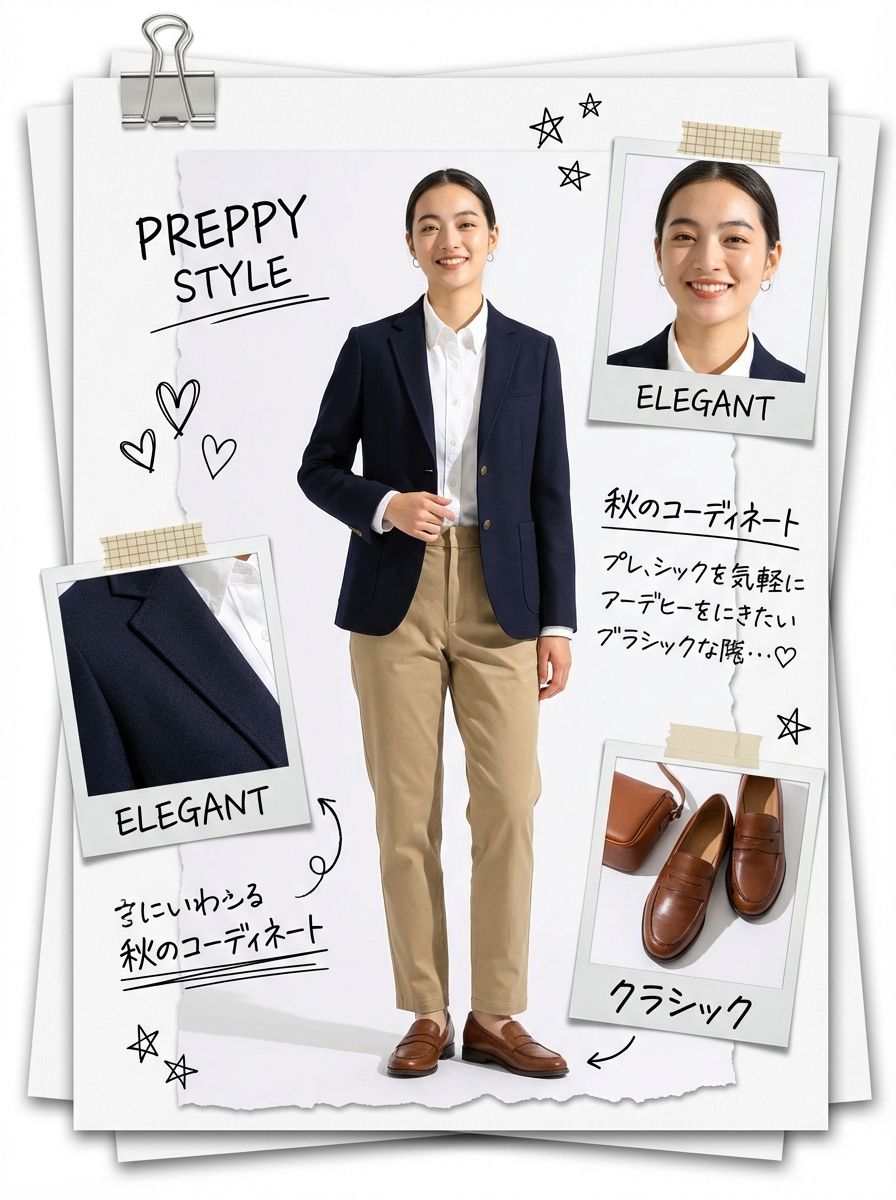
傑作、最高品質、高解像度、(全身ショット:1.5)、ファッションスクラップブックページレイアウト、コラージュスタイル、[テーマ/美的キーワード]

[主題]:[キャラクター説明]のワイドショット全身ファッション写真。[ポーズとアクション]。[衣装詳細]、[アクセサリー]を身に着け、(靴が見える:1.3)、頭からつま先まで完璧な体型。

[構成]:画像は[レイアウトメタファー:DIYジン/フィールドドシエ/ムードボード]のようにデザインされており、メインキャラクターを中央に配置し、その周囲を(異なるポラロイド写真3枚:1.3)で囲んでいます。これらの写真にはそれぞれ異なる[テーマ]ディテールが示されています:([顔/メイクアップディテール]のクローズアップ1枚:1.2)、[生地/テクスチャ/武器ディテール]のマクロ1枚:1.2)、([靴/アクセサリーディテール]のディテール1枚:1.2)。これにより、挿入写真が重複せず、ユニークでユニークなものとなっています。

[装飾]: [スタイル] スクラップブッキングの要素、[紙の厚さ] の紙をまとめた [クリップの種類: シルバークリップ / ゴールドクリップ / 錆びたクリップ]、[テープの種類: 和紙 / ダクト / マスキング] テープ、手描きの [落書きの種類: 矢印 / 星 / グラフィティ]、[インクの種類] で手書きされたテキスト注釈 (例: [ショートテキスト 1]、[ショートテキスト 2])、[ステッカー/スタンプ]、破れた紙のテクスチャ。
注意:テキスト注釈は日本語である。

[背景]: ([紙の種類: 白紙 / 厚紙 / 地図 / フォルダー] の乱雑な積み重ね: 1.4)、メインシートの下にある紙の端の層、紙の層間のリアルな奥行きと影、[表面の素材と色] の上に配置。

[技術的]: [照明スタイル]、[雰囲気]、シャープフォーカス、エディトリアル写真、8k、触覚的な質感、リアルなマテリアルレンダリング。
Category
创意图片
Model
Nano Banana Pro
Views0
Source ID
72f08b6a-b9ab-4842-8cac-05ea543c2f31
Published
Mar 8, 2026

Guide

About "时尚剪贴簿页面布局生成"

What is this prompt for?

"时尚剪贴簿页面布局生成" AI image prompt for Nano Banana Pro (创意图片). 使用 Lovart 工具中的 Nano Banana Pro 模型生成时尚剪贴簿或拼贴页面布局的详细提示。该提示明确了构图、主体细节、回形针和胶带等装饰元素、背景以及技术渲染风格,旨在呈现出一种触感真实…

The full copyable prompt and example visuals above are ready for AI image generation or one-click recreate in Picva.

How to use this prompt

  1. Step 1

    Open the prompt detail

    Review the example visuals, category, and full prompt text for "时尚剪贴簿页面布局生成".

  2. Step 2

    Copy the prompt

    Copy the prompt body from this page, or load it directly in Studio.

  3. Step 3

    Pick a model (Nano Banana Pro)

    Prefer Nano Banana Pro. If you switch models, keep subject and composition and tweak style terms.

  4. Step 4

    Generate and export

    Recreate the look in Picva, or export into your workflow for editing and publishing.

FAQ

What is the "时尚剪贴簿页面布局生成" prompt?
It is an AI image-generation prompt for Nano Banana Pro in the 创意图片 category. This page includes the full prompt text, example visuals, and a one-click recreate path in Picva.
How do I use this prompt to generate an image?
Copy the prompt from this page, or use Generate / Studio. Paste it into a compatible image model, or recreate the look in Picva with optional reference images.
Which model is this prompt for?
This page lists Nano Banana Pro. Most descriptive prompts also transfer to nearby image models such as GPT Image, Flux, or Midjourney with light style tweaks.
Can I use the result commercially?
You can usually copy the prompt for creation, but commercial use of the final image depends on the model terms, reference-image rights, and the generated content. Follow the source author and platform rules.










