20

极简主义镜面自拍的 JSON 提示
Enlarge

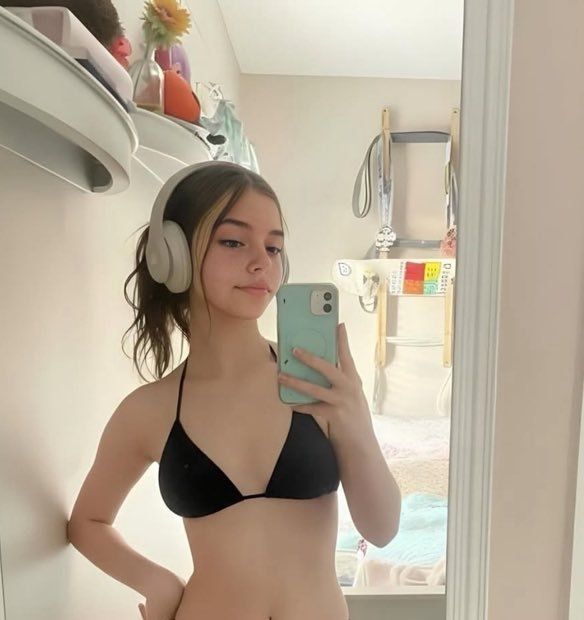
极简主义镜面自拍的 JSON 提示

Prompt
{
  "id": "selfie_001",
  "title": "Aesthetic Indoor Mirror Selfie",
  "description": "A calm indoor mirror selfie captured in soft natural lighting with a minimal and relaxed vibe.",
  "category": "Photography",
  "subcategory": "Self Portrait",
  "location": {
    "type": "Indoor",
    "room_type": "Bedroom",
    "environment": "Cozy and Personal Space"
  },
  "camera_details": {
    "device_type": "Smartphone",
    "shot_type": "Mirror Shot",
    "angle": "Front Facing",
    "framing": "Mid Shot",
    "orientation": "Vertical"
  },
  "lighting": {
    "source": "Natural Light",
    "intensity": "Soft",
    "tone": "Warm"
  },
  "subject_details": {
    "pose": "Standing, holding phone",
    "expression": "Soft and Neutral",
    "mood": "Relaxed and Confident",
    "style": "Casual Minimal"
  },
  "accessories": [
    "Headphones",
    "Smartphone"
  ],
  "background_elements": [
    "Wall Shelves",
    "Decor Items",
    "Bedroom Furniture"
  ],
  "color_palette": {
    "primary_colors": ["Beige", "Black", "Soft Pastels"],
    "overall_tone": "Warm and Neutral"
  },
  "aesthetic_tags": [
    "Minimal",
    "Calm Vibes",
    "Indoor Aesthetic",
    "Lifestyle"
  ],
  "usage": {
    "platform": "Social Media",
    "content_type": "Personal Post",
    "theme": "Daily Life"
  }
}
Category
创意图片
Model
Nano Banana Pro
Views307
Source ID
46f42ff0-c39f-42e7-ab79-b244dd387e07
Published
Mar 8, 2026

Guide

About "极简主义镜面自拍的 JSON 提示"

What is this prompt for?

"极简主义镜面自拍的 JSON 提示" AI image prompt for Nano Banana Pro (创意图片). 一个结构化的 JSON 提示词,详细描述了如何生成一张具有极简主义和轻松氛围的室内镜面自拍,其中指定了相机细节(智能手机、镜面拍摄)、柔和的自然光照以及温暖、中性的调色板。 --- ```j…

The full copyable prompt and example visuals above are ready for AI image generation or one-click recreate in Picva.

How to use this prompt

  1. Step 1

    Open the prompt detail

    Review the example visuals, category, and full prompt text for "极简主义镜面自拍的 JSON 提示".

  2. Step 2

    Copy the prompt

    Copy the prompt body from this page, or load it directly in Studio.

  3. Step 3

    Pick a model (Nano Banana Pro)

    Prefer Nano Banana Pro. If you switch models, keep subject and composition and tweak style terms.

  4. Step 4

    Generate and export

    Recreate the look in Picva, or export into your workflow for editing and publishing.

FAQ

What is the "极简主义镜面自拍的 JSON 提示" prompt?
It is an AI image-generation prompt for Nano Banana Pro in the 创意图片 category. This page includes the full prompt text, example visuals, and a one-click recreate path in Picva.
How do I use this prompt to generate an image?
Copy the prompt from this page, or use Generate / Studio. Paste it into a compatible image model, or recreate the look in Picva with optional reference images.
Which model is this prompt for?
This page lists Nano Banana Pro. Most descriptive prompts also transfer to nearby image models such as GPT Image, Flux, or Midjourney with light style tweaks.
Can I use the result commercially?
You can usually copy the prompt for creation, but commercial use of the final image depends on the model terms, reference-image rights, and the generated content. Follow the source author and platform rules.












