20

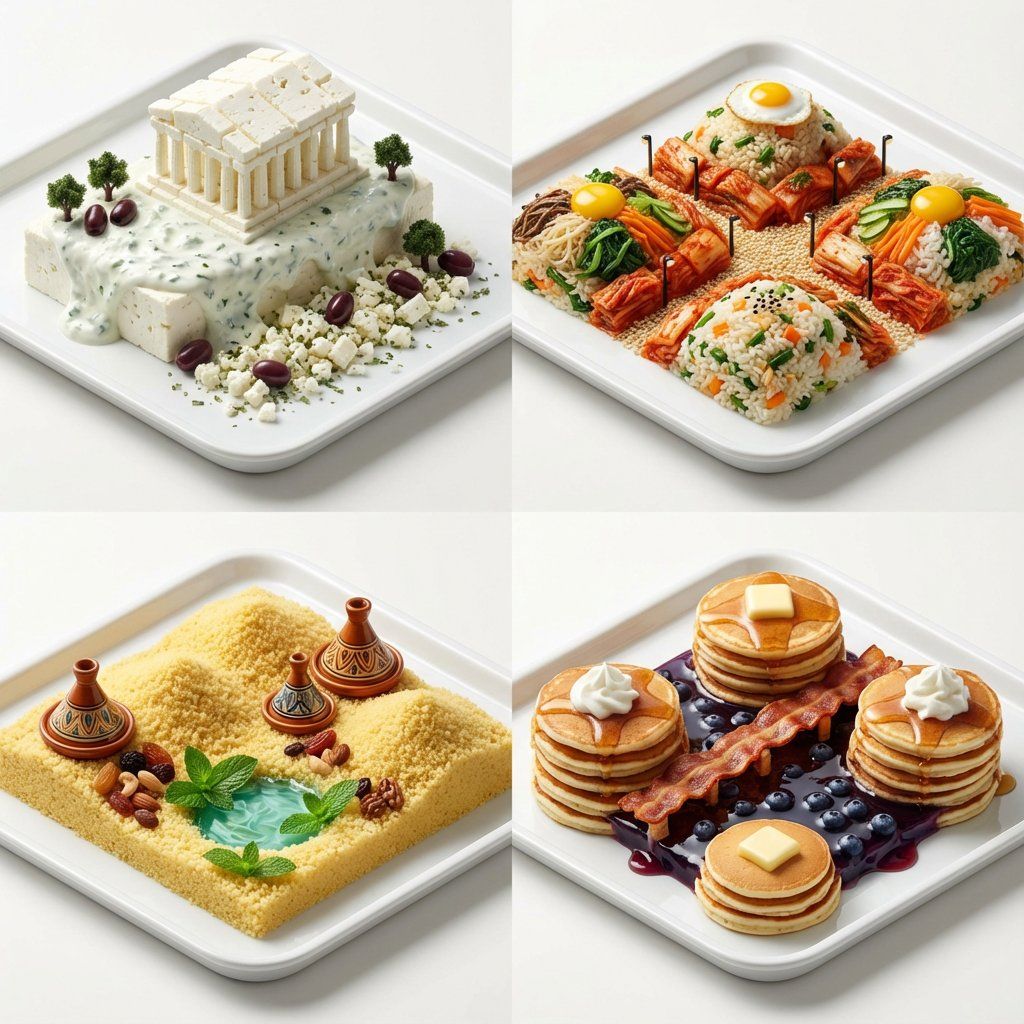
超逼真微缩食物景观网格
Enlarge

超逼真微缩食物景观网格

Prompt
A 2x2 grid of hyper-realistic miniature food landscapes on clean trays. [Top Left: {argument name="country 1" default="Greece"}; A Parthenon made of blocks of white feta cheese, standing on a creamy tzatziki sauce cliff, with kalamata olive trees] [Top Right: {argument name="country 2" default="Korea"}; A rolling landscape of bibimbap rice and vegetables, with kimchi forming red alleyways and sesame seeds acting as tiny streetlights] [Bottom Left: {argument name="country 3" default="Morocco"}; Golden dunes made of fluffy couscous, miniature ceramic tagine towers, and a mint tea oasis pool] [Bottom Right: {argument name="country 4" default="USA"}; A Grand Canyon carved from stacks of fluffy pancakes, a crispy bacon boardwalk, and a blueberry syrup lake]. Macro food photography, incredible detail, shallow depth of field, studio lighting, appetizing textures, 8k, isometric view.
Category
创意图片
Model
Nano Banana Pro
Creator
Gadgetify
Views0
Source ID
95c5cd02-8c0c-451b-8148-ad8a4d58d231
Published
Mar 8, 2026

Guide

About "超逼真微缩食物景观网格"

What is this prompt for?

"超逼真微缩食物景观网格" AI image prompt for Nano Banana Pro (创意图片). 生成一个 2x2 网格的提示,其中包含超逼真的微距美食景观,每个象限代表一个不同的国家(希腊、韩国、摩洛哥、美国),并使用特定的国家菜肴和食材来构建微缩场景和地标。 --- 一个 2x2 的超逼真微缩食…

The full copyable prompt and example visuals above are ready for AI image generation or one-click recreate in Picva.

How to use this prompt

  1. Step 1

    Open the prompt detail

    Review the example visuals, category, and full prompt text for "超逼真微缩食物景观网格".

  2. Step 2

    Copy the prompt

    Copy the prompt body from this page, or load it directly in Studio.

  3. Step 3

    Pick a model (Nano Banana Pro)

    Prefer Nano Banana Pro. If you switch models, keep subject and composition and tweak style terms.

  4. Step 4

    Generate and export

    Recreate the look in Picva, or export into your workflow for editing and publishing.

FAQ

What is the "超逼真微缩食物景观网格" prompt?
It is an AI image-generation prompt for Nano Banana Pro in the 创意图片 category. This page includes the full prompt text, example visuals, and a one-click recreate path in Picva.
How do I use this prompt to generate an image?
Copy the prompt from this page, or use Generate / Studio. Paste it into a compatible image model, or recreate the look in Picva with optional reference images.
Which model is this prompt for?
This page lists Nano Banana Pro. Most descriptive prompts also transfer to nearby image models such as GPT Image, Flux, or Midjourney with light style tweaks.
Can I use the result commercially?
You can usually copy the prompt for creation, but commercial use of the final image depends on the model terms, reference-image rights, and the generated content. Follow the source author and platform rules.









